


Every printer below is sorted by the widest paper it takes and by whether its ink is pigment or dye. A 13-inch pigment printer makes the archival prints a photographer sells or hangs, and a 17-inch one does the same at the size a gallery asks for. A dye printer costs less and makes glossier prints, but they fade sooner, and a 4×6 dye-sublimation printer is a different machine that the search results keep filing under the same heading.
Print matching is the part the printer cannot do alone. A print that comes out darker or warmer than the screen is a display problem in most cases, covered in our monitor calibrator guide and photo-editing monitor guide.
Canon and Epson both have instant-savings prices running with no end date shown. Some links below are affiliate links. Buying through them supports the site at no extra cost to you.
TLDR
If you want a 13-inch pigment printer, buy the Canon imagePROGRAF PRO-310 at $699.99. Canon released it in 2025 to replace the PRO-300, and it costs the same as the Epson it competes with. That Epson is the Epson SureColor P700 at $699, linked at Adorama because Amazon’s listing is $846.10. For 17-inch paper, buy the Canon imagePROGRAF PRO-1100 at $1,149.99. Its rival, the Epson P900, is named in that section without a link, because no seller has it to ship at list.
Below the pigment pair, the Canon PIXMA PRO-200S at $549.99 is the 13-inch dye printer for glossy color. If you print in volume up to letter size, the Canon PIXMA G620 at $299.99 runs on refillable tanks. For 4×6 prints and nothing else, buy the Canon SELPHY CP1500 at $179.99. The slate is Canon-heavy because Canon’s printers can be bought at list or under, and most of Epson’s cannot.
The picks
Best 13-inch: Canon imagePROGRAF PRO-310 at $699.99
The PRO-310 is the printer for a photographer whose prints get sold or framed. It uses pigment ink. Pigment sits on the paper’s coating instead of soaking in and holds its color far longer than dye, which is why it is the ink for prints like those. Its 13-inch carriage covers 13×19 sheets, the largest size most photographers print at home. Canon released it in 2025 to replace the PRO-300, and it sells under list. The price is $699.99, down from Canon’s $971.99. Best Buy and Adorama sell it for $699.
The cost to weigh is the ink. A pro pigment printer runs a full set of individual cartridges, and when every slot runs dry at once, the set costs a large fraction of the printer’s price. The printer also spends ink on head cleaning when it sits idle, which matters most to someone who prints a few times a year. If the prints go behind glass at home rather than into a client’s hands, the PRO-200S below is the right call: you give up pigment for dye and keep $150.

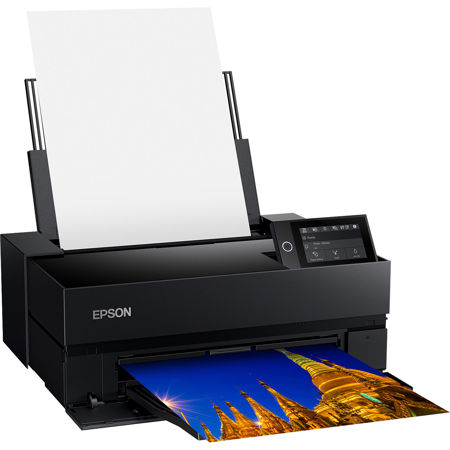
The Epson 13-inch: Epson SureColor P700 at $699
The SureColor P700 is the 13-inch pigment printer Epson has sold since 2020 with no successor announced. Where you buy it matters. Epson.com has it at $699, down from an $849 list, and Adorama matches that price. Amazon’s only listing is $846.10, which is 21% over the price Epson itself charges, so the link goes to Adorama.
The PRO-310 costs the same and is the newer design, so the case for the P700 is a workflow already built on Epson, with profiles and paper a photographer does not want to redo. Availability is the risk with a 2020 printer whose successor has not been announced. Order well before a deadline. To stay with Epson for less, look at the Expression Photo HD XP-15000 at $349.99, down from a $429.99 list. It prints 13×19 paper on dye cartridges, which makes it Epson’s answer to the PRO-200S. If the P700 goes out of stock, the XP-15000 takes this slot.
Best 17-inch: Canon imagePROGRAF PRO-1100 at $1,149.99
The PRO-1100 is the pick for 17-inch paper because it is the 17-inch pigment printer that can be bought at list. Canon released it in 2024 as its 17-inch pro printer. It sells for $1,149.99, down from a $1,403.99 list, and Best Buy has it at $1,149. A 17-inch carriage takes 17×22 sheets, the size a gallery or a print sale moves up to. The rumour that Canon discontinued it is false. Canon USA sells it, on sale.
Its competitor is the Epson SureColor P900, which is not linked here. Epson’s list price is $1,349, but Epson.com and Adorama have none to ship. The Amazon listings are $1,448.29 and a $1,669.95 bundle, both over list. A 17-inch printer that cannot be bought at list from a seller that ships it is not a pick. Until that changes, the P900 stays a name. Above both sits Epson’s SureColor P5370, which is studio money at $1,795 on sale at Epson.com. The PRO-1100 itself takes up a desk and needs a larger cartridge set than the 13-inch printers. If you print 17-inch twice a year, the PRO-310 plus a lab order for the big ones costs less.

Best for glossy color under $600: Canon PIXMA PRO-200S at $549.99
The PIXMA PRO-200S is the printer for prints judged on a wall rather than kept in an archive. Its dye ink soaks into the paper coating, which gives a dye print on glossy or luster stock a deeper gloss and stronger saturation than pigment on the same sheet. Canon released this 13-inch printer on dye cartridges in 2025 to replace the PRO-200. It sells for $549.99, down from a $647.99 list and $150 under the pigment pair. Best Buy matches it.
The lower price costs you permanence. Dye prints fade sooner than pigment on the same paper, which makes the PRO-200S the wrong printer for limited editions or client deliverables with a longevity claim. For the home gallery wall, portfolio prints and anything that gets reprinted when it ages, it is the right one. The Epson XP-15000 from the section above prints the same 13×19 size on dye for $200 less, at $349.99.

Cheapest prints to letter size: Canon PIXMA G620 at $299.99
The PIXMA G620 is for anyone who prints 4×6 proofs by the hundred or 8x10s for client previews. Canon calls it a MegaTank photo printer, which means the dye ink arrives in bottles that fill tanks on the side of the machine instead of in cartridges. You pay for ink by the bottle, at a fraction per millilitre of the same ink in a pro cartridge, and the printer is $299.99, down from a $356.99 list. The maximum paper size is letter, 8.5×11, so this is a volume printer rather than a large-format one.
Letter size and dye ink rule it out for the wall-sized archival print the PRO-310 exists for, and its output on fine-art matte paper is not in a pigment printer’s class. If you would rather have cartridges, Epson’s Expression Photo XP-8800 prints the same letter-size dye output from them for $279.99, down from a $329.99 list. The $20 saved up front goes back to Epson on the second set of ink, so the G620 is the one to buy for anyone printing more than a few dozen sheets a year.
For 13×19 volume on bottles, the printer is Epson’s tank model at the 13-inch size, the EcoTank Photo ET-8550. The link goes to Best Buy at Epson’s $749.99 list. Adorama charges the same.

The 4×6 printer: Canon SELPHY CP1500 at $179.99
A dye-sublimation printer for 4×6 paper is a different product, and the search results that mix it in with the printers above are answering a different question. The SELPHY CP1500 prints one size from a ribbon rather than an ink tank. A dye-sub print is dry as it leaves the machine, sealed under a clear overcoat, and consistent from the first sheet to the last. That suits events, booths and anyone who wants a stack of 4×6 prints without a desk-sized inkjet. The SELPHY is $179.99 on Amazon, Canon’s list price, and Canon’s own store has it at $159.99. We do not earn on Canon-direct sales, so the link stays with Amazon and the $20 is yours by going direct.
There is no paper choice beyond Canon’s own packs, no size above a postcard and no path to a print someone would frame at 13×19. If the 4×6 prints are a by-product of a larger printing habit, look at the G620 above. For $120 more it prints 4×6 from bottles and letter size on the same day. The inkjet at this size is Epson’s PictureMate PM-400 at $299.99, which costs more and prints the same size on cartridges, so we would not pick it over the SELPHY.

How the six compare
| Printer | Max paper | Ink | Price | Seller | Best for |
|---|---|---|---|---|---|
| Canon imagePROGRAF PRO-310 | 13 in (13×19) | Pigment cartridges | $699.99 | Amazon.com | Archival prints, the default 13-inch |
| Epson SureColor P700 | 13 in (13×19) | Pigment cartridges | $699 | Adorama | The Epson 13-inch for an Epson workflow |
| Canon imagePROGRAF PRO-1100 | 17 in (17×22) | Pigment cartridges | $1,149.99 | Amazon.com | Gallery and sale sizes at home |
| Canon PIXMA PRO-200S | 13 in (13×19) | Dye cartridges | $549.99 | Amazon.com | Glossy color for the wall |
| Canon PIXMA G620 | Letter (8.5×11) | Dye, refillable bottles | $299.99 | Amazon.com | Volume 4×6 and 8×10 at the lowest ink cost |
| Canon SELPHY CP1500 | 4×6 | Dye-sublimation ribbon | $179.99 | Amazon.com | Snapshots, events, kiosks |
These are the Epsons linked in the sections above. The XP-15000 is $349.99 at Amazon.com and prints 13×19, on dye cartridges. The ET-8550 is $749.99 at Best Buy and prints 13×19, on dye bottles. The XP-8800 is $279.99 at Amazon.com and prints letter size on dye cartridges. The PictureMate PM-400 is $299.99 at Amazon.com and prints 4×6, on cartridges.
What matters in a photo printer
Decide between pigment and dye first, because that choice is about what the print is for. Pigment particles sit on the surface of the paper’s coating, which is why pigment prints hold their color far longer on archival paper, print well on matte and fine-art stock, and look slightly flatter on gloss. Dye soaks into the coating, which gives it the deeper gloss and stronger saturation on glossy and luster paper and the shorter life. If the print has a price tag or a signature on it, buy pigment.
The width comes next. Thirteen inches or seventeen depends on how often you need the large size. A 13-inch printer takes 13×19 sheets, which cover 11×14 and 12×18 prints with a border and every size below. A 17-inch printer adds 16×20 and 17×22, and costs $450 more at the Canon prices above. Because it also takes a larger cartridge set and a bigger desk, buy it only if you sell or exhibit at those sizes regularly.
Ink cost follows the ink system, and the sticker price of the printer says nothing about it. Cartridge printers charge by the cartridge, and a pro printer with a full set of individual colors replaces them one at a time as each runs dry. A tank printer such as the G620 or the ET-8550 charges by the bottle, at a fraction of the price per millilitre. Every inkjet here also uses ink to clean its print head after sitting idle, so an occasional printer pays an ink tax a frequent printer does not. Per-set prices change too often to print here; check the full set at the seller before buying, because on a pro machine the first full replacement is a large fraction of the purchase.
Paper handling decides whether the printer takes the paper a pigment printer is bought for, because fine-art matte and heavier stock need a straight path from a rear or top slot rather than a turn around a roller. The pro printers from both brands have one. The budget dye printers are built around glossy sheets of standard weight. Before you buy, check the paper weight ceiling on the maker’s spec page against the stock you intend to use.
A print that does not match the screen is usually the screen’s fault. Darker than the monitor means the monitor is set too bright; warmer or cooler means it has never been profiled. The printer, driven by the paper maker’s ICC profile, is the more predictable half of the pair. The calibrator guide picks the probe, our calibration essay explains what the probe can and cannot fix, and the photo-editing monitor guide explains why an Adobe RGB panel is the one to proof prints on. Soft-proofing in Lightroom or Photoshop with the paper’s profile closes the last gap.
FAQ
Epson or Canon for photo printing?
At the 13-inch pigment tier the two cost the same. The Canon PRO-310 is $699.99 and the Epson P700, its direct rival, is $699. Stay with the brand the existing workflow is built on. With no workflow yet, buy the Canon, which is the newer design. Below that tier Canon has the stronger lineup at list, which is why five of the six boxes here are Canon. Epson’s answers, the XP-15000 and the ET-8550, are linked inline rather than boxed.
Is a home photo printer cheaper than a lab?
Per print, usually not. Ink, paper and cleaning cycles all count, and the fewer prints a year, the worse the arithmetic. What a home printer gives you is control and turnaround: the print is in hand in minutes, on the paper you chose, and a second proof at a different brightness costs one sheet. Photographers who want a stack of 4×6 prints a few times a year are the lab’s customer, or the SELPHY’s.
Do I need a 17-inch printer?
Only if 16×20 and 17×22 prints are a regular part of the work. The step from the PRO-310 to the PRO-1100 is $450 on the printer plus a larger cartridge set and desk, and it beats a lab only if you would otherwise be ordering those sizes regularly.
Why do my prints come out darker than the screen?
The monitor is too bright. A display left at its factory brightness is lit far above the level a print is viewed at, so a correctly exposed file looks right on the screen and dark on paper. Calibrate the monitor to a print-viewing brightness with a colorimeter and soft-proof with the paper’s ICC profile; the calibrator guide covers the probe and the target.
Will the ink dry out if I print rarely?
Pigment and dye inkjets both clog when left idle for weeks, and the printer’s answer is a cleaning cycle that uses ink to clear the head. Printing a small sheet every week or two keeps the head wet and costs less than the cleaning cycles. A dye-sublimation printer such as the SELPHY has no ink nozzles to clog, which is one reason it suits the once-a-season user.
Where this fits in your setup
The photo-editing monitor guide picks the Adobe RGB panel the print is judged on. The calibrator guide picks the probe that keeps it honest. The photo editing software guide covers the Lightroom and Capture One soft-proofing workflow that drives the printers above. The editing machine is in the photo-editing PC guide and the photo-editing Mac guide; a video colorist whose deliverables never touch paper wants the color grading monitor guide instead.


