


A monitor light bar is task lighting. It clips to the top edge of the display and throws light down onto the keyboard and desk while keeping that light off the screen. That fixes glare from a lamp behind you, the dark keyboard at night, and the strain of a bright screen in a dark room. Colour judgement is a different job. A bias light behind the monitor does that one, and the section near the end says which to buy.
The picks are three bars from BenQ, which makes the optics everyone else copies, and one at $30.99 for a desk that needs the keyboard lit and nothing more.
Some links below are affiliate links. Buying through them supports the site at no extra cost to you.
TLDR
The BenQ ScreenBar Halo 2 is the best bar overall at $199, with a rear halo, a wireless desk controller and a presence sensor. Most editing desks should buy the BenQ ScreenBar Pro at $139 instead. It carries the same output rating without the rear light, holds the desk at 500 lux on its own and ships with a webcam mount. For two monitors or a wide desk, the BenQ ScreenBar Max at $289 spans 33 inches with a backlight. The Yeelight Monitor Light Bar with Remote at $30.99 is the cheapest bar we would put on a desk. For an iMac, BenQ makes the iScreenBar at $189.
The picks
Best overall: BenQ ScreenBar Halo 2 at $199
The ScreenBar Halo 2 is the bar for a single monitor in a dark room, because it puts a second light on the wall behind the screen. That rear halo gives the screen a soft field behind it at the same colour temperature as the desk light, which lowers the contrast between a bright panel and a black wall. BenQ rates the front light at over 1,000 lux at the centre of the desk, 50 cm below the bar. The patch it lights to 500 lux is 85 by 50 cm. The colour temperature runs from 2700 to 6500 K, though BenQ’s page prints no Rf or CRI figure. The bar is 50 cm wide, and its clamp fits flat and curved monitors. A flat edge can be 0.7 to 6 cm thick and a curved edge 1.6 to 3.8 cm. The monitor’s curve can be anything from 1000R to 1800R. You set the light from a wireless controller on the desk, and an ultrasonic sensor 50 cm above the desk switches it with the person and can shut it off after five minutes without motion. Power is USB-C at 5 V and up to 3 A, so it wants a phone charger or a monitor’s USB-C port rather than a keyboard’s pass-through.
The trade-off is price, since the halo and the controller cost $60 more than the ScreenBar Pro. The rear light is a convenience, a dim wash at the desk light’s colour temperature, and it is not a calibrated bias light. BenQ’s page describes a webcam accessory for the Halo 2 and does not say it is included. The seller is BenQ INFTY Lab, BenQ’s reseller on Amazon, at the same $199 as benq.com and Adorama. If the halo and the desk controller are not worth the difference to you, buy the ScreenBar Pro.

Best value BenQ: ScreenBar Pro at $139
Most editing desks should buy the ScreenBar Pro, because it puts the same light on the desk as the Halo 2 for $60 less. BenQ rates it at the same over 1,000 lux at 50 cm. It lights the same 85 by 50 cm of desk to 500 lux, and an ambient sensor adjusts the output in real time to hold the desk at that level, the ANSI figure BenQ cites. Its colour fidelity is rated at Rf above 96. There are 16 brightness levels and eight colour temperature settings from 2,700 to 6,500 K. The bar is 50 cm wide, and the clamp is rated for thin and curved edges with no curve range printed. A webcam mount comes in the box, which puts the Pro ahead of the Halo 2 for a desk with a camera on the monitor. The controls are on the bar itself. There is no desk dial. Power is USB-C at 5 V and up to 1.7 A, which is within what a monitor’s USB port delivers.
What you give up is the rear light, and you reach up to the bar to change brightness. On a 32-inch panel on an arm the controls are a stretch, and that reach is most of what the Halo 2’s controller is for. The black version is $139, the same as BenQ’s site. If the desk needs the keyboard lit and nothing more, the Yeelight below does that for less.
The rest of BenQ’s US lineup is easy to sort. The iScreenBar at $189 is shaped for the iMac, and the original ScreenBar at $109 keeps the older optics and a narrower clamp range, so the Pro is worth the $30 over it. The ScreenBar Plus and the first Halo are gone from BenQ’s page, and the Plus at over $300 on Amazon should be ignored.

Two monitors: BenQ ScreenBar Max at $289
The ScreenBar Max is the bar for two monitors or one ultrawide. At 33 inches wide, about 85 cm, it sits across them so the whole desk underneath is lit from one bar, with a backlight behind the panels. A Halo 2 or a Pro at 50 cm lights the keyboard under one monitor and leaves the second one’s desk dark. The Max is $289, the same as BenQ’s US price.
A single-monitor desk gains nothing from the Max. We do not have BenQ’s output and colour figures for it, so this pick rests on the span and the seller. Two ScreenBar Pros, one per monitor and each with its own sensor, come to $278, which is $11 less than the Max.

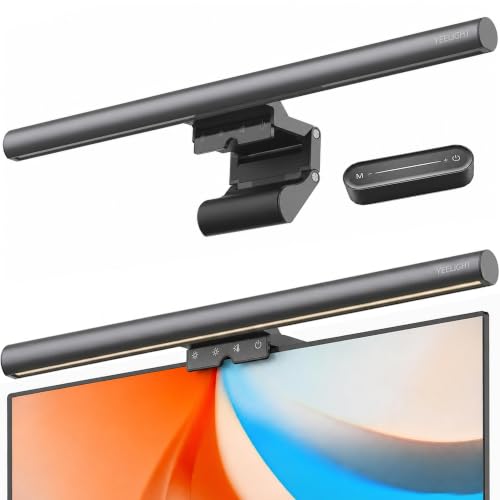
Cheapest worth buying: Yeelight Monitor Light Bar with Remote at $30.99
The Yeelight Monitor Light Bar with Remote is the cheap bar to buy because the brand itself sells it. The seller is Yeelight Global, so the warranty and the listing are the brand’s rather than a reseller’s, and that puts this bar ahead of the other $30 bars. Yeelight’s store lists the remote version at a colour rendering index above 90 and a 2700 to 6500 K range. You control it from the remote, and the bar is powered over USB.
Compared with the $139 ScreenBar Pro, it gives up the auto-dimming sensor, any stated curved-monitor fit and BenQ’s lens. Yeelight also sells an RGB version at $51.99 whose listing title claims Ra98, but RGB is decoration on an editing desk, so the white-light bar is the one to buy. The sub-$50 bar most readers see first on Amazon is the $39.95 Quntis, a 15.7-inch auto-dimming bar that claims Ra98. Quntis also sells a $69.99 bar with a remote, a CRI95 and 1,200 lux claim, and an ambient sensor with a two-hour timer. Both are sold on Amazon by a reseller rather than the brand, which is why the Yeelight is the pick at this tier. We would not link anything cheaper. The bars under $25 are the same hardware with no brand behind the listing.
How the picks compare
| Pick | Width and fit | Colour temperature | Output and colour claim (maker’s figure) | Sensor and control | Power | Price |
|---|---|---|---|---|---|---|
| BenQ ScreenBar Halo 2 | 50 cm; curved 1000R to 1800R; flat edge 0.7 to 6 cm, curved edge 1.6 to 3.8 cm | 2700 to 6500 K | Over 1,000 lux at 50 cm; 85 by 50 cm at 500 lux; no Rf or CRI stated | Ultrasonic presence sensor; wireless desk controller | USB-C, 5 V / up to 3 A | $199 |
| BenQ ScreenBar Pro | 50 cm; clamp rated for thin and curved edges, no curve range stated; webcam mount in the box | 2,700 to 6,500 K, 8 settings; 16 brightness levels | Over 1,000 lux at 50 cm; 85 by 50 cm at 500 lux; Rf above 96 | Ambient sensor holds 500 lux; controls on the bar | USB-C, 5 V / up to 1.7 A | $139 (black) |
| BenQ ScreenBar Max | 33 in (about 85 cm) across two monitors; backlight | $289 | ||||
| Yeelight with Remote | No curved fit stated | 2700 to 6500 K (store listing) | CRI above 90 (store listing) | Remote (no sensor stated) | USB | $30.99 |
Output and colour figures are the makers’ own. None were measured here. BenQ quotes Rf for the Pro, a newer fidelity index, and prints no colour figure for the Halo 2. A bar quoting CRI 95 is not claiming the same thing as one quoting Rf 96.
What matters in a monitor light bar
Asymmetric optics
The lens decides whether a bar works at all. A plain LED strip above the screen would light the panel as much as the desk, and the reflection would be worse than the lamp it replaced. An asymmetric lens sends the beam forward and down with a hard cut-off toward the screen. On a matte monitor a cheap lens shows as a faint brightening of the top edge. On a glossy iMac or laptop screen it is the difference between a bar that works and one that goes back in the box. The price tiers follow this spec more than any other.
Colour temperature and the Rf or CRI claim
Every bar here adjusts from warm to cool, and the setting that matters on an editing desk is the cool end, near the 6500 K the monitor is calibrated to. Set it there so the keyboard and hands in your peripheral vision are not a warmer white than the screen. Rf and CRI both describe how faithfully the light renders colour, and Rf is the stricter and newer of the two. Neither turns a desk light into a reference.
Auto-dimming and the sensor
An ambient sensor holds the desk at a set brightness as daylight changes, which matters by a window, while a presence sensor switches the bar with the person, which matters for a desk you leave twenty times a day. The Halo 2 carries the ultrasonic presence sensor, and the Pro’s sensor is the ambient kind that holds the desk at 500 lux. The Yeelight is sold on the remote and states no sensor.
Width, curves and two monitors
A 50 cm bar lights the keyboard area under a 27-inch monitor. A 40 cm bar does the same for a 24-inch display and leaves the edges of a 27-inch desk darker. On a 32-inch or an ultrawide a 50 cm bar centred on the screen is the normal choice, since the light is for the desk under it. Two monitors side by side are a different case: one bar lights one keyboard, and the ScreenBar Max at $289 exists for the desk that wants the whole surface under one 33-inch light. On a curved panel the clamp’s angle changes with the curve. BenQ rates the Halo 2 for 1000R to 1800R, which spans the curves on the ultrawides in our best monitor for video editing guide. BenQ says the Pro’s clamp takes curved edges and prints no range for it.
Webcam clearance
The bar and the webcam want the same four centimetres of top bezel. The ScreenBar Pro includes a mount that puts the camera on top of the bar. BenQ’s Halo 2 page describes a webcam accessory and does not say it is included. On any other bar the camera goes beside it, off centre, or on a separate clamp. A display with a built-in camera at the top centre is the hard case, and that includes the iMac and the Apple Studio Display. BenQ’s answer for the iMac is the iScreenBar at $189. For the Studio Display we have not confirmed that any bar clears the camera, so measure before buying.
USB power
The Halo 2, the Pro and the Yeelight draw their power over USB. The Halo 2 wants 5 V at up to 3 A for the halo and the front light together. That is more than a USB-A hub port or a keyboard pass-through supplies, so it needs a phone charger or a monitor’s USB-C port rated for 15 W. The Pro at 1.7 A and the Yeelight run from a monitor’s USB port, and a bar on a monitor port goes dark when the monitor sleeps.
Light bar, bias light or desk lamp for colour work
A light bar lights the desk. A bias light lights the wall behind the monitor at a controlled brightness and a controlled white, so the eye holds a stable reference while it judges the picture. The standard for that is set out in our monitor calibration guide. The pick is the MediaLight Mk2, a D65 strip built for that one job. The Halo 2’s rear light is not a substitute: it is dimmable but not referenced to a brightness, and it tracks whatever colour temperature the desk light is set to. A colourist’s desk runs both, the bias light on through every grade and the bar for the keyboard between them.
A desk lamp is the thing a light bar replaces. It reaches the screen from the side or from behind you and reflects back at the eye, and moving it off the screen moves it off the keyboard too. Our small-room studio setup treats the shooting key light as a wall wash between shoots and the bias light as the one duplicate purchase. A light bar is the third light on that desk, and the cheapest of the three.
FAQ
Is the BenQ ScreenBar worth it over a $30 bar?
For a glossy screen, a curved monitor, or a desk where the bar is on eight hours a day, yes. The $139 ScreenBar Pro gets you a lens that keeps light off the panel, a clamp rated for curved edges, an ambient sensor that holds the desk at 500 lux and a webcam mount. For a matte 24-inch monitor and a keyboard that needs light at night, the $30.99 Yeelight does the job, and the extra $108 for the Pro pays for the lens, the clamp and the sensor.
Does a monitor light bar cause glare on the screen?
A bar with asymmetric optics does not. That cut-off is the reason the category exists. A cheap bar with a plain diffuser lights the top of the panel, and on a glossy display that shows as a bright band. Tilting the bar forward on its clip helps on any model.
Does a light bar work on a curved or ultrawide monitor?
BenQ rates the Halo 2 for 1000R to 1800R curves and says the Pro’s clamp takes thin and curved edges without printing a range. The Yeelight states no curved fit. On an ultrawide the bar sits in the middle and lights the keyboard. It does not need to span the screen.
Does a monitor light bar help with eye strain?
It removes two causes: a dark desk under a bright screen, and a lamp reflecting in the panel. It does not change the screen’s brightness, which is the other half of the problem and is set in the calibration, not the lamp. Run the bar at the cool end of its range so the desk and the screen are the same white.
Where this fits on your desk
The monitor under the bar is in best monitor for photo editing and best monitor for video editing, and the Mac-sized version of the question is in best monitor for Mac mini and MacBook Pro. The puck that sets the white the bar should match is in best monitor calibrator, and the room it sits in is in the calibration guide. The arm that puts the monitor at the height where a bar’s on-bar controls are reachable is in best monitor arm for editors, and a laptop that needs its own light is in best laptop stand for editors.


