


Some links below are affiliate links; buying through them supports the site at no cost to you.
TLDR
The Ergotron LX Pro is the pick for one monitor up to 34 inches, at $199.00 from Ergotron’s own Amazon storefront. The LX Pro is the current version of the LX that sits on most edit desks, and Ergotron charges the same price on its site. A 32-inch reference monitor, a panel with a shade hood or a 40-inch ultrawide goes on the Ergotron HX at $329.00. For two 27-inch screens on one pole, buy the Ergotron LX Dual at $479.99, rated 7 to 20 lb per monitor. Under $50 the choice is between a dual arm and a single. The VIVO dual arm at $49.99 holds two panels up to 32 inches and 19.8 lb each. The Amazon Basics gas-spring arm at $35.99 holds one 27-inch monitor up to 15.4 lb. The weight of the panel without its stand decides which of the five you need, and the table below maps the monitors we recommend to the arm that holds them.
What matters
Weight range, read against the panel without its stand
Every arm is rated for a minimum and a maximum weight, and both ends matter, because a gas-spring or constant-force arm is tuned for a band. A panel below the minimum floats up and will not stay put, while one above the maximum sags, drifts down through the day and eventually stops holding height at all. The number to compare is the monitor’s weight without its stand. Every maker lists that figure as “without stand” or “panel only” on the spec page. A shade hood, a mounted calibrator and a thick cable bundle all count toward the ceiling, so a 27-inch photo monitor with a hood can need more arm than its screen size suggests.
VESA 75 and 100, and the Studio Display case
All five picks take the 75 by 75 and 100 by 100 mm patterns, which covers every monitor we recommend. The HX also takes 200 by 100 and 200 by 200. The exception to plan for is the Apple Studio Display, which Apple sells either with its tilt stand or with a VESA mount adapter in place of the stand. The choice is made at purchase, and the stand version does not convert, so a Studio Display headed for an arm has to be ordered as the VESA version. Our photo monitor guide covers the display itself.
Clamp or grommet, and the desk thickness
A clamp grips the rear edge of the desk; a grommet mount bolts through a hole in the top. Both need a desk thickness inside the mount’s range, so check the range on the listing against the desk before ordering. The LX Pro’s clamp takes tops 0.4 to 2.4 inches thick, and the LX Dual’s takes 0.63 to 2.6. Clamps also want a rear edge that is flat and a few inches deep; a desk with a lip, a modesty panel or a cable tray at the back needs the grommet. A thin top under a heavy monitor on a long arm flexes, which shows up as a monitor that bounces when you type.
Reach and height
Reach is how far the screen comes forward from the pole: pulled to the front of a deep desk for retouching, pushed back for a wide edit layout. Height range decides whether the top of a 32-inch panel lands at eye level on a standing desk at full extension. The LX Pro lifts 13 inches and the HX 11.5, topping out 17.8 inches above the desk. Ergotron sells the LX Pro with a tall pole as a separate model for that case, and a stacking dual version with two monitors one above the other on one pole.
Cable routing
An arm in a video frame or on a tidy desk needs a channel for the power, video and USB cables along its length; the Ergotron arms have snap-on cable covers, the budget arms use clips. Leave slack at every joint, because an arm that swings through its full range pulls a short cable out of a USB-C port.
Single or dual
A dual arm puts two monitors on one clamp, which saves a second desk edge and keeps both screens on one plane. The cost is a lower weight ceiling per monitor and a size cap: the LX Dual tops out at 27 inches per screen, the VIVO at 32. Two 32-inch panels, or one 32 and a 27, want two single arms. A single 40-inch ultrawide replaces two 27s with one panel, one cable run and one arm, and that arm is the HX.
Which arm holds which monitor
The monitors below are the ones our monitor guides recommend. Each row gives the arm that holds that class of panel on its published rating; the panel weight without its stand is on each maker’s spec page and is the number to confirm before ordering.
| Monitor | Size | VESA | Arm that holds it | Note |
|---|---|---|---|---|
| Apple Studio Display (VESA version) | 27-inch 5K | 100 x 100 via Apple’s adapter | Ergotron LX Pro | Order the VESA version; the stand version does not convert |
| Dell UltraSharp U2725QE | 27-inch 4K | 100 x 100 | Ergotron LX Pro; Amazon Basics if the panel is under 15.4 lb | USB-C hub monitor; leave cable slack |
| BenQ SW272U with hood | 27-inch 4K | 100 x 100 | Ergotron LX Pro | The hood adds weight; count it |
| ASUS ProArt PA32UCDM | 32-inch 4K OLED | 100 x 100 | Ergotron HX | The reference-monitor class |
| Dell UltraSharp U4025QW | 40-inch ultrawide | 100 x 100 | Ergotron HX | One arm, one panel, in place of two 27s |
| Two 27-inch 4K panels | 2 x 27 | 100 x 100 | Ergotron LX Dual (7 to 20 lb each) | VIVO dual under $50 |
| Two 32-inch panels | 2 x 32 | 100 x 100 | Two Ergotron HX, or two LX Pro if each panel is under 22 lb | No dual arm we link is rated for two 32s above 19.8 lb |
The picks
Best overall: Ergotron LX Pro at $199.00
For a single monitor, buy the LX Pro, which covers every 27-inch monitor in our guides and a 32-inch panel under 22 lb. It is the current model in Ergotron’s LX line and replaces the classic LX that has been the default on edit desks for years. The price is $199.00 from Ergotron’s own storefront, the same as on Ergotron’s site. The rating is 4 to 22 lb and screens to 34 inches, on 75 and 100 mm VESA. The arm lifts 13 inches and its clamp takes tops 0.4 to 2.4 inches thick, but the grommet mount is a separate Ergotron part. The arm holds the position it was left in, which is what separates it from the $35 class. A monitor on an LX swings out of a camera frame and back to the same spot, and still does a year later.
The LX Pro stops at 22 lb and 34 inches. A reference monitor with a hood, a 32-inch panel at the heavy end of its class or any ultrawide over 34 inches belongs on the HX, and the LX Pro has no answer for a 40-inch panel. The classic Ergotron LX is the older option at $199.99, 99 cents more than the LX Pro, and Ergotron’s own site no longer lists it. Its rating is 34 inches and 7 to 25 lb, with 75 and 100 mm VESA. You will see it in every studio photo, and it is the arm our small-room studio guide boxes. Both arms carry the same ten-year warranty, so buy the classic LX only for a panel between 22 and 25 lb, or for a desk that needs the grommet mount, which is a separate part on the LX Pro. For everything else, buy the LX Pro.

Best for 32-inch, ultrawide and reference monitors: Ergotron HX at $329.00
The weight ceiling is the reason to buy the Ergotron HX, which is the arm Ergotron sells for the monitors the LX line cannot hold. That means 32-inch reference panels, the 40-inch Dell U4025QW in our Mac mini monitor guide, and any grading display with a hood and a calibrator hanging off the bezel. The rating is 20 to 42 lb and screens to 49 inches. Both ends count. Compare them with the panel weight without its stand, because a panel under the 20 lb floor floats on it. The VESA patterns run from 75 by 75 up to 200 by 200 mm. The lift is 11.5 inches, and the grommet mount is in the box. The HX costs $329.00 on Amazon.
The cost is bulk as well as money. It needs a heavier pole and clamp and a deeper rear edge or a grommet, and it is $130 more than the LX Pro for a ceiling a 27-inch monitor never uses. Two heavy panels get the HX Dual, which is $539.00 on Amazon. A single 32-inch panel under 22 lb does not need the HX at all, because the LX Pro holds it for $199.00. On a tight budget, a 32-inch panel can go on the VIVO below, where each arm is rated to 19.8 lb.

Best dual: Ergotron LX Dual at $479.99
The Ergotron LX Dual puts two screens side by side on one pole, which is the layout for a two-screen edit or grading desk. Each monitor rides its own LX arm off the shared pole, so the two move independently, and the build is the same as the single. The screens can be up to 27 inches and 7 to 20 lb per monitor. The clamp takes tops 0.63 to 2.6 inches thick, and the grommet mount is in the box. The price is $479.99 on Amazon.
The LX Dual has a 27-inch cap and costs more than two LX Pros. Two single arms on two clamps cost less, hold two 32-inch panels and give each one a higher ceiling. That leaves the LX Dual for a desk with one usable rear edge, or for two screens that need to stay on one plane. If the price is the problem, the VIVO dual at $49.99 trades Ergotron’s hold and finish for a tenth of the price.

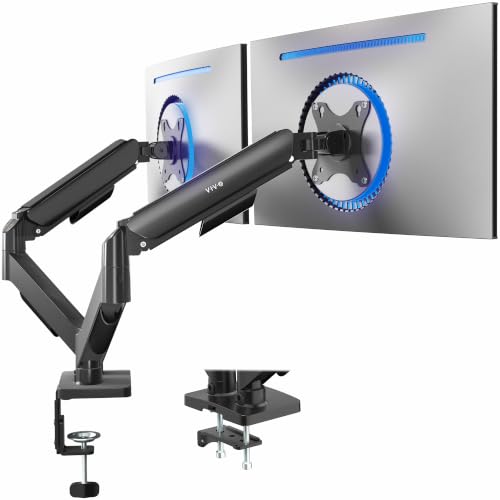
Best budget dual: VIVO dual arm at $49.99
The VIVO STAND-V002O is the arm for a second screen that holds a bin or a scope and rarely moves. For $49.99 it carries two monitors up to 32 inches and 19.8 lb each, and that is the whole case for it. Panels from 17 to 32 inches fit on 75 and 100 mm VESA. That size range is wider than the LX Dual’s, at a tenth of the price. The arm ships from VIVO’s storefront.
The VIVO holds a position rather than floating to one. Height and tilt are set with a tool and stay set, so moving a monitor to the front of the desk and back each session is a two-minute job rather than a push. Under a pair of heavy 32s it also shows more bounce than the Ergotron on a thin desk. We would not link a dual arm that costs less, and the single-arm alternative at this price is the Amazon Basics below.
Best budget single: Amazon Basics gas-spring arm at $35.99
The Amazon Basics gas-spring arm is the budget arm for a light monitor. For $35.99 you get a 4.4 to 15.4 lb range, which is both the reason to buy it and its limit. The arm is rated for 15 to 27-inch monitors on 75 and 100 mm VESA. A 27-inch office monitor or a light 4K panel sits inside the range, and at this weight the gas spring does float the screen to a new height with one hand.
The 15.4 lb ceiling is low. A 27-inch photo monitor with a hood or a 27-inch panel with a built-in hub can cross it, so read the panel weight without stand before ordering, and go to the LX Pro if it is close. A 32-inch panel of any kind is out. The ErGear heavy-duty arm at $59.99 is the step between this and the Ergotron, with a higher rating and a stiffer hold. Do not go below $35, where the arms wobble under any 27-inch panel, because a monitor that shivers when you type is worse than its stand.

How the picks compare
| Arm | Monitors | Weight range | Max size | VESA | Mount | Price | Seller |
|---|---|---|---|---|---|---|---|
| Ergotron LX Pro | 1 | 4 to 22 lb | 34 in | 75 / 100 | Clamp 0.4 to 2.4 in; grommet sold separately | $199.00 | Ergotron storefront |
| Ergotron HX | 1 | 20 to 42 lb | 49 in (ultrawide and 32-inch reference) | 75 / 100 / 200 | Clamp or grommet | $329.00 | Ergotron storefront |
| Ergotron LX Dual | 2 | 7 to 20 lb each | 27 in each | 75 / 100 | Clamp 0.63 to 2.6 in, or grommet | $479.99 | Third party (AllSavings) |
| VIVO STAND-V002O | 2 | Up to 19.8 lb each | 32 in each | 75 / 100 | Clamp or grommet | $49.99 | VIVO storefront |
| Amazon Basics gas spring | 1 | 4.4 to 15.4 lb | 27 in | 75 / 100 | Clamp or grommet | $35.99 | Amazon |
| Ergotron LX (classic) | 1 | 7 to 25 lb | 34 in | 75 / 100 | Clamp or grommet | $199.99 | Third party (SNK Official Store) |
FAQ
Is a monitor arm worth it for editing?
Yes, because an arm does things the stand cannot. It puts the top edge of the screen at eye level on a sit-stand desk at both heights, and it clears the desk under the monitor for a tablet or a control surface. In a room that shoots and edits, it also swings the monitor out of a camera frame in seconds.
Can a monitor arm hold a 32-inch monitor?
Yes, but the panel’s weight without its stand decides which arm, and size is only a rough proxy. A 32-inch panel under 22 lb goes on the LX Pro. A 32-inch reference monitor, an OLED with a hood or anything from 20 to 42 lb goes on the HX. The VIVO dual holds a 32-inch panel up to 19.8 lb per arm. The Amazon Basics arm stops at 27 inches and 15.4 lb, so it is out for any 32.
Will a clamp damage the desk?
Not on a solid top inside the clamp’s thickness range. A veneered or hollow-core top can dent under the clamp pad, and a thin top flexes; a scrap of plywood between the clamp and the underside spreads the load. On a glass desk or a top below the clamp’s minimum, use the grommet mount through a drilled hole.
Does the Apple Studio Display work on a monitor arm?
Only the VESA mount adapter version, which Apple sells in place of the tilt stand at purchase. On that version it goes on the LX Pro like any other 27-inch panel. A stand version cannot be converted later, so a Studio Display bought for an arm is ordered as the VESA model.
Dual arm or two single arms?
Buy two singles when either monitor is over 27 inches or heavy, because they cost less than the LX Dual and give each screen the full single-arm rating. The dual wins on a desk with one usable rear edge, or when both screens must stay on one plane in a video frame. Under $50 the VIVO dual at $49.99 is the only two-screen option on this list.
Where this fits on the desk
The monitors in the table are picked in best monitor for photo editing, best monitor for video editing and best monitor for a Mac mini; the reference displays that need the HX are in best monitor for color grading. The light that mounts on top of the screen is in best monitor light bar. The laptop that sits beside it is in best laptop stand for editors, and the desk the clamp grips is in the small-room studio setup.


