


Every monitor guide on this site ends the same way: buy the screen, then put a probe on it. This is the guide for the probe. Two companies matter, Calibrite and Datacolor, and between them there are six pucks that look identical in the product photos. Five of them are picks below. They differ in two things that count: how bright a display they can read, and which app you’ll be sitting in front of once a month.
The Calibrite Display Pro HL is the one on my desk, so the verdict here is short, and most of the length below goes to the handful of desks where a different puck is the right call. If you want the argument for calibrating at all, or the software-versus-hardware calibration distinction, that’s in my calibration essay and I’m not going to repeat it. This post is the shopping list.
Some links below are affiliate links. Buy through them and it helps keep the site running, at no extra cost to you. I only point at gear I’d be comfortable handing to a friend.
TLDR
If you just want the answer: the Calibrite Display Pro HL, $279 at Adorama, is the colorimeter for almost everyone reading this. It reads LCD, mini-LED and OLED panels up to 3,000 nits and runs Calibrite’s PROFILER app. It’s also the puck the software list in the calibration essay is written around. Three situations change the answer. You grade HDR on a very bright mini-LED, or you own an Apple Studio Display you want to recalibrate through Apple’s own system: the Display Plus HL at $339. Your budget is $129: the Display 123. You run two or three mismatched monitors and want the more guided app: the Datacolor Spyder at $169. And if your only screen is a Studio Display or a factory-calibrated OLED and you never print from it, there’s a paragraph near the end that may save you the money.
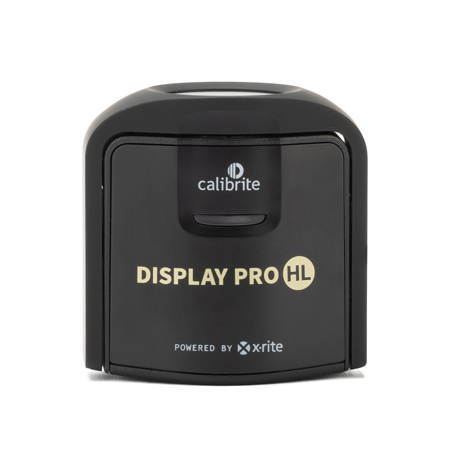
Best overall, and the one I own: Calibrite Display Pro HL
This is the successor to the X-Rite i1Display Pro, the puck that spent a decade in every colorist’s drawer. The listing tells you what you need to know. It reads LCD, mini-LED and OLED, measured up to 3,000 nits. The PROFILER software comes with validation and uniformity tools. It’s USB-C, with an adapter in the box. That ceiling covers every monitor in the grading monitor guide, QD-OLED included, with room to spare. Mine goes on the monitor once a month and before any job where color is contractually my problem, and I’ve had no reason to look at anything else. PROFILER is at version 3.1.0, released May 2026, and it’s the app I’d rather hand a beginner than the free alternatives; the software section explains why.
Two things to know before you click. First, the routing. The Amazon listing ships from Amazon Germany at $246.54, which means import shipping and a return trip to Europe if it’s faulty. So I’m linking Adorama at $279 (list $289), the same price Calibrite charges direct. If a US-shipped Amazon listing appears, buy there. Second, $279 is real money for twenty minutes of use a month, and if your whole setup is one or two SDR IPS panels for photo work, the Display 123 below does that job for $150 less.
Best for video, HDR and Apple displays: Calibrite Display Plus HL
Same platform, a sensor Calibrite labels “advanced HL,” rated to 10,000 nits instead of 3,000. The brightness headroom is the obvious reason to buy it, and for most desks it’s headroom you’ll never use… a 27-inch IPS grading monitor never asks for it. The less obvious reason is the one that moved it up this list. “The first colorimeter approved for use with Apple’s built-in display calibration system,” is what Calibrite’s home page calls it. And Apple’s own support page covers recalibrating a Studio Display or Pro Display XDR with a third-party instrument. If you own one of those and want it recalibrated inside macOS rather than through an ICC profile, this is the puck the two companies agree on.
It’s $339, Calibrite’s own list price. The $60 over the Pro HL buys you the HDR ceiling and the Apple approval and nothing else that I can find, so if neither of those sentences describes your desk, go back up one pick.

Best budget: Calibrite Display 123
$129, the same price Calibrite’s own store charges, and it’s the right first calibrator for a photo editor with one or two SDR monitors. The listing describes a three-step software workflow, a before-and-after check, USB-C, and support for two displays. That’s the job: profile the screen, see the difference, do it again next month.
What you give up is spelled out by what’s missing from the listing. The validation and uniformity tools are listed on the Pro HL, not here. Calibrite doesn’t put a brightness ceiling in the Display 123’s listing at all, so I wouldn’t point it at an HDR panel. And the two-display cap matters the day you add a third monitor. For a Lightroom desk with a single IPS panel, none of that applies, and the $150 you save goes toward a better monitor.

Best Datacolor, and the pick for mixed multi-monitor desks: Datacolor Spyder
Datacolor renamed its whole line in 2024. The store now sells three pucks, SpyderExpress, Spyder and SpyderPro. The Spyder X2 Elite and Ultra names are gone from it. The only pointer to the old range is “Own a Spyder5 or earlier? Purchase the all-new SpyderPro.” If a search turns up a Spyder X Pro or an X2 kit, it’s old stock and I wouldn’t buy it.
The middle puck, the Spyder, is $169 on Amazon from Datacolor’s own storefront. It’s rated to 3,000 cd/m², the same ceiling class as the Pro HL, for $110 less. Where it wins is the desk with a laptop screen next to a desktop monitor next to a second-hand panel of a third brand. Datacolor’s app is the simpler of the two, and its own listing pitches the line for matching monitors and laptop displays. If you’re going to calibrate three mismatched screens every month, the puck with the friendlier app is the one that gets used. The SpyderExpress at $119 is the entry model, capped at 1,200 cd/m² on Datacolor’s spec page, and the $50 step to the Spyder is the better buy for anyone who owns more than one screen.

The Datacolor step-up: SpyderPro
$269 from the Datacolor storefront on Amazon. “Calibrate up to 12,000 nits,” says Datacolor’s spec page, and that’s about as plainly as it can be said. The listing pitches it for photo and video editing across monitors and laptop displays. That’s the Spyder’s multi-screen pitch with an HDR ceiling added. If you’re a Datacolor household with a bright mini-LED in the mix, this is the one.
It lands $10 under the Pro HL, and for a single grading monitor I’d still spend the $10. The Calibrite is the puck I own, it’s the one the calibration essay’s software list is written around, and that familiarity is worth more than a brightness ceiling I don’t need. The SpyderPro is the right answer when you already run Datacolor’s app on the other screens and don’t want two calibration workflows on one desk.

How the five compare
| Calibrator | Price | Brightness ceiling (maker’s spec) | Where I link | Buy it when |
|---|---|---|---|---|
| Calibrite Display Pro HL | $279 | 3,000 nits | Adorama (the Amazon listing ships from Germany) | Almost always |
| Calibrite Display Plus HL | $339 | 10,000 nits | Amazon | HDR mini-LED, or a Studio Display / XDR you’ll recalibrate in macOS |
| Calibrite Display 123 | $129 | Not stated in the listing | Amazon | One or two SDR monitors, $129 budget |
| Datacolor Spyder | $169 | 3,000 cd/m² | Amazon, Datacolor storefront | Two or three mixed monitors, you want the guided app |
| Datacolor SpyderPro | $269 | 12,000 nits | Amazon, Datacolor storefront | A Datacolor desk with an HDR panel in it |
What matters in a calibrator
The brightness ceiling only matters if your monitor can reach it. An SDR IPS panel sits far below the 3,000 nits the Pro HL and the Spyder are rated for, and the Pro HL’s listing names OLED outright. The 10,000 and 12,000-nit pucks exist for HDR mastering-class mini-LED panels, and if you own one of those, you already knew that.
You’ll spend more time in the app than with the puck. Two minutes holding the sensor, twenty in the software, every month, so pick the one you’ll keep opening. PROFILER is Calibrite’s and it’s what the Pro HL and Plus HL ship with; the Display 123 gets the three-step version. Datacolor’s app is the simpler of the two, which is a feature on a mixed desk. Some monitors support hardware calibration (BenQ’s SW line and the ASUS ProArt panels in the grading guide). On those, the monitor maker’s own tool does the writing and the puck is just the sensor. Check that tool’s supported-instrument list before you buy. And read the software-versus-hardware section of the essay if any of that was new to you.
The room is still part of the instrument. A calibrated monitor against a bright or tinted wall is a calibrated monitor your eyes will override. The cheapest upgrade here costs less than any of the pucks: the MediaLight Mk2 bias light, the one the essay covers and the one Flanders Scientific resells for its own reference monitors. Buy the probe, then buy the light, then stop spending.
You don’t need one yet if… your only display is an Apple Studio Display or Pro Display XDR and you deliver SDR video for the web. Apple’s reference modes pin the color space, white point and gamma to a standard. The day you need more is the day you buy the Plus HL and use Apple’s own recalibration path. Same if you unboxed a factory-calibrated panel last month and nothing you make goes to print or to a client who grades. “Factory calibrated” has no expiration date printed on it, so put the probe on your list for the first print job or the first “why does everyone look green” email, whichever arrives first.
The software
The apps change faster than the pucks. Calibrite PROFILER is at 3.1.0, released in May 2026, and it’s free with any of the three Calibrite pucks above. DisplayCAL, the free tool the essay recommends, had its Homebrew cask disabled in September 2026, so the one-line Mac install is gone. ArgyllCMS 3.3.0, the engine underneath it, is still current. But a beginner on a Mac is now better served by PROFILER than by hunting for another install path. On the Apple side, Apple’s support page covers calibrating a Studio Display or Pro Display XDR with a third-party instrument, and Calibrite’s approval claim for that system is why the Plus HL holds its spot here.
FAQ
Calibrite or Datacolor?
Calibrite for a single monitor you take seriously; it’s the X-Rite lineage, it’s what I own, and the ASUS and BenQ hardware-calibration tools support it. Datacolor when the desk is two or three mismatched screens, or when you’re already a Datacolor household. Both companies’ mid pucks share a 3,000-nit ceiling, so for most readers the difference is $110 and an app.
Is the Display Pro HL worth $150 over the Display 123?
For a photo editor with one or two SDR monitors, no, and I’d rather you spend the difference on the panel. For anyone grading video, running three or more displays, or wanting the validation and uniformity tools, yes. The Display 123’s listing caps it at two displays and states no brightness ceiling, and those are the two walls you’ll hit.
Do I need the Plus HL for an OLED monitor?
No. The Pro HL’s listing names OLED, and OLED panels are not the bright displays the 10,000-nit sensor exists for. The Plus HL is for HDR mini-LED and for Apple’s built-in recalibration on a Studio Display or XDR. A QD-OLED like the ASUS PA32UCDM is a Pro HL job.
How often do I have to run it?
Monthly, and after any change to brightness or position. That’s my cadence; the full maintenance schedule is in the calibration essay.
Where this fits in your suite
The probe is step two of three. Step one is a monitor worth calibrating: the grading monitor guide if color is your job, the video editing monitor guide if it’s one of your jobs, and the photo editing monitor guide if you print. Step three is the room and the signal chain, which is the color suite build. The why behind all of it, and the snake oil to skip, is the calibration essay.
And that’s it! As always, what you see here is what works for me, my clients, and my crew. One puck, twenty minutes a month, and your monitor stops being the variable you can’t account for. The rest of our buyer’s guides live on the Gear Guides page.


