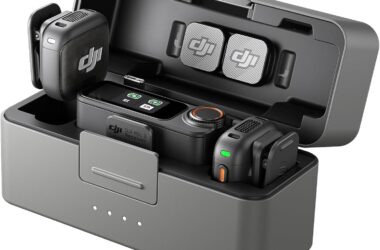
For about a year the wireless mic question had a clean answer: buy the Rode Wireless Pro if you’re serious, buy something cheaper if you’re not. Then DJI shipped the Mic 3 with timecode, 32-bit float, and a 16-gram transmitter for $259, Rode cut the Wireless Pro from $399 to $299, and both kits went on sale. As of September 21, 2026, the Mic 3 is $259 on Amazon and the Wireless Pro is $260. A dollar apart, and the spec sheets read like the same product with different logos.
They aren’t the same product. There is one hardware difference between them that decides the purchase for most people, and it isn’t on the front of either box. Our wireless mic guide ranks the whole category; this page is the head-to-head for the two kits at the top of it, written for the person who has narrowed it down to these two and wants a straight answer.
Last updated: September 2026. Some links below are affiliate links. Buy through them and it helps keep the site running, at no extra cost to you. Prices were read on the live Amazon listings on September 21, 2026, both sold by Amazon itself. Black Friday targets for both kits are on Black Friday wireless mic deals for creators.
TLDR
If your subjects wear a proper lavalier, or ever will, buy the Wireless Pro. It has locking 3.5mm inputs on the transmitters and ships with two Rode Lavalier II mics; the DJI has no lav input at all. If your subjects wear the transmitter itself, which is how most creators, vloggers, and run-and-gun interviewers work, buy the Mic 3. It’s half the weight on a lapel, it costs the same within a dollar, and on 32-bit float, timecode, and onboard recording it matches the Rode feature for feature. Everything else in this article is detail.
The lav input decides it
Every current wireless kit has a capsule built into the transmitter, and on both of these the built-in capsule sounds good enough that most creator work never needs anything else. Clip it on, talk, done. The difference is what happens when the built-in capsule isn’t the right tool: a subject in a wardrobe that has to hide the mic, a two-camera interview where a dangling transmitter looks amateur on the wide, a corporate shoot where the client wants the lav they’ve seen on television.
On the Wireless Pro that’s a solved problem. Each transmitter has a locking 3.5mm input, the box includes two Lavalier II mics, and the transmitter goes in a pocket or on a belt while the lav goes wherever it needs to go. Locking is the underrated word in that sentence; a lav that unscrews itself mid-take is a reshoot, and the threaded collar on the Rode is the kind of small thing you don’t think about until you’re using a kit that lacks it. The Mic 3 has no input. The capsule on the transmitter is the mic, and that’s the end of the conversation. DJI made that trade to get the transmitter down to 16 grams with a magnetic clip, and for the creator who wants the mic to disappear on a T-shirt, it was the right trade. For anyone who owns a lav or wants one, it’s disqualifying. That one line on the spec sheet should settle the purchase before you read another word about range.
Where they tie: 32-bit float, timecode, and the backup
Both kits record 32-bit float audio inside the transmitter while they send the live feed to your camera, and both have 32GB of internal storage for it: about 43 hours on the DJI, about 40 on the Rode. That backup file is the whole reason to spend $200 or more on a wireless kit in 2026. A 32-bit float file has effectively unlimited headroom, so when a guest laughs into the mic and the camera’s track clips, the file inside the transmitter still has the whole waveform, and you pull the gain down in the edit and the clipped take un-clips. The wireless mic guide covers the mechanics; the short version is that you stop riding gain on set and normalize once, calmly, in post. Neither kit has an edge here. Both do it automatically, both do it on both transmitters, both survive a dropout in the radio link because the file was never in the radio link.
Timecode is the other tie, and it’s the spec that pays off entirely in the edit. Both kits stamp their onboard files with the same clock as your camera, so a multicam bin in Resolve or Premiere syncs by timecode instead of waveform roulette. On one camera and one mic you’ll never notice. On a two-camera interview shot across two days, it’s the difference between a sync that takes a minute and one that takes an afternoon. Both kits do it; the DJI does timecode in and out. If you’re choosing between these two because of timecode, stop, because you can’t lose.
One real difference in this area, and it’s small: offloading. The Rode routes its onboard files through the Rode Central app, which is friction at the end of a long day. The DJI mounts more directly. Ten minutes a shoot, roughly, in DJI’s favor. Not a reason to buy, but a reason to set up your ingest routine before the first job.

Weight, range, and the spec-sheet fight
Transmitter weight is the spec I’d rank second after the lav input, and here the DJI wins outright: 16 grams against roughly 32 for the Rode. Half the battle with wireless mics is getting a guest to forget the thing is on them. A 16-gram unit on a magnetic clip gets forgotten. A heavier unit gets adjusted, tugged at, and bumped, and every one of those touches is a thump on your track that no plugin cleans up. If you mic nervous first-timers, and most creator interviews are exactly that, the weight difference is worth more than any range number. Which brings up range: DJI claims 400 meters, Rode claims 260. Nobody will ever verify either, and nobody shooting an interview will use a tenth of it. Ignore range.
The DJI wins the rest of the sheet too, on paper. Its receiver pairs with up to four transmitters, so a four-person panel runs on one receiver where the Rode tops out at two. It has adaptive gain control, dual-band transmission, two levels of noise cancelling, and three voice-tone presets, none of which I’d use on a paid job but all of which help a solo creator who never opens an audio meter. And if you shoot DJI cameras, the Mic 3 links to some DJI bodies with no receiver at all, which is one fewer thing on the rig and one fewer battery. The Rode’s answer to all of that is GainAssist, which does the one job well, and an ecosystem: the Wireless Pro shares accessories, software, and Rode’s deep bench of lavs and interface gear with everything else they make. If your kit bag is already Rode, that counts.

The third option: Wireless GO Gen 3
“What if I don’t need timecode?” Then neither of these is the right kit, and the Wireless GO Gen 3 is. It’s the Wireless Pro with the extras shaved off: same 32-bit float onboard recording, same roughly 40 hours of storage, same 260-meter range, same GainAssist, no timecode, no lavs in the box. Amazon had it at $169.99 on September 21, sold by Amazon, after a year in which the price wandered between $199 and $299. At $170 it’s the obvious kit for a single-camera creator who will never cut multicam, and it keeps the one feature that saves an edit. The moment you add a second camera, or a second shoot day on the same project, you’ve outgrown it, and you’re back to the two kits above.
Side by side
| Kit | Amazon, Sept 21 | 32-bit float onboard | Timecode | Lav input | TX weight | TX per receiver | Claimed range |
|---|---|---|---|---|---|---|---|
| DJI Mic 3 | $259 | Yes, 32GB, ~43 hrs | Yes, in and out | No | 16 g | Up to 4 | 400 m |
| Rode Wireless Pro | $260 ($299 list) | Yes, 32GB, ~40 hrs | Yes | Yes, locking 3.5mm, two Lavalier II included | ~32 g | 2 | 260 m |
| Rode Wireless GO Gen 3 | $169.99 | Yes, ~40 hrs | No | 3.5mm input, no lav in the box | ~32 g | 2 | 260 m |
In conclusion
Which would I buy? For the way most people reading this shoot, the Mic 3, and it isn’t close at $259: the same insurance as the Rode, the same price within a dollar, and a transmitter guests forget about. The day the job calls for a hidden lav, a client’s preferred lav, or a mic that has to live under a jacket, the Wireless Pro is the only one of the two that can do the job, which is why it’s the kit in our run-and-gun documentary kit and will stay there. Buy for the shoots you’ll have, not the spec sheet you’ll admire.
And that’s it! As always, what you see here is what works for me, my clients, and my crew. Your talent, your cameras, and your wardrobe department get the final vote. The rest of the audio kit lives in the on-camera and shotgun mic guide and, for the mic that stays on the desk, the best podcast microphone guide. The budget pair, the Mic Mini and the Wireless Micro, has its own head-to-head in DJI Mic Mini vs Rode Wireless Micro. Running one of these kits in a way I didn’t cover? Leave a comment.