


Lightroom Classic and Photoshop spend most of a session on one or two cores, so the chip with the fastest single core wins before the chip with the most cores does. Memory decides whether a 45-megapixel RAW opens without the drive stepping in, the scratch disk decides how a layered retouch behaves past a gigabyte, and the graphics card wakes up for a short list of tasks: Denoise, the AI masks and Generative Fill.
That order is the reverse of a video build. Our best PC for video editing over-buys GPU and under-buys RAM for a photographer, so this page is its Windows-only photo twin: three self-builds, two prebuilt towers, and the arithmetic that puts a prebuilt ahead of the build it replaces.
Memory is the line that moves: the 32 GB DDR5 kit in every build went up $10 in a day. Some links below are affiliate links. Buying through them supports the site at no extra cost to you.
TLDR
The Dell Tower with a Core Ultra 7 265F, an RTX 5060, 32 GB of DDR5 and a 1 TB SSD is the pick, at $1,699.99 at Best Buy. The same class of machine built from parts costs $2,047.58, because the 32 GB memory kit alone is $484.99, so the prebuilt comes in about $350 under the build. The step-up prebuilt is the iBUYPOWER Trace at $2,899.99, with a Ryzen 7 9800X3D, an RTX 5070 Ti 16 GB, 32 GB and 2 TB. Build when the parts list is the point: the sweet-spot build around a Ryzen 7 9700X and a 16 GB RTX 5060 Ti is $2,458.42, and the 100-megapixel studio build with 64 GB and a Core Ultra 7 270K Plus is $3,314.87. The Mac half of the question is in best Mac and desktop for photo editing.
The picks
Best value, buy this: Dell Tower (Core Ultra 7 265F, RTX 5060, 32GB, 1TB) at $1,699.99
32 GB of DDR5 decides this pick. The Dell Tower is the only prebuilt under $2,000 at Best Buy with 32 GB and an RTX 5060, and 32 GB is the floor for Lightroom Classic and Photoshop open together on files from a current full-frame body. The Core Ultra 7 265F covers the lightly threaded Develop-module work, the RTX 5060 runs Denoise, the AI masks and Generative Fill, and Windows 11 Home is in the price. Best Buy is the only route; Dell does not list this configuration on Amazon.
The 1 TB SSD and the 8 GB graphics card are the compromises. 1 TB holds Windows, both Adobe apps and a catalogue with its previews; the originals go on an external drive from the first month. 8 GB of VRAM handles Denoise one frame at a time and falls short of the 16 GB that keeps a batch Denoise run or a Generative Fill on a large document inside graphics memory, which is the gap the Trace and the sweet-spot build close. There is no cheaper 32 GB tower we would link; HP’s $1,969.99 OMEN 35L with 16 GB costs more for half the memory.

Step-up prebuilt: iBUYPOWER Trace (Ryzen 7 9800X3D, RTX 5070 Ti 16GB, 32GB, 2TB) at $2,899.99
16 GB of VRAM and a 2 TB drive are what the extra $1,200 over the Dell buys. The RTX 5070 Ti’s 16 GB keeps batch Denoise and Generative Fill resident in graphics memory, and 2 TB puts the catalogue and a season of originals on the internal drive. The Ryzen 7 9800X3D in the iBUYPOWER Trace is a gaming chip first; its cache advantage is one the photo apps don’t use, and it has no weakness in them either. Against the sweet-spot build the Trace costs $441.57 more and adds one warranty on the whole box and pre-installed Windows. Best Buy sells it first-party.
HP’s OMEN 35L GT16-0107t with a Core Ultra 7 265F, an RTX 5070 and 32 GB sits between the two at $2,749.99, and we do not link it. That Best Buy listing reads “Sold & shipped by HP Inc”, which is the marketplace, and the 5070’s 12 GB of VRAM is the odd size for this work, under the 16 GB line and over the 8 GB one at a $1,050 premium to the Dell. The cheaper option is the Dell.
Value build: Ryzen 5 9600X, RTX 5060 8GB, 32GB, 2TB ($2,047.58)
$484.99 for 32 GB of DDR5-6000 shapes this tier. The list is the Dell’s specification built by hand on the AM5 socket with a 2 TB drive, and it comes to $2,047.58 before a Windows license. The Ryzen 5 9600X at $179.67 (list $220) has six cores; the photo apps load one or two of them most of the day, so the saving over the 9700X costs little in the Develop module and shows up in export times. The ASUS Dual RTX 5060 8 GB at $547.99 is the same card class as the Dell’s.
Against the Dell, the build has 2 TB instead of 1 TB and a socket that takes a faster CPU later; the Dell has Windows, one warranty and $347.59 left over. Memory stays at 32 GB, because a 16 GB machine swaps to disk on every panorama. At this specification the cheaper option is the Dell Tower.
Sweet-spot build: Ryzen 7 9700X, RTX 5060 Ti 16GB, 32GB, 2TB ($2,458.42)
16 GB of VRAM for $799.65 is why this build exists. The PNY RTX 5060 Ti 16 GB OC is the cheapest 16 GB card on Amazon, and 16 GB keeps a batch Denoise run and Generative Fill on a large document inside graphics memory instead of spilling into system RAM. The Ryzen 7 9700X at $338.85 is the photo-first CPU in this guide: eight cores on AM5, with the per-core speed for the Develop module and enough cores to clear exports and panorama stitches faster than the 9600X.
Against the Trace, the build is $441.57 cheaper and carries the photo-first CPU, the same 16 GB of VRAM and 32 GB of memory, and an ATX board with three M.2 slots for the drives a catalogue grows into; the Trace has Windows and iBUYPOWER’s support line. The cheaper option is this build with the 8 GB RTX 5060 in place of the 16 GB Ti, which lands at $2,206.76 and keeps the 9700X.


100-megapixel studio build: Core Ultra 7 270K Plus, 64GB, RTX 5070, 2TB PCIe 5 ($3,314.87)
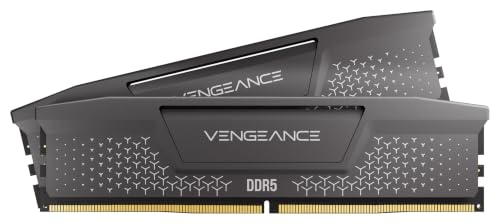
64 GB of memory is the specification, and the Corsair Vengeance RGB RS DDR5-6000 64 GB kit (2×32, CL40) is $1,049.99, up $50 in a day and the most expensive part in the build. 100-megapixel RAWs, a dozen-frame panorama and a 16-bit layered retouch with both apps open pass 32 GB as a matter of routine, so the kit stays in the list at that price. The Intel Core Ultra 7 270K Plus at $330.00 is the single-core pick, 8 P-cores and 16 E-cores up to 5.5 GHz, on an MSI Z890 Gaming Plus WiFi at $189.99.
The Samsung 9100 Pro 2 TB at $399.95 (list $679.97) is $10 over the 990 Pro for a PCIe 5 drive rated to 14,700 MB/s, and at this tier the scratch disk gets the $10. The ASUS ROG Strix RTX 5070 12 GB OC at $1,039.99 is the RTX 5070 here, a tier up in compute from the 5060 Ti and a step down in VRAM, 12 GB against 16, which makes it the card for a studio that also cuts video on this machine. For stills alone the 5060 Ti 16 GB is the better photo card per dollar and saves $240.34.
Against the Trace this is $414.88 more for double the memory and a PCIe 5 scratch drive, with no single warranty. The RTX 5080 step above this card belongs to the video guide, where the GPU decides the build. The cheaper option is the sweet-spot build with the 64 GB kit in place of the 32 GB one: $3,023.42, with the 16 GB card and the AM5 socket.
The three build sheets
| Part | Value build | Sweet-spot build | Studio build |
|---|---|---|---|
| CPU | Ryzen 5 9600X $179.67 | Ryzen 7 9700X $338.85 | Core Ultra 7 270K Plus $330.00 |
| Motherboard | Gigabyte B650 Eagle AX $139.99 | Gigabyte B650 Eagle AX $139.99 | MSI Z890 Gaming Plus WiFi $189.99 |
| RAM | Corsair Vengeance RS 32 GB $484.99 | Corsair Vengeance RS 32 GB $484.99 | Corsair Vengeance RGB RS 64 GB $1,049.99 |
| GPU | ASUS Dual RTX 5060 8 GB $547.99 | PNY RTX 5060 Ti 16 GB $799.65 | ASUS ROG Strix RTX 5070 12 GB $1,039.99 |
| SSD | Samsung 990 Pro 2 TB $389.99 | Samsung 990 Pro 2 TB $389.99 | Samsung 9100 Pro 2 TB $399.95 |
| Cooler | Thermalright Peerless Assassin 120 SE V3 $34.99 | same, $34.99 | same, $34.99 |
| PSU | Corsair RM850e (2025) $114.97 | same, $114.97 | same, $114.97 |
| Case | Fractal Design North $154.99 | same, $154.99 | same, $154.99 |
| Total, parts only | $2,047.58 | $2,458.42 | $3,314.87 |
Prices are before a Windows license. The Samsung 990 Pro 2 TB at $389.99 (list $639.99) is the catalogue and scratch drive in both AM5 builds; PCIe 4 is enough for Lightroom, and the originals live on it too until the archive outgrows 2 TB. The 9100 Pro’s extra $10 belongs on the Z890 board.

The Corsair Vengeance RS DDR5-6000 32 GB kit (2×16, CL38) is the cheapest 32 GB kit on Amazon at $484.99, up $10 in a day; EXPO and XMP profiles cover the AM5 boards and the Z890. The 64 GB RGB RS kit at $1,049.99 is the studio-tier line. Memory is never downgraded in this guide to hit a price. The Peerless Assassin 120 SE V3 mounts on AM5 and LGA1851, the RM850e has headroom for a 5070 Ti later, and a plainer case than the Fractal North saves about $80.
How the picks compare
| Pick | CPU | GPU (VRAM) | RAM | Storage | Price | For |
|---|---|---|---|---|---|---|
| Dell Tower | Core Ultra 7 265F | RTX 5060 (8 GB) | 32 GB | 1 TB | $1,699.99 (Best Buy) | Most photographers; the buy |
| Value build | Ryzen 5 9600X | RTX 5060 (8 GB) | 32 GB | 2 TB PCIe 4 | $2,047.58 (parts) | Building for the upgrade path |
| Sweet-spot build | Ryzen 7 9700X | RTX 5060 Ti (16 GB) | 32 GB | 2 TB PCIe 4 | $2,458.42 (parts) | Batch Denoise, Generative Fill, 45 to 61 MP |
| iBUYPOWER Trace | Ryzen 7 9800X3D | RTX 5070 Ti (16 GB) | 32 GB | 2 TB | $2,899.99 (Best Buy) | 16 GB VRAM with one warranty; photographers who also game |
| Studio build | Core Ultra 7 270K Plus | RTX 5070 (12 GB) | 64 GB | 2 TB PCIe 5 | $3,314.87 (parts) | 100 MP, panoramas, tethered studio |
| HP OMEN 35L (265F, 5070, 32 GB) | Core Ultra 7 265F | RTX 5070 (12 GB) | 32 GB | 1 TB | $2,749.99 (Best Buy marketplace, not linked) | Named for reference |
Build totals are parts only, before a Windows license. The two prebuilts include Windows 11 Home.
What matters for Lightroom and Photoshop
Single-core speed sets the feel of the machine. The Develop module, a brush, a healing stroke and the Library grid run on one or two threads, which is why a $330 Core Ultra 7 270K Plus or a $338.85 Ryzen 7 9700X is the right chip here and a 16-core part is money spent on exports. Exports, panorama merges and HDR stacks do scale with cores, which is the 9700X’s case over the 9600X.
Memory is the part that doubled. 32 GB is the floor for both apps open on a full-frame catalogue and 64 GB is the line for 100-megapixel files and panoramas; a system that runs short pages to the SSD, and that is the stall between slider and screen. The scratch disk is the next lever: the catalogue, its previews and Photoshop’s scratch file want a fast NVMe drive, and PCIe 4 is enough, so the 990 Pro is the drive and PCIe 5 belongs on the Z890 board at the studio tier.
The GPU runs a short list, and the size of its memory decides whether that list runs well. Denoise, the AI masks and Generative Fill are the jobs. 8 GB covers them one image at a time; 16 GB covers a batch Denoise overnight and Generative Fill on a large layered document without spilling into system memory, which is the single reason the 16 GB RTX 5060 Ti is the build card and the 8 GB RTX 5060 is the value card. Faster GPUs above the 5070 Ti are a video-editing purchase, and the video build guide covers the RTX 5080 tier.
Build or buy
Memory and flash have roughly doubled since January 2025, and that one fact flips the usual answer. A self-build pays retail for the $484.99 memory kit; Dell and iBUYPOWER buy DRAM and flash on contract, so a tower with 32 GB inside costs them less than the kit costs a buyer on Amazon, and the sticker shows it: the Dell Tower at $1,699.99 is $347.59 under our value build, with Windows and a warranty included and a 1 TB drive instead of 2 TB as the only concession.
Buy the prebuilt when 32 GB is the target, which is most photographers. Build when the list needs something the towers don’t sell: 64 GB, a PCIe 5 scratch drive, a photo-first CPU in place of a gaming one, or three M.2 slots for the day the archive moves inside the case. The sweet-spot build at $2,458.42 is the one most builders should assemble; it beats the Trace by $441.57 on parts and gives up the warranty and the pre-installed Windows.
FAQ
How much RAM do I need for Lightroom and Photoshop?
32 GB for a full-frame catalogue with both apps open, 64 GB for 100-megapixel files, panoramas and 16-bit layered retouching. That is $484.99 or $1,049.99 in a build, and the Dell Tower at $1,699.99 is the cheapest way to get 32 GB in a finished machine.
Is a prebuilt worse than building it yourself?
Not at 32 GB. The Dell Tower is $347.59 cheaper than the same class of machine built from Amazon parts, because memory and flash are at contract prices inside a prebuilt and at retail on a parts list. A build wins at 64 GB, with a PCIe 5 scratch drive or a specific CPU, and on the upgrade path.
Do I need a 16 GB graphics card for photo editing?
Only for batch work. 8 GB, the RTX 5060 in the Dell and the value build, runs Denoise, the AI masks and Generative Fill one image at a time. 16 GB, the RTX 5060 Ti in the sweet-spot build and the 5070 Ti in the Trace, keeps an overnight Denoise batch and Generative Fill on a large document in graphics memory. The $251.66 between the two cards buys that and nothing else a photographer can feel.
Mac or PC for photo editing?
Both run the same Adobe apps, and the pick depends on the memory you can buy for the money. The Mac side, including the Mac mini and the Mac Studio for 100-megapixel work, is in best Mac and desktop for photo editing. On Windows the Dell Tower is the pick.
Can I use the video editing build for photos?
Yes, and it over-buys the GPU. The video build puts the money into a 16 GB or larger card and a cache drive because Resolve runs on the GPU. The 270K Plus, the 9100 Pro, the cooler, the power supply and the case carry over to a photo build; the RTX 5080 and the three-drive layout do not.
Where this fits in your setup
The video side of the same decision is best PC for video editing, and the Mac side is best Mac and desktop for photo editing. A photographer who edits on the road is in best laptop for photo editing. The screen in front of the tower is in best monitor for photo editing, the device that calibrates it is in our calibrator guide, and the pointing device is in best mouse for editing.


