


Editors will agonize for weeks over a GPU that saves them four seconds per export, then spend a decade in a $110 chair that’s slowly wrecking the one spine they get. I know because I did it. The math finally clicked for me on a color pass years ago: I was standing up every forty minutes because my back demanded it, and every one of those stand-ups was a lost thought, a broken loop, a “wait, where was I”: a focus problem the chair was billing to my body.
So this is the guide to the two pieces of gear you touch for more hours than any camera, monitor, or keyboard: the chair and the desk under it. It includes the one piece of gear on this entire site I will defend at any price, a remanufactured-chair route, and a warning about the chairs marketed hardest at people like us.
Last updated: August 2026. Some links below are affiliate links; buying through them supports the site at no cost to you. Prices verified early August; chairs run sales constantly, so check the listing.
TLDR
If you just want the answer: the Herman Miller Embody ($2,090 and up) is the best chair I have ever owned, and I’d buy it again at three times the price. If that number is absurd for you right now (fair), the Steelcase Series 1 ($530) has the real adjustments that matter for a fraction of it, the Branch Ergonomic Chair ($359) is the budget pick that doesn’t cut the lumbar corner, and a remanufactured Aeron from Crandall ($600 to $800) is the smartest dollars-per-decade play in the entire category. Desk: the FlexiSpot E7 Pro (~$479) unless you’re stacking serious monitor weight.
The chairs
The one I own: Herman Miller Embody
My Embody is the only purchase in my edit suite I have never once second-guessed. Not the Mac, not the monitors… the chair. Herman Miller built it with a team that included a spine surgeon, and the thing that makes it different is the back: instead of a mesh sheet or a foam slab, it’s a matrix of pixel-like supports that redistribute pressure as you move, so leaning into a shot for a fine trim doesn’t mean losing support. That lean matters. Editors don’t sit like office workers; we perch, we hunch toward the waveform, we slump back for playback. The Embody’s backfit adjustment is built for exactly that cycle.
It’s $2,090 to $2,565 depending on configuration, direct from Herman Miller, with a 12-year warranty that covers everything including the pneumatics. Amortize it: twelve years of 8-hour days lands under a dime an hour. The price is the price, the armrests are merely good rather than exceptional, and it runs firm for people who want to sink into a chair. It still tops my gift list for editors, with the cheaper routes below it. Sit in one somewhere before you order if you can. But if you spend 40-plus hours a week in the seat and you have the money, stop optimizing and buy it.
The Embody Gaming edition you’ll see in the same search results (a Logitech collaboration) is the same chair with extra foam and a copper-colored logo for about $100 more. Buy the standard one.
Best value: Steelcase Series 1
At the $500 line, the game is “which adjustments survived the cost cutting,” and the Series 1 ($530 direct) keeps the ones that count: adjustable lumbar with depth control, 4D armrests, seat-depth adjustment, and weight-activated recline, all under the same 12-year warranty Steelcase puts on its top-of-the-line chairs, a term no company offers unless the engineering supports it.
It runs slightly small, so if you’re well over six feet, look at the Series 2 or the taller Branch Pro below. And the cushion is supportive rather than plush… this is a work tool. For the editor who wants one correct purchase at the half-grand mark and no further reading, this is it.
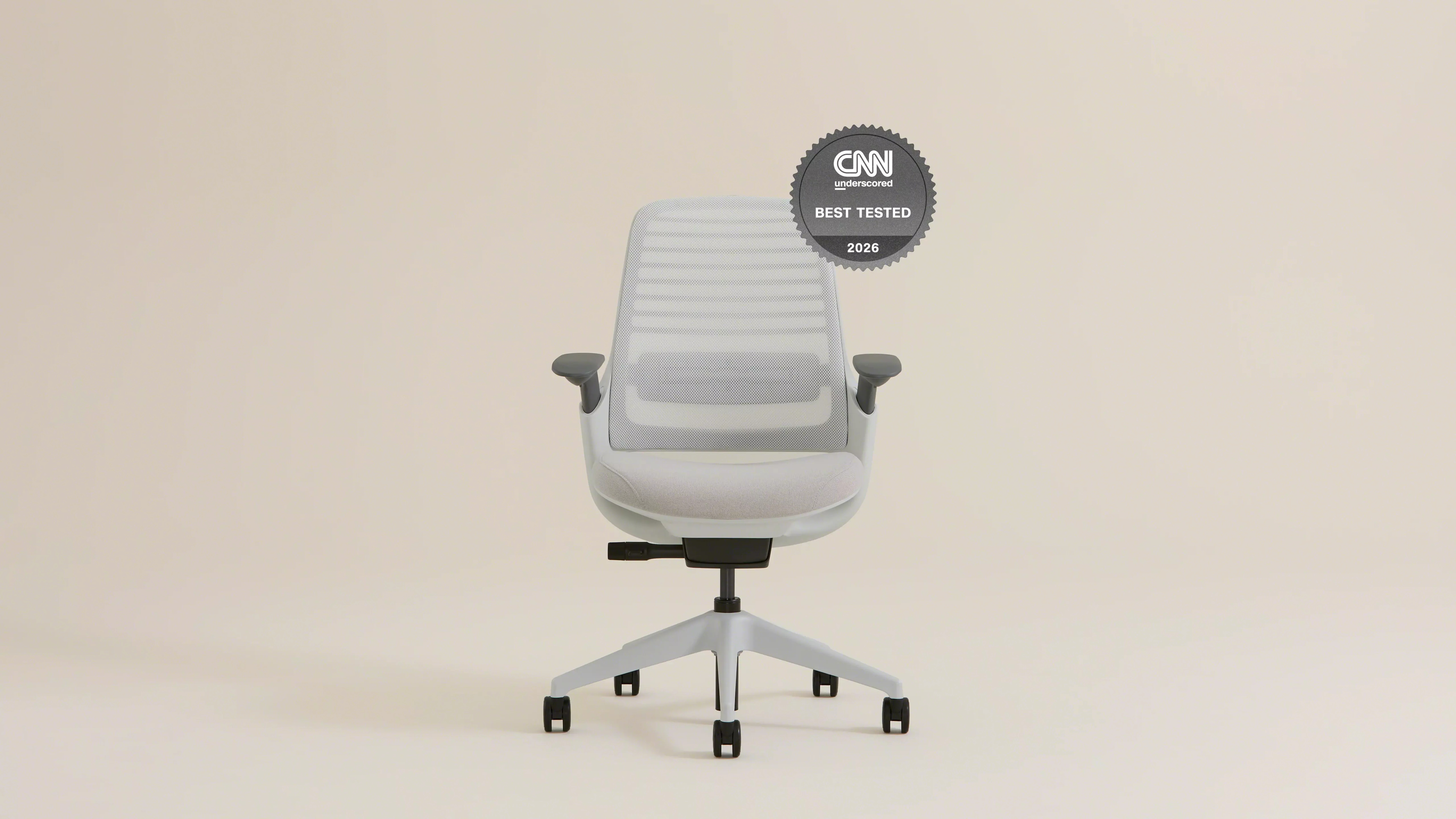
The Branch Ergonomic Chair Pro ($499) fights the Series 1 to a draw on features (a bit more adjustment range per dollar) with a shorter track record. Defensible either way; I give the Steelcase the slot on the strength of that warranty history.
Best budget: Branch Ergonomic Chair
At $359, the standard Branch Ergonomic Chair keeps the feature that vanishes first in cheap chairs: adjustable lumbar depth. Seven points of adjustment total, a weight rating and build quality that outclass the Amazon-brand mystery chairs at half its price, and none of the crunchy plastic feel that usually lives at this tier. Below this price, the curve gets ugly. If $359 is still too far, the Sihoo Doro C300 (usually under $300) is the best of the direct-from-factory options, but between a $200 chair and a used Aeron, take the used Aeron. Which brings us to the used market.
The smart-money route: a remanufactured Aeron
Herman Miller Aerons have been the default post-house chair for twenty-five years, which means the used market is deep. The move is a remanufactured one from Crandall Office Furniture: they tear the chair down and rebuild it with a new cylinder, casters, arm pads, and foam, then back it with their own 12-year warranty and 30-day returns. A rebuilt Aeron typically lands at $600 to $800, which is Series 1 money and change for a chair that costs well north of double that new.
Not every “open box” chair site is doing that. Madison Seating, the one you’ll hit first in the search results, has a Better Business Bureau complaint record full of heavily used chairs sold as open-box, painted bases, aftermarket parts, and an all-sales-final policy with cancellation fees. The remanufactured route is only smart when the rebuilder actually rebuilds. Crandall does.
About gaming chairs
No. Racing-style chairs are shaped like car seats because they’re modeled on car seats, built for a reclined, legs-forward driving posture you never use at a desk. The high side bolsters that look supportive physically block the perch-and-lean postures that make up a real edit day. The materials are the worst of both worlds for long sessions: PU foam that packs down and PU leather that doesn’t breathe. And the price defense doesn’t work either, because a $550 flagship gaming chair costs Series 1 money, and a rebuilt Aeron starts only $50 above that. They’re fine chairs for streaming on camera, where looking like a cockpit is the point. For eight hours of timeline work, every pick above beats every one of them.
The desks
Standing desk: FlexiSpot E7 Pro
The case for a standing desk is stronger for editors than for almost anyone, and it has nothing to do with the standing-desk wellness industry. Renders and exports are built-in stand-up intervals. The research on sitting supports posture variety rather than standing per se, and our work hands us the variety schedule for free: stand for the export, sit for the trim pass.
The E7 Pro (~$479 frame) carries a 355-pound rating and a 15-year warranty, and in the head-to-heads it gives up a fraction of an inch of wobble at max height to the Uplift V2 (~$599) while costing $120 less. Loaded with two 27-inch monitors and an interface, both are steady; the V2’s extra rigidity starts mattering when you stack a reference monitor and speaker shelves on top, or run the desk high. Buy the E7 Pro for a normal dual-monitor rig, the V2 for a heavy one, and either with the cable tray option, because a standing desk without cable management is a guillotine rehearsal for your Thunderbolt cables.
The fixed-desk answer
If you never render long enough to stand, skip the motors and spend the difference on the chair, seriously. A butcher-block top on sturdy fixed legs (or the IKEA Karlby-on-cabinets classic) gives you a rock-solid 30-inch-deep surface for a few hundred dollars, and a stable fixed desk at the correct height beats a wobbly motorized one at any height.
The spec nobody checks: depth
Desk depth decides your viewing distance, and viewing distance is an ergonomics spec with an OSHA range attached: 20 to 40 inches from eyes to screen, with a 27-inch 4K display sitting comfortably at arm’s length plus a hand. A 24-inch-deep desk physically cannot deliver that with a keyboard in front of the monitor. Spec 30 inches of depth, minimum, or plan on a monitor arm that pushes the display back past the desk’s rear edge; most “my new monitor gives me headaches” threads trace back to this one number.
How the chairs compare
| Chair | Price (Aug 2026) | Warranty | Lumbar | Armrests | The job |
|---|---|---|---|---|---|
| Herman Miller Embody | $2,090+ | 12 years | Backfit matrix | Adjustable | The decade chair |
| Remanufactured Aeron (Crandall) | $600 to $800 | 12 years (Crandall’s) | PostureFit | Fully adjustable | Smart money |
| Steelcase Series 1 | $530 | 12 years | Adjustable depth | 4D | Value pick |
| Branch Ergonomic Chair Pro | $499 | 7 years | Adjustable | 4D | Value alternate |
| Branch Ergonomic Chair | $359 | 7 years | Adjustable depth | Adjustable | Budget pick |
Setting it up (the ten-minute ergonomics pass)
The best chair set up wrong is a worse chair. Three adjustments, in order:
- Armrests: elbows at 90 to 110 degrees, armrest just kissing the underside of your forearm. Too high and your traps carry the day (that’s the classic “mouse shoulder” editors get from scrub-heavy work); too low and your wrist loads instead.
- Seat height and depth: feet flat, thighs level, two or three fingers of clearance between seat edge and the backs of your knees.
- Monitor: top of the screen at or just below eye level, 20 to 40 inches away. Chair, desk, and display are one system; this is why this guide covers both pieces of furniture.
On mesh versus foam, since it decides comfort at hour eight: mesh runs cooler and doesn’t pack down; cheap foam compresses into a body-shaped dent within a year and then you’re sitting on the frame. The Embody is the interesting exception, with its layered support system in place of either. In the budget tiers, prefer mesh backs and dense (not soft) foam seats.
FAQ
Is the Embody worth it over a rebuilt Aeron?
If the budget really does stretch to both, the Embody supports the lean-in editing posture better and it’s the one I chose with my own money. If the choice pinches at all, the rebuilt Aeron at a third the price gets you most of the experience and is the better decision. You will not be sad in either chair.
Sit-stand desk: do people keep using the standing part?
Mostly no, and then yes once they tie it to renders. A bare “I should stand more” resolution dies in a week; “the desk goes up when the export bar appears” sticks, because the trigger is built into the job. If you know you won’t do either, see the fixed-desk answer above and put the savings in the chair.
What about a headrest?
For upright editing work, a headrest is mostly along for the ride; you only load it in deep recline, which is playback posture, not working posture. Nice to have on a call or a review, never worth choosing a worse chair to get.
My back hurts now. Which single change helps fastest?
Armrest height, today, free. Most editing-specific shoulder and neck pain traces to arms hovering over a desk that’s effectively too tall. Set the armrests so your forearms rest while you scrub, and drop the chair or raise your monitor to compensate. Then fix the chair itself when you can.
The layer everything else sits on
The chair and desk are the foundation layer of the edit suite, literally: everything else in the room (the monitors and their arms, the bias lighting, the acoustic panels, the machine) stacks on top of decisions you make here, and the home edit suite guide ties all of it together. If you read this whole page and buy nothing but a door seal and better armrest habits, that’s still a win, and if the budget is there, you already know which chair I’d put you in.
And that’s it! One spine, one chair budget, choose accordingly. This is what I sit in and what I’d put under the editors I work with; bodies vary more than gear does, so sit in things when you can. Questions about a specific height/desk/monitor geometry? Comments are open.


