



Higgsfield MCP is a connector. Paste one URL into Claude, add a plugin in ChatGPT, or let Claude Code install a command-line tool, and the assistant can generate images, video and audio on your Higgsfield account without you opening the website. It hands you the same models and the same Assets library you get on the web. What it does not hand you is the Unlimited access your plan may include: every generation through MCP deducts credits, on every tier, and the July blog post that says otherwise described a trial that closed on July 31. This page is what the connector does, what it costs, how to set it up in each agent, and what the editing-app skills for DaVinci Resolve, Premiere Pro, After Effects and Blender promise, read against Higgsfield’s own pages.
Last updated: November 2026. Some links below are affiliate links. Buy through them and it helps keep the site running, at no extra cost to you. Every claim here was read on higgsfield.ai (the MCP page, the skill pages, the help center, the pricing page and the July 28 blog post) on October 26, 2026. We have not run the Resolve grading skill on a client timeline; where the page promises something we could not check, the text says so.
TLDR
Higgsfield MCP lets Claude, ChatGPT, Cursor and a few coding agents call Higgsfield’s generators from inside a chat. It needs a paid plan, no API key, and the server URL is https://mcp.higgsfield.ai/mcp. The help center carries the condition the MCP page leaves out: “MCP always uses credits. Unlimited access and free generations apply only on higgsfield.ai.” Budget about 60 credits for a 5-second 1080p clip, which makes a $47-a-month Plus plan roughly 20 clips, not the 80 the pricing card estimates for shorter settings. The “Unlimited MCP” headline from July was a 24-hour trial for new users that ended July 31 and converted to a Plus subscription. For editors the interesting part is the skills bundle: slash commands that run Codex inside Resolve Studio, Premiere Pro, After Effects and Blender to grade, sort bins, clean plates and build scenes, with editable results. The pages say Codex; the changelog says Claude. Signing up to Higgsfield through our link gets you up to 50% off for three hours from your first login, in Higgsfield’s own words.

What Higgsfield MCP is, and what it is not
MCP is the Model Context Protocol, the open standard that lets an AI assistant call outside tools. Higgsfield‘s MCP server exposes its generation stack as tools: image and video on every model in the lineup, upscaling, background removal, image expand and video reframe, Kling 3.0 Motion Control, Soul characters and reference Elements, voiceover, voice cloning and dubbing, the Personal Clipper, and account calls like “what is my credit balance.” The help center’s own table lists all of those as available through MCP and marks two things unavailable: Unlimited model access and free generations.
Three things it is not. It is not the Higgsfield API, which is a separate developer product with its own keys and a pay-as-you-go dollar balance (minimum top-up $5) that never touches your plan credits. It is not the plugin panel inside Resolve, Premiere or After Effects, which is a download you run in the host app; those plugins spend the same credits but need no agent. And it is not a different account: MCP connects over OAuth to the subscription you already have, and everything it makes lands in your Assets on higgsfield.ai tagged with the MCP source, usually within a minute of the job finishing.
Connecting also moves you under a different section of the Terms of Use. The help center says MCP use “falls under the Developer Terms” and that “you’re responsible for anything an agent generates through your account” (terms as read October 26, 2026). Once you let the connector run without confirming each call, that is the clause that applies.
The credits clause, and the blog post that contradicts it
Higgsfield’s own blog still carries a July 28, 2026 post titled “Meet Higgsfield Unlimited MCP,” which opens with “the first time unlimited generation has worked directly inside Claude and ChatGPT rather than only on the web.” The next sentence sets the scope: “New users can claim a free 24-hour trial until July 31.” The post also says the trial “converts into a Plus monthly plan automatically once the 24 hours are up” unless cancelled, and that the two Unlimited offers that already existed “were both web-only and stay that way.” The offer is over, and the page is still up.
The help center, written in August and revised through October, is the document that governs today. Its MCP article: “The most important difference is credit behavior: everything generated through MCP deducts credits, regardless of your plan.” Its credits article answers the obvious question directly. “I used MCP and my credits dropped faster than expected. Is that normal? Yes.” The same rule covers the CLI, Canvas, Supercomputer “and other automated tools.” If your plan includes 7-day Unlimited on Kling 3.0 and you want it free, you generate on the website.
The arithmetic is credits per clip, and Higgsfield publishes two numbers that disagree. The Plus pricing card (October 26, 2026) says 1,200 credits a month “= 80 Seedance 2.5 videos,” which is 15 credits a clip. The Generate button, read logged in on October 12, charged 60 credits for the default 5-second 1080p Cinema Studio clip. A sponsored walkthrough published October 25 logged 64 credits per 4-second 1080p Seedance 2.5 clip, a quarter credit per still, and 840 credits for a session that kept 11 of 13 clips. Plan on 60 a clip at 1080p. That makes Plus about 20 usable clips a month and Ultra about 50, before retakes. Failed generations refund automatically; a clip that rendered but is unusable does not.
There is no spending cap on the Higgsfield side. Asked whether the agent’s spend per session can be limited, the help center says to tell the agent in the conversation: “Do not spend more than X credits. Always ask for approval before generating.” It adds that this “is a prompt-level instruction, not a hard limit.” Put that line at the top of every session, check Manage Account → Usage afterwards (every MCP deduction is logged with the model and a timestamp), and treat an always-allow toggle on the connector as a decision about money. The plan prices themselves, and what each tier includes, are in our Higgsfield pricing page.
How to connect it, agent by agent
Every path needs an active paid Higgsfield subscription; the free account cannot connect. None needs an API key.

Claude (claude.ai and Claude Desktop). Settings → Connectors → Add custom connector. Name it Higgsfield, paste https://mcp.higgsfield.ai/mcp, click Connect, and authorize in the Higgsfield window that opens; if you are already logged in on higgsfield.ai the authorization is automatic. The MCP page’s own dialog gives the same three steps “in under a minute” and offers an Add Higgsfield MCP button that skips the paste. Claude is the only chat agent that gets the full set, including audio and the Website Building skill.
ChatGPT. No URL. Add the official Higgsfield plugin from the Plugins Directory, or hit Add Higgsfield plugin on the MCP page, then sign in. Two gaps in ChatGPT per the help center: “Audio generation and the Website Building skill aren’t available in ChatGPT.” Image and video work the same as in Claude.
Cursor. Customize → Marketplace, find Higgsfield, Add, sign in.
Claude Code, Codex, OpenClaw, Hermes. Coding agents do not use the MCP URL. Higgsfield’s instruction is to paste this into the agent and let it do the work: install the CLI with npm install -g @higgsfield/cli, run higgsfield auth login and finish the sign-in in the browser it opens, then npx skills add higgsfield-ai/skills for the companion skills. The help center explains the split: MCP exposes “all tools with free parameter selection” and sends the full schema on every call, which is fine in a chat window; CLI plus Skills gives a coding agent a fixed structure per task with “minimal” token overhead. The CLI article says the install “pulls three skills: generate, soul, and product-photoshoot”; the public repository lists a few more. Same account, same credit rates, same no-Unlimited rule.
Two things to do before the first real job. Ask the agent for your Higgsfield credit balance in a fresh conversation; if it answers without calling a tool, the connector is not live and you reconnect. And learn the upload rule: the agent “can’t read images attached to the chat itself,” so a reference photo or a start frame goes in through a Higgsfield upload window the agent opens inside the conversation, or by pasting a direct image URL, or by naming a past generation, an Element or a Soul character. If the agent asks you to attach a file to the chat, the help center’s suggested reply is “Open the Higgsfield upload window for my file.” When a session dies with “Authorization with the MCP server failed,” the token has expired: disconnect and reconnect.
The skills for Resolve, Premiere, After Effects and Blender
This is the part of Higgsfield MCP that is aimed at post rather than at ads. On September 23, 2026 Higgsfield shipped a Production Skills Bundle: eleven slash-command workflows that run an agent inside a desktop application on your machine, with Higgsfield supplying generated elements where the job needs them. Each skill page gives the same four steps: open the agent on the same computer as the host app, enable Higgsfield in it, install the host app, press Open and give it a brief and your source files. Every page’s prompt ends with the same two instructions to the agent, “Ask me for the source assets and project files before editing” and “Preserve existing work.”
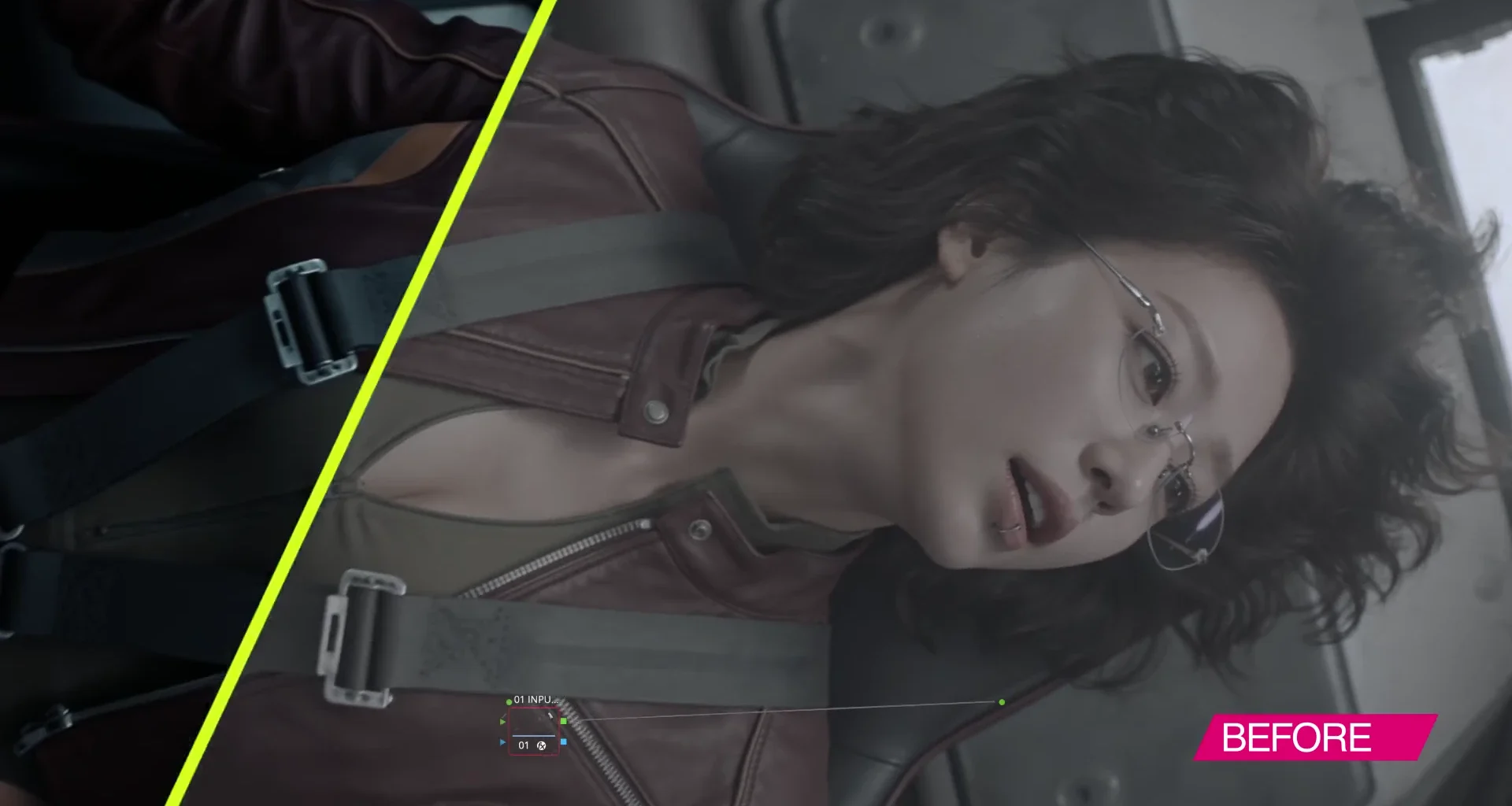
/color-grading, DaVinci Resolve Studio. The promise on the page: “Grade footage in DaVinci Resolve Studio with balanced shots, natural skin tones, and an editable node structure.” The prompt asks the agent to balance exposure and white balance first, then contrast and saturation, match shots across the sequence, keep skin tones, build “a clearly organized node structure” and leave “the original grade in a separate version” for review before export. The requirement is explicit and it is Studio, not the free build: “Use Codex on the same computer as DaVinci Resolve Studio.” Whether the free Resolve also works is not stated anywhere; the separate Higgsfield plugin panel asks only for Resolve 19 or newer. If you are on free and weighing the upgrade for this, our Studio vs free comparison is the longer answer, and Resolve Studio is a one-time purchase. An editable node tree is the right output to ask for, and the first thing to open when the run finishes, because a grade you cannot read node by node is one you cannot fix later.

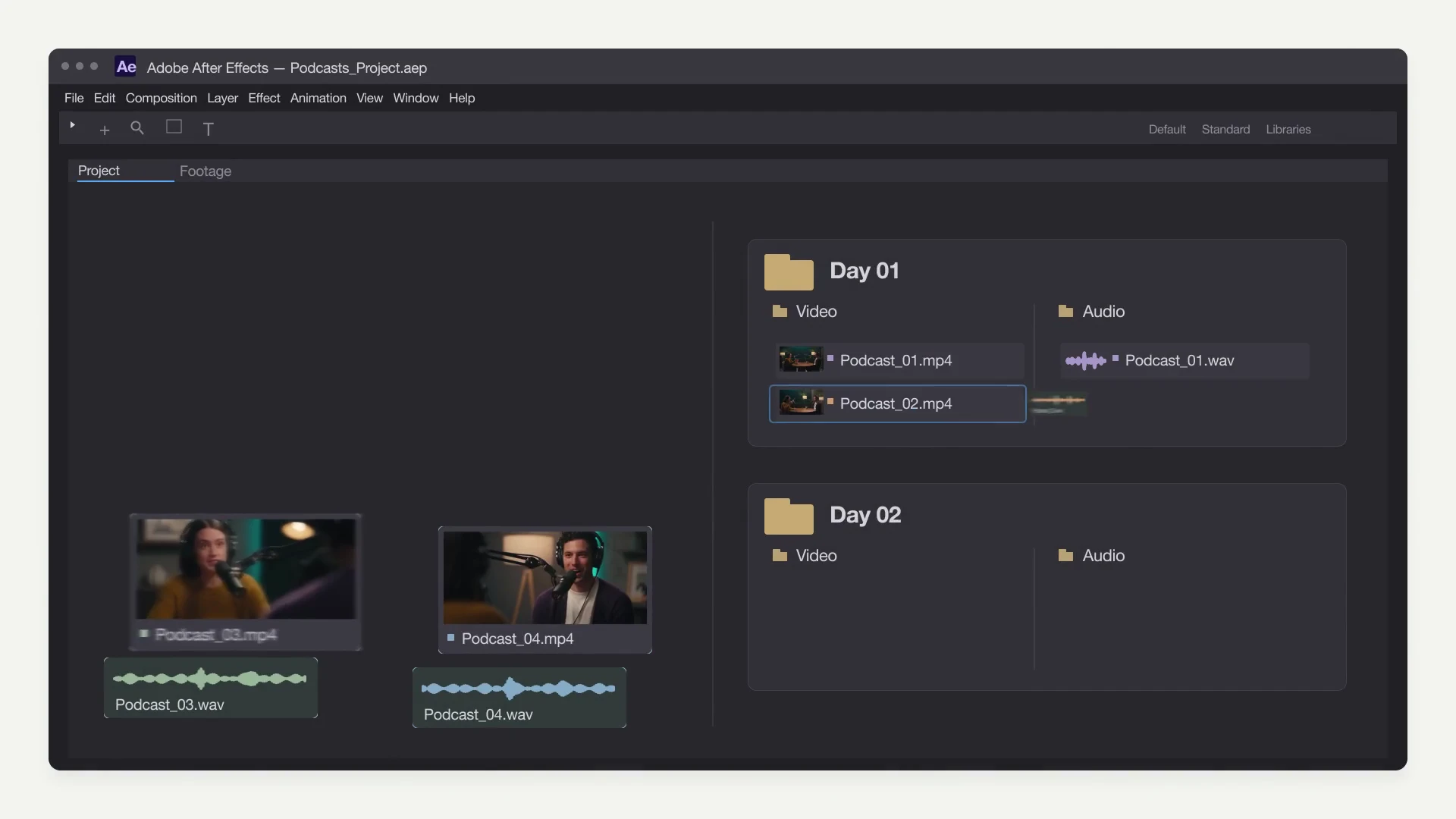
/Project-sorter, Premiere Pro. The least glamorous skill and the one with the clearest payoff. The prompt: organize the supplied media “into bins by shooting day and media type, synchronize video with external audio where reliable sync information is available, and create clearly named sequences,” preserve originals and existing edits, and “flag clips that need manual review.” That is an assistant editor’s first morning on a job. The same-machine rule applies, the page invokes a /use-premiere integration, and the help center’s version requirement for the Premiere and After Effects integrations is 2024 (24.0) or newer.
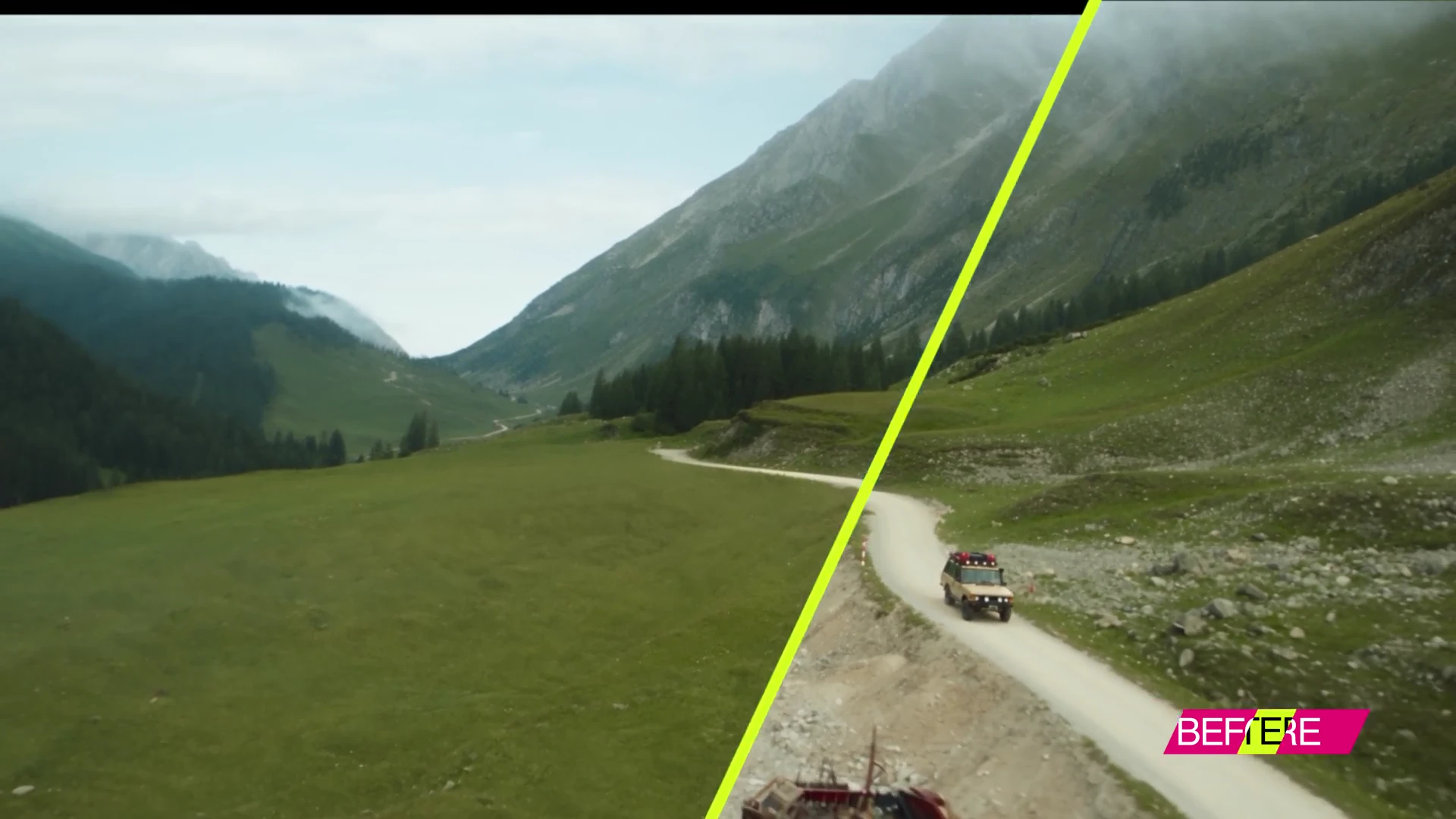
/Shot-Cleanup and /Shot-Composer, After Effects. Cleanup asks the agent to inspect the motion of the elements you name, “create tracked masks or cleanup layers as needed,” keep texture, lighting and camera movement, review “for visible patches or flicker,” and “save an editable AE project.” Composer combines footage and generated layers into a VFX shot with matched lighting, depth and grain, again as an editable project. Both run on Codex inside your After Effects. The generated plates come from Higgsfield and cost credits; the tracking and masking happen in AE.
Blender, and the rest. Four Blender skills: /Scene-Builder (an editable scene from characters, architecture and props, saved as a .blend), /Destruction-Studio (fractured structures, debris, dust), /Exploded-view (parts assembling under staged cameras) and /Cartoon-shaders (toon materials and outlines). Then /Vectorize for Illustrator, /Image-fixer for Photoshop and /use-touchdesigner. The help center puts the Blender integration at 5.1 or later on Windows or macOS.
The agent’s name differs between pages. Every skill page says Codex: “Open Codex,” “Use Codex on the same computer as DaVinci Resolve Studio.” The September 23 changelog entry for the same bundle calls them “workflows for Claude MCP that run inside Blender, Adobe apps, TouchDesigner.” We take the pages as current and the changelog as the launch wording; if you plan to run these from Claude rather than Codex, confirm it on the skill page the day you set up. No skill page publishes a credit figure for a run, so the per-clip arithmetic above is the only budget you have.
Katana: the edit-transfer skill
Katana, dated October 8, 2026, is a skill rather than a desktop integration: “Recreate aura edits with your own subject.” You give it a reference edit of 3 to 30 seconds and up to five images of your subject, pick a preset (Aura Farming, Motion or Clipping), and it regenerates the cut with your material, matching the reference’s pacing, camera moves, transitions, grade and graphics, keeping the reference soundtrack unless you say otherwise. It starts with /katana in a connected assistant and, per the page, “After Effects and Blender are not required.” It is a social-video tool, and it spends Higgsfield credits like everything else through MCP. The longer read on what Katana and the rest of the toolset are for is in our Higgsfield review.
MCP, CLI, API or the plugin: which one for which job
| Surface | Runs from | Pays with | Unlimited applies | Best for |
|---|---|---|---|---|
| Website (higgsfield.ai) | Your browser | Plan credits, or Unlimited where the plan includes it | Yes | Anything you want for free on an Unlimited model; Cinema Studio and the studios |
| MCP | Claude, ChatGPT (plugin), Cursor, any MCP client | Plan credits, standard rates | No | Generating, upscaling, reframing and dubbing inside a chat; the ads, UGC and faceless skills; Katana |
| CLI + Skills | Claude Code, Codex, Cursor, OpenClaw, Hermes | Plan credits, standard rates | No | Coding agents; the Production Skills Bundle for Resolve Studio, Premiere, After Effects, Blender |
| API | Your own software | Separate dollar balance, $5 minimum, per request | No | Building generation into a product |
| NLE plugins | Resolve 19+, Premiere and After Effects 2024+, Photoshop 2024+, Blender 5.1+ | Plan credits, standard rates | No | B-roll, reframes, upscales and LUTs that land straight in the media pool, no agent involved |
For an editor who wants generated plates in a timeline, the plugin is the shorter path: it imports to the Media Pool or the project panel, it runs in the app you are already in, and it costs the same credits. MCP is the right surface when the job is upstream of the edit, a storyboard of frames, a batch of hooks, a voiceover and its dubs, done from a chat with an agent that remembers the brief. The Production skills are a third thing: an agent operating your NLE through its scripting API, which is the same idea as Resolve 21.1’s own AI Assistants menu, covered in our guide to AI inside DaVinci Resolve, with Higgsfield’s generators bolted on.
Two warnings before you connect
First, the unofficial servers. The top results for this query include community MCP servers on GitHub and directory sites, and at least one is sold as “unlimited mode, bypassing the credit system used by the official” server. Higgsfield’s Unlimited article says Unlimited “is designed for personal, human use only” and that “automation tools, scripting, credential sharing, and reselling access are strictly prohibited,” with unusual activity liable to slow generations or pause the account for review (terms as read October 26, 2026). A wrapper that routes your login through an automation to dodge credits is the thing that clause describes. Use the official URL.
Second, the output file. Nothing on the MCP pages states the container, codec or bit depth of a generated clip, and the consumer generators ship 8-bit H.264 MP4 unless a page says otherwise. Download from Assets and inspect the file before you promise a client a grade on it; the workflow for that is in the review.
FAQ
Is Higgsfield MCP free?
The connector costs nothing, but it requires an active paid plan and every generation through it deducts credits at standard rates. The free account cannot connect, and the “free Unlimited MCP” trial ran from late July to July 31, 2026 for new users only.
Does Unlimited work through MCP?
No. The help center: “Unlimited access and free generations apply only on higgsfield.ai.” That covers MCP, the ChatGPT plugin, the CLI, Canvas and Supercomputer. The help center’s own FAQ calls faster credit burn through MCP “expected,” not a bug.
Do I need an API key?
No. MCP and the CLI authorize over OAuth against your subscription. API keys belong to the separate Higgsfield API, which bills from its own dollar balance.
How many credits does a video cost through MCP?
The same as on the web, which depends on model, length and resolution. The 5-second 1080p default read on the Generate button was 60 credits (October 12, 2026); the Plus card’s “80 Seedance 2.5 videos” from 1,200 credits implies 15 at a cheaper setting. Budget 60 for 1080p work.
Does the Resolve color-grading skill work with the free version of DaVinci Resolve?
The skill page names DaVinci Resolve Studio and says nothing about the free build. The plugin panel is a different product and asks for Resolve 19 or newer from Blackmagic’s site, not the Mac App Store version.
Can ChatGPT generate audio through the Higgsfield plugin?
No. Audio (voiceover, cloning, dubbing) and the Website Building skill are not available in ChatGPT. Use Claude, Cursor or a CLI-based agent for those.
Where do the generations go?
Into your Assets on higgsfield.ai, tagged with the MCP source, usually within 60 seconds of the job completing. If credits were deducted and nothing appears, Manage Account → Usage shows the operation, and support wants the generation ID and time.
In conclusion
Higgsfield MCP is a credit-metered remote control for a generator you already pay for, and it suits the jobs that live in a chat: boards, hooks, dubs, reference-driven remixes. The editing-app skills are the reason a post person should keep an eye on it, and they come with two conditions that the marketing skips: Codex on the same machine as the application, and Resolve Studio rather than free for the grade. The budget line is 60 credits per 1080p clip and no hard cap, so write the cap into the first message of every session. If you are signing up to try it, Higgsfield gives everyone who arrives through our link up to 50% off for three hours from the first login, and Plus at $47 a month billed annually is the first tier that includes every model.


