Some links below are affiliate links; buying through them supports the site at no cost to you.
Adobe finally built Premiere a real color room. At NAB in April 2026, Premiere got a full Color Mode: a dedicated grading workspace, a clip grid, new scopes, a new correction toolset, the works. It’s the biggest thing to happen to color in Premiere since Lumetri shipped, and the reactions split hard: ProVideo Coalition’s Scott Simmons calls it “one of the biggest feature additions in the history of the application,” and a 15-year editor on Adobe’s own bug tracker calls it, quote, “a catastrophy” (spelling his). Both takes are worth understanding, because this thing will eventually land on every Premiere editor’s machine whether you asked for it or not.
What it is, what breaks, and whether you should care yet. Short version on that last one: not with client work while it’s in beta. Adobe says so themselves.
What shipped (and what didn’t)
Status first, because it matters more than any feature: as of July 2026, when this was written, Color Mode was beta-only. It lived in the Premiere (Beta) app, announced April 15 at NAB, free for all subscribers, with general availability promised “later in 2026.” The shipping Premiere 26 release did not have it then. Adobe’s beta announcement is unusually blunt about the implications: they “don’t recommend doing client work just yet,” and Color Mode projects should be treated as, their words, potentially disposable, because the project format may change during the beta. It gets better: open a beta project with Color Mode grades in regular Premiere and your color shows up as offline-filter warnings. That’s a one-way door. Play with it on personal work, and bill nobody for anything inside it.
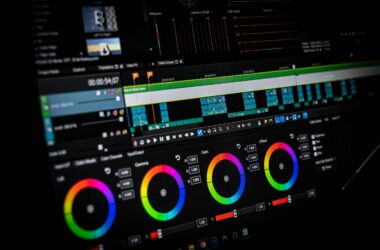
What you get when you do play: a proper grading environment instead of a panel bolted onto the Edit page. A Color Monitor with a Solo mode that suspends compositing while you grade the shot underneath. A Clip Grid showing every clip in the sequence as thumbnails you can filter and sort, which is how actual color sessions move through a timeline. Grades organized as “Operations” at three levels: clip, group, and sequence-wide styles. Contextual scopes that appear next to whatever control you’re touching. And the whole pipeline runs in 32-bit precision on top of Premiere’s color management, which under the hood uses an ACEScct-based wide-gamut working space. (Careful with that phrasing: it rides ACEScct plumbing. It is not a full user-facing ACES pipeline like Resolve offers.)
The controversial part: no wheels, no nodes
Adobe made two big bets. No nodes, which most editors will thank them for. And no lift/gamma/gain wheels, which is the real muscle-memory earthquake. Tonal control in Color Mode is zone-based: global adjustments plus definable shadow and highlight zones, replacing LGG’s three broadly overlapping ranges. Adobe’s rationale (delivered via an explainer citing colorist author Alexis Van Hurkman) is that lift/gamma/gain is an SD-era model that was never designed for HDR. They’re not wrong about the history. But twenty-plus years of colorist hands know where those wheels are, and even Adobe’s sponsored coverage concedes the zone system takes real relearning before you “get the exact look you were aiming for.”
The friction shows up the first time you grade with a mouse. The circular controls are small, adjustments overshoot, and one wrong move can wipe the value you just dialed in (Adobe’s answer: sliders exist in the Properties panel). The other flashpoint: Color Mode hides your sequence timeline while you grade. Editors filed that as a bug. Adobe replied that it’s intentional… “you are focused on grading, not editing.” Which is a very colorist-brained answer to give the world’s largest population of editor-colorists, and the perfect one-sentence summary of this whole release: Adobe built a colorist room for people who have never had one.
Migration gotchas, collected
Lumetri isn’t dead. The Lumetri Color effect survives in the Effects panel and existing graded projects import with full fidelity; it’s the Lumetri panel that’s gone from the new workspace. But Adobe explicitly warns against mixing systems: applying Lumetri effects “often restricts your grading options in Color Mode.” So a real migration is a clean break. The beta’s known holes as of July 2026, straight from the announcement thread: After Effects interop is broken enough that Adobe says avoid it entirely for now, 8K sequences have known performance problems, there’s no LUT import or creation inside Color Mode yet, and HSL keying for masked operations is still pending. Also worth knowing: Adobe has published no Color-Mode-specific hardware requirements at all. NVIDIA’s NAB post says “RTX-accelerated” and offers zero numbers. If your machine handles current Premiere with color management on, that’s the best available signal, and it’s an unofficial one.
So… does this kill the Resolve roundtrip?
This is the strategic question, because the Premiere-to-Resolve roundtrip is a tax every serious Premiere editor has paid: reel-name metadata that silently breaks the conform, subclips that relink from the wrong in-points, transitions that produce broken XML, the ritual stripping of effects and padding of handles before every export. If Color Mode’s grading tools are good enough for your finishing, that entire tax disappears. For a solo editor delivering SDR web work, that’s a big deal, and it’s who this release is for.
For everyone else, Resolve isn’t sweating yet. The comparison as of July 2026: Resolve Studio is $295, one time, and brings node-based grading, HDR scopes that measure in nits, Dolby Vision and HDR10+ mastering, and native support for real grading panels. Color Mode has none of those, and third-party surface support (Tangent, etc.) is officially “to be determined.” Blackmagic also shipped Resolve 21 stable in June 2026 (we covered what’s in it for working editors), and the free version got those updates too. If you hand off to a colorist, nothing about your life changes: your colorist is in Resolve, with hardware, and Color Mode can’t talk to their panels. If you grade your own docs and shorts seriously, Resolve Studio remains the deeper, cheaper-over-time tool. The pool of people for whom Color Mode changes the answer is real but specific: Premiere-native editors doing their own color who never wanted to leave, and after GA, never have to.
Who should care
Solo Premiere editors delivering web and broadcast SDR, who currently either suffer Lumetri or suffer the roundtrip, should care a lot. This was built for you, and at GA, with the beta’s rough edges filed down, it likely becomes your finishing environment. Learn the zone system on a passion project now. Editors who hand off for color should care a little: your workflow is untouched, and the interesting question is whether cheaper jobs stop being handed off at all. Same for Resolve-curious Premiere folks, for whom this might ironically be the on-ramp that teaches them grading concepts before they defect anyway. Anyone billing clients on it while it’s in beta, HDR deliverable folks (no mastering-grade output tools here), and anyone whose muscle memory is their hourly rate can wait. Adobe said the beta would stay free through the fall, and the one-way project door won’t get a “wait, undo” lever added retroactively.
Color Mode is the most serious Adobe has ever been about color, and the beta warnings deserve the same seriousness. Kick the tires on footage you love and money doesn’t touch. And if you’re now wondering whether your GPU is ready for a 32-bit color pipeline, or what monitor that grade deserves, the GPU guide and the grading monitor guide have you covered. Questions or beta war stories? Comments are open.