


Every photographer I know who lost a catalogue lost it the same way. One drive, no second copy, and a clicking noise one morning. The fix is cheaper than people expect: one fast drive for the work you are doing this month and two slow drives for the copies. That whole setup costs less than the 4 TB SSD most guides open with.
I have run every drive below. The Samsungs and the OWC have lived in my bag for years, the SanDisk USB4 is the newest thing in it, and the WD and Seagate spinners hold the old jobs. The guide runs by job, from the working SSD to the NAS you move to when the archive stops fitting on drives. The Samsung decision on its own is in T7 vs T7 Shield vs T9, and the copy-and-verify routine is in the travel offload and backup workflow.
Some links below are affiliate links. Buy through them and it helps keep the site running, at no extra cost to you. Memory pricing has moved monthly all year, so the prices below will drift.
TLDR
Buy the Samsung T9 2TB ($434.99) as the working drive. It is $82 cheaper than the T7 Shield 2TB right now and it is the faster drive. If you shoot in rain and dust, get the SanDisk Extreme PRO Portable SSD V3 ($549.99) instead. Same if your Mac has USB4 and you want the speed the port can give you. It is rated 4,000 MB/s, IP65 and a 3 m drop. For the copies, buy two spinning drives. A WD My Passport 5TB ($259.91) leaves the building. A Seagate Expansion Desktop 8TB ($279.99) stays on the desk. That is three copies of a 2 TB catalogue for $975. When the archive passes what a desk drive holds, a Synology DS225+ ($364.99, diskless) replaces the desk drive.
The picks
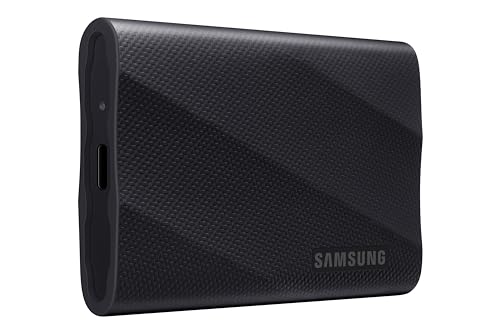
Working drive: Samsung T9 2TB
A working drive holds the catalogue, the previews and the current jobs, and the number that matters is sustained write rather than the one on the box. The T9 is rated 2,000 MB/s over USB 3.2 Gen 2×2. That is a 20Gbps port that no Mac has ever shipped. So on a MacBook it runs at about 950 MB/s and holds roughly 900 through a full card dump. That is plenty for a Lightroom or Capture One catalogue, and it is the floor the plain T7 cannot hold. The whole port story and the sustained-write numbers are in the Samsung comparison; I will not re-argue it here.
What changed since I wrote that comparison is the price order. The T9 2TB is $434.99 against a $489.99 list, and the T7 Shield 2TB is $517.47. The slower drive costs more. The drive has a rubber shell and a drop rating but no IP rating, so it rides in the bag and sits on the desk; it does not go to the beach.
Rugged and fastest: SanDisk Extreme PRO Portable SSD V3 USB4 2TB
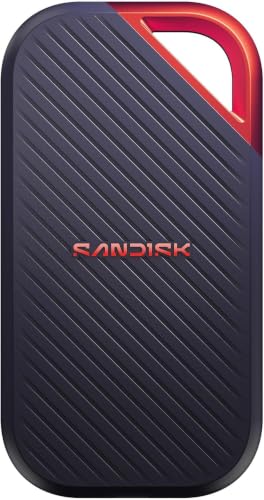
USB4 is the spec that decides this pick. Where the T9’s 20Gbps port exists on almost nothing, USB4 runs at full speed on every Apple Silicon Mac, so this is the first rugged portable that gives a Mac the number printed on the box. SanDisk rates the Extreme PRO V3 (model SDSSDE83) at 4,000 MB/s read. Writes are rated 3,800 MB/s in a burst and 3,100 MB/s sustained. It also has IP65 water and dust resistance, a 3 m drop rating and a five-year warranty. At those numbers the drive stops being the slow part of a card offload; the card and the reader are, and the readers that keep up are in the SD card reader guide.
Price is the downside, and it is a moving one. The 2TB is $549.99 on Amazon. SanDisk’s own store lists the same $549.99 as an offer against a $687.99 “actual price,” and Best Buy carries it first-party too. That is $115 over the T9 for speed you only get from a USB4 or Thunderbolt port. On a plain USB 3.2 Gen 2 port it is capped at 10Gbps like the Samsungs. The T7 Shield used to be my rugged answer and it is still a fine drive, but at $517.47 it costs more than the T9 and $32 less than this, and it is the slowest of the three. The Shield 4TB is $1,100 and only makes sense if you need sealing and capacity in one brick.
4 TB working drive: Samsung T9 4TB
If the catalogue and the current year of RAWs live on the same drive, 2 TB runs out. The T9 4TB is the same drive with twice the flash, at $936.98 against a $1,144.99 list. That list price is the memory shortage in one number. I keep a 4 TB in the kit for multi-week jobs where I do not want to triage what stays on the drive.
Neither alternative is cheaper. The T7 Shield 4TB is $1,100 with IP65 and the slower Gen 2 interface. The OWC Envoy Ultra 2TB is $799.99 and is a Thunderbolt 5 drive. It is only here for people whose Mac has Thunderbolt 5 and who want the fastest thing that plugs into it. You get half the capacity for most of the price. For everyone else, a 2 TB working drive plus the archive pair below is the layout I would build today.
Archive copy: WD My Passport 5TB
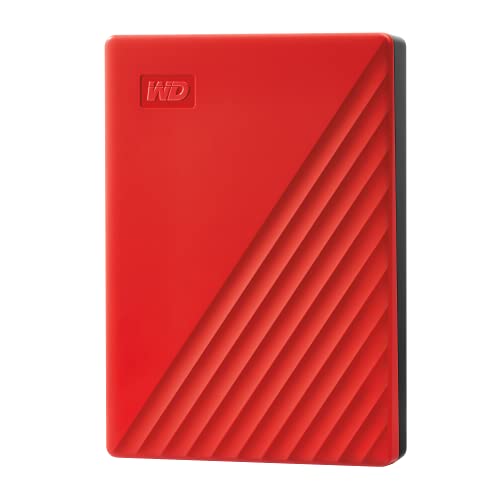
Now the slow drives, which is where the actual safety lives. An archive copy sits somewhere other than your desk with a second copy of everything. It does not need to be fast; it needs to be cheap per terabyte and small enough to leave the building. The WD My Passport 5TB is $259.91 against a $284.99 list. It is bus-powered over a single USB cable, and it holds the 2 TB catalogue plus two more years of growth. Copy to it, verify the copy, take it to the studio or a friend’s house, bring it back monthly to update. That is the off-site copy in 3-2-1, and it costs less than any of the SSDs above.
Do not try to edit off it. A 2.5-inch spinner is a fraction of SSD speed and browsing a catalogue from one is miserable. If you want USB-C and a metal shell, the My Passport Ultra 6TB is $339.99 and does the same job with one more terabyte; I would put the $80 toward the desk drive instead.
Desk archive: Seagate Expansion Desktop 8TB
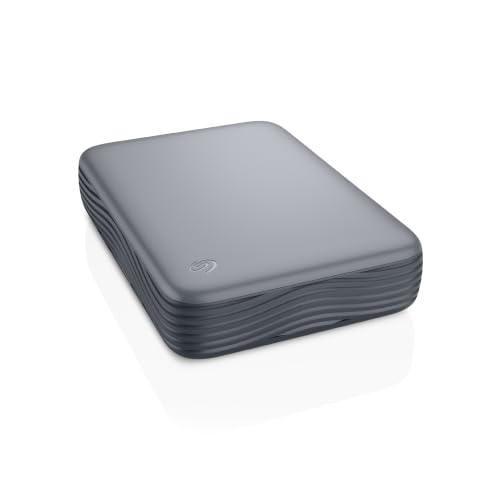
The second copy stays on the desk, plugged in, and takes the nightly or weekly sync from the working drive. Capacity per dollar is the whole argument here and a 3.5-inch desktop drive wins it. The Seagate Expansion Desktop 8TB is $279.99, mains-powered with a Micro-B to USB-C cable in the box, with a one-year warranty plus a year of Seagate’s Rescue recovery service. Eight terabytes holds every job you have ever shot, with room for years more.
When 8 TB is not enough, the WD Elements 12TB is $549.99, the same kind of drive with half again the room. The 12 TB Elements is the biggest single desk drive I will put my name to.
When the catalogue outgrows drives: Synology DS225+
Somewhere around 8 TB the desk drive stops being a tidy answer. You are swapping drives, the catalogue is split across two of them, and the sync script has opinions. A two-bay NAS puts two drives in one box with one volume. The Synology DS225+ is $364.99 diskless, and the reason it is back on my list is a policy change. “With the introduction of DSM 7.3, 2025 DiskStation Plus series models offer more flexibility for installing third-party HDDs and 2.5″ SATA SSDs when creating storage pools,” says Synology’s drive compatibility page. The DS225+ is on that model list. That is Synology’s way of saying third-party drives are back on the table for this box.
A NAS is not fast enough to edit a catalogue over the network the way a local SSD is, so the working drive stays. It is also still one box in one building, so it takes over the desk drive’s job in 3-2-1 and the off-site copy stays separate. If you would rather spend on the hardware than the software, look at UGREEN. The UGREEN DXP2800 is $439.99 from UGREEN’s storefront, and the newer DXP2800 GT is $509.99. The four-bay DXP4800 Plus is $632.98 against a $729.99 list. The full NAS argument, including what the drives inside should be, is in building a video editing server on a budget.

How the picks compare
| Drive | Type | Job | Rated speed | Price |
|---|---|---|---|---|
| Samsung T9 2TB | SSD, USB 3.2 Gen 2×2 | Working drive | 2,000 MB/s (about 950 on a Mac) | $434.99 |
| SanDisk Extreme PRO V3 2TB | SSD, USB4, IP65 | Rugged working drive | 4,000 read / 3,100 sustained write | $549.99 |
| Samsung T9 4TB | SSD, USB 3.2 Gen 2×2 | 4 TB working drive | 2,000 MB/s | $936.98 |
| Samsung T7 Shield 2TB | SSD, USB 3.2 Gen 2, IP65 | Rugged, previous pick | 1,050 MB/s | $517.47 |
| OWC Envoy Ultra 2TB | SSD, Thunderbolt 5 | TB5 Macs only | Thunderbolt 5 | $799.99 |
| WD My Passport 5TB | 2.5-inch HDD, bus-powered | Off-site archive copy | Spinning | $259.91 |
| Seagate Expansion Desktop 8TB | 3.5-inch HDD, mains-powered | Desk archive | Spinning | $279.99 |
| WD Elements 12TB | 3.5-inch HDD, mains-powered | Bigger desk archive | Spinning | $549.99 |
| Synology DS225+ | 2-bay NAS, diskless | Archive past 8 TB | Network | $364.99 |
All Amazon.com first-party listings except the T9 2TB (marketplace, fulfilled by Amazon, near list) and the OWC and UGREEN units (brand storefronts).
The 3-2-1 setup for $975
Three copies of everything, on two kinds of media, one of them somewhere else. That is the whole rule, and because it is not a product it rarely gets a section of its own. For a 2 TB catalogue, with the drives above:
- Copy one, the working drive: Samsung T9 2TB, $434.99. Lives in the bag, plugs into the laptop, holds the catalogue and the current jobs.
- Copy two, the desk archive: Seagate Expansion Desktop 8TB, $279.99. Stays plugged into the desk and takes a sync from the T9 every time you get home. Different medium from copy one, which is the “2” in 3-2-1.
- Copy three, off-site: WD My Passport 5TB, $259.91. Synced monthly, then it leaves for a studio locker or a drawer at a friend’s place, anywhere the same fire or burglary cannot reach.
Total: $975 for three copies of a 2 TB catalogue, two of them on spinning disk. That is less than one T9 4TB at list, and it survives a dead drive and a stolen bag, which one big SSD does not.
If carrying a drive to another building is never going to happen, make the third copy a cloud one. Backblaze Computer Backup is the one I point people at who want the off-site copy to happen on its own; no link there, I have no arrangement with them. And once the archive passes what the 8 TB holds, the DS225+ with two drives in it takes the desk copy’s job; the Passport or the cloud still does the off-site part. The copying itself, with checksums so you know the copy is a copy, is the offload and backup workflow.
Why the SSDs cost what they cost right now
Memory and flash have roughly doubled since January 2025, and the portable SSD market is where a photographer feels it first. The T9 4TB lists at $1,144.99. SanDisk prints a $687.99 “actual price” above the $549.99 offer on its new USB4 drive. The T7 Shield 2TB, which I once called the value rugged pick, is $517.47 and sits above the faster T9.
With 2 TB of SSD at $435 and 4 TB at $937, buy the working-drive capacity you need this year. Put the archive on spinning disk, where the per-terabyte price is in a different universe. There, $259.91 buys 5 TB and $279.99 buys 8 TB, against $434.99 for 2 TB of flash. If the listing you land on is far from the number in the table, something has moved again and the comparison post will say which way.
FAQ
Do I need an SSD for a Lightroom catalogue?
For the catalogue and previews you are working in, yes. The catalogue is thousands of small reads and writes, and a spinning drive turns every scroll into a wait. A T9 2TB at $434.99 is the drive for that job; finished jobs move to the spinning archive.
Is the Samsung T7 Shield still worth buying?
It is still a good drive and nothing about it got worse. What changed is the price around it. At $517.47 the Shield 2TB costs more than the faster T9. It is only $32 less than the SanDisk USB4, which is also IP65 and several times faster on a USB4 Mac. If you already own one, keep using it. If you are buying today, the T9 or the SanDisk.
SSD or hard drive for a long-term photo archive?
Hard drive, two of them. The archive gets written once and read rarely, so speed is irrelevant and the price per terabyte decides it. You get 5 TB for $259.91 or 8 TB for $279.99, against $434.99 for 2 TB of SSD. Both kinds of drive fail; the second copy in a second place is what protects you.
Do I need a NAS as a photographer?
Not until the archive stops fitting on one desk drive, which for most photographers is somewhere past 8 TB. Until then two bare drives are cheaper and simpler. When you get there, the DS225+ at $364.99 plus two drives is the tidy version, and it now takes third-party drives under DSM 7.3. It still needs an off-site copy; a NAS is one box in one building.
The drive is the cheap part
Spend $435 on the working drive and $540 on the two copies, and the catalogue outlives any one piece of hardware. Here is the rest of the shelf around it. T7 vs T7 Shield vs T9 is the full Samsung breakdown. The portable SSDs for editing roundup covers the wider field. The SD card reader guide is for the thing between the card and the drive. The travel offload and backup workflow is the copy routine. And building a video editing server on a budget is for the day the NAS becomes the plan. These prices will be wrong within the month; trust the listing over my table.


