Here’s an uncomfortable question: how do you know your monitor is telling you the truth? You graded that interview until the skin tones sang. The client watched it on their laptop and asked why everyone looks sunburned. Somebody in that conversation has a lying monitor, and the scary part is you can’t tell whose it is by looking.
This guide is the deep dive on the single most important purchase in a color setup: the display you make decisions on. It’s the companion piece to the color suite kit, which covers the whole room. Here we’re just picking the screen, from a $229 board that tells the truth about Rec.709 to the point where “monitor” becomes “reference monitor” and the price tag grows a comma. And in classic Post Flow fashion, I’m going to spend a decent chunk of this article talking you out of the expensive ones.
Last updated: July 2026. Some links below are affiliate links. Buy through them and it helps keep the site running, at no extra cost to you. I only point at gear I’d be comfortable handing to a friend.
TLDR
If you just want the answer: the ASUS ProArt PA32UCDM is the grading monitor for people who grade. QD-OLED blacks, 99% DCI-P3, factory Delta E under 1, and it takes a calibration probe directly into its own hardware. If $1,700 made you flinch, the BenQ PD2706U at $400 is the best trustworthy-image-per-dollar on the market and the monitor I’d point most editors at. Everything else in this guide is for a specific situation, including the one where a client contract forces the $4,400 question.
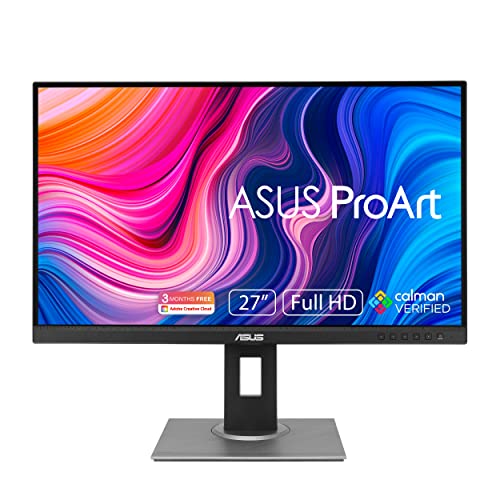
Best budget: ASUS ProArt PA278QV
Still here, still $229, still the cheapest display with an actual calibration pedigree: 100% sRGB and Rec.709 coverage, factory-calibrated to Delta E under 2, Calman Verified, with the report card in the box. If your work is web delivery (and most of it is), Rec.709 is the whole job, and this covers Rec.709 completely. Pair it with a $199 probe and you have a color setup that tells fewer lies than plenty of setups costing five times as much. For a beginner, this plus the calibrator IS the correct first move. Not a bigger monitor. Accuracy first, inches later.
The trade-offs: it’s 1440p, not 4K, so you’re judging UHD deliverables zoomed or scaled. There is zero wide-gamut ability, meaning P3 work is off the table entirely, not “sort of covered.” And the ports (DVI-D! Mini DisplayPort!) will remind you this design shipped in 2020. ASUS also released a Gen2 (the PA278QGV, about $270) that adds 95% P3 and 120Hz while the original stays on sale. If you can find the Gen2 for less than $50 over this one, take it. Otherwise the original remains the budget answer.
Best value: BenQ PD2706U
Same pick as the color suite kit, and it earned the repeat. Four hundred dollars gets you a factory-calibrated 27-inch 4K IPS panel with 99% Rec.709, uniformity compensation so the corners match the center, a hardware KVM, 90 watts of USB-C charging, and BenQ’s M-Book mode for matching what your MacBook-carrying client sees. There’s a reason this thing shows up on so many edit desks. For Rec.709 delivery work, which is the actual daily reality of most editors reading this, the image is trustworthy and the price is rational. That combination is rarer than it should be.
Now the fine print. P3 coverage is 95%, so it’s a Rec.709 tool that can preview P3, not judge it. The DisplayHDR 400 badge on the box is marketing… no local dimming means no real HDR, and we’ll get into that below. Factory calibration is Delta E under 3, looser than the pro tier, so the probe is not optional here. And corrections live in software profiles on your computer, because BenQ saves true hardware calibration for its photo-oriented SW line. If your work lives in P3, the ASUS PA279CRV at around $429 covers 99% of it for barely more money. For everyone else, this is the value king.

Best for most colorists: ASUS ProArt PA32UCDM
This is the one. A 31.5-inch 4K QD-OLED with true blacks, 99% DCI-P3, factory Delta E under 1, Dolby Vision, dual Thunderbolt 4, and (the part that matters most for long-term trust) real hardware calibration: a probe writes corrections into the monitor’s own electronics, not into a software profile your OS may or may not respect. List is $1,899 and it dips to $1,699. RedShark called it the new QD-OLED gold standard. They’re right. This is a reference-adjacent image for about a fifth of reference money, and it’s what I’d put in front of a working colorist who doesn’t have a facility behind them.
“So it’s flawless?” Mmm… not quite. OLED physics still apply. Push a full white frame and brightness clamps to roughly 250 nits, with the auto-limiter dimming things even at everyday grading levels. Tom’s Hardware measured it; the 1,000-nit number only lives in small highlight windows. So no, this is not an HDR mastering monitor, whatever the spec sheet whispers. The glossy panel wants a dim, controlled room and a D65 bias light. And Resolve’s very static UI on an OLED is a burn-in bet you shouldn’t take… run it as a clean-feed display off an I/O box and do your clicking on a boring second monitor. Which is how a grading display should live anyway.

Best for Mac studios: Apple Studio Display XDR (2026)
The news you might have missed in March: Apple killed the $4,999 Pro Display XDR and replaced it with a new Studio Display XDR at $3,299. And this one changes an argument we’ve all been having for years. It’s a 27-inch 5K mini-LED with over 2,000 local dimming zones, 120Hz, and, here’s the headline, it sustains 1,000 nits across the full screen. Not in a highlight window. Full screen, sustained. Every OLED above and below this price clamps hard on full-frame brightness; this doesn’t. Which makes it the cheapest display in existence that can preview HDR the way HDR is mastered. Amazon has already had it under $2,900, and for a Mac Studio owner who colors their own work and wants one gorgeous cable-connected screen for everything, this is that.
Why it isn’t higher on the list: control. There’s no probe-to-hardware calibration path. You get Apple’s factory reference modes (which are good) plus fine-tune sliders, and you trust them, because that’s the deal Apple offers. It’s Thunderbolt-only, so it cannot hang off a DeckLink or UltraStudio clean feed like a proper grading display… it lives inside macOS color management by design. Mini-LED blooms a little where OLED simply doesn’t. And $3,299 becomes $5,198 if the nano-texture glass and the height-adjustable stand both call your name. So preview HDR on it all day… just know that mastering HDR on it is a choice you’re making, not a guarantee you bought.

The reference answer: Flanders Scientific DM242
Time to eat some crow. Years ago I wrote on this very site that I couldn’t recommend Flanders Scientific after QC problems at a studio I worked with around 2018. That was my real experience and I stand by having said it. It’s also 2026 now, the DM line has spent the better part of a decade earning its reputation back, and FSI is once again the entry point to an actual reference monitor. So: updated stance. The DM242 is a 24-inch, true 10-bit, SDI-fed display with volumetric auto-calibration and proper Rec.709, P3, and Rec.2020-emulation modes, and it’s what “reference monitor” means at $4,395. (FSI is also being acquired by Atomos as of April 2026, with the brand continuing. Worth knowing on a five-figure-adjacent purchase.)
Now look at what $4,395 buys: a 1080p panel. 400 nits. Twenty-four inches. More than double the PA32UCDM for fewer pixels and no HDR. That’s not a scam, it’s the entire point… you’re paying for a display whose behavior is guaranteed, measured, and boring, fed clean off a DeckLink or UltraStudio the way broadcast monitoring is supposed to work. If a client contract or a broadcast QC spec says “reference monitor,” this is where that sentence starts, and it’s a direct order from FSI, not an Amazon purchase. If the job needs true HDR mastering, that’s FSI’s $10,995 XMP270, and the job’s budget should rent one. Most readers should buy the ASUS and a probe and keep the change. That’s not me being cheap. That’s me reading your deliverables list.

How the five compare
| Monitor | Panel | Gamut (measured claims) | Real HDR ability | Calibration | Street price |
|---|---|---|---|---|---|
| ASUS ProArt PA278QV | 27″ 1440p IPS | 100% sRGB/Rec.709, no wide gamut | None | Factory ΔE<2 + software profile | ~$229 |
| BenQ PD2706U | 27″ 4K IPS | 99% Rec.709, 95% P3 | None (ignore the HDR400 badge) | Factory ΔE≤3 + software profile | ~$400 |
| ASUS ProArt PA32UCDM | 31.5″ 4K QD-OLED | 99% DCI-P3 | Highlights only (~250 nits full-screen) | Factory ΔE<1 + true hardware cal | ~$1,699 to $1,899 |
| Apple Studio Display XDR (2026) | 27″ 5K mini-LED, 2,000+ zones | P3, Apple reference modes | Yes: 1,000 nits sustained full-screen | Factory modes, no probe path | $3,299 |
| Flanders Scientific DM242 | 24″ 1080p, true 10-bit | Rec.709 / P3 / Rec.2020 emulation | No (SDR reference) | Volumetric auto-cal, SDI clean feed | $4,395 (FSI direct) |
What matters in a grading monitor
Accuracy beats size, resolution, and refresh rate. Every time. A grading display has one job: show you what’s in the signal. That’s coverage of your delivery gamut (Rec.709 for most of us, P3 if you’re delivering for Apple platforms or cinema), a factory calibration report with a Delta E number on it, and a way to keep it honest over time. A 32-inch 4K panel that lies is worse than a 27-inch 1440p panel that doesn’t. Buy truth first.
The HDR badge on the box is probably fiction. Here’s the two-gear truth: VESA’s DisplayHDR 400 tier requires no local dimming and no wide gamut, which means a DisplayHDR 400 monitor is an SDR monitor with a marketing sticker. TFTCentral has been saying the tier should be retired entirely, and they’re right. Real HDR evaluation needs sustained brightness AND per-zone (or per-pixel) contrast: that’s the 2026 Studio Display XDR‘s 2,000-zone mini-LED at this end of the market, and $10K+ mastering panels at the other. Anything between is “HDR-flavored.” Grade SDR on it and be at peace.
The GPU is not a trustworthy source. Real grading suites feed the display from a dedicated I/O box (a Blackmagic UltraStudio or DeckLink card) instead of the graphics card, because that signal bypasses OS color management, GPU driver “enhancements,” and whatever your operating system decided a color profile means today. It’s a $175-and-up fix for an entire category of “why does it look different in QuickTime” mysteries. The full plumbing walkthrough is in the color suite guide.
Calibration is half the purchase. Every monitor above except the Apple should have a Calibrite Display Pro HL pointed at it on a schedule, and the difference between software profiles and true hardware calibration is worth understanding before you spend. That’s a whole article, and conveniently I wrote it: the calibration guide covers probes, software, and the snake oil.
FAQ
Do I need a reference monitor?
If a contract, broadcaster, or QC spec says you do, yes, and the DM242 is the entry point. If you deliver to the web and client review links, no. A calibrated PA32UCDM (or the BenQ plus a probe) puts you ahead of a shocking percentage of “color-graded” content out there. The reference tier exists to guarantee behavior, not to make your image prettier.
Can I grade on an OLED TV?
As a client-viewing display, absolutely, and lots of suites hang one on the wall for exactly that; our TV-as-grading-monitor guide covers which sets and which I/O box. As the display you make decisions on: risky. Consumer TVs apply processing you can’t fully defeat, vary unit to unit, and drift. If you do it, feed it clean from an I/O box, calibrate it, and know that “Filmmaker Mode” is a starting point, not a guarantee.
What about the regular Studio Display?
The 2026 refresh of the base $1,599 Studio Display kept the same 600-nit, 60Hz 5K panel and added a faster chip and camera tricks. It’s a lovely GUI monitor and a fine “my work looks like what Apple users see” screen. But at that money the PA32UCDM exists, hardware calibration exists, and the XDR exists a tier up. Hard to make the case for it as the grading display.
Is 4K necessary for a grading monitor?
For color decisions, no… the industry graded a decade of 4K cinema on 1080p reference panels, and the $4,395 pick in this very guide is 1080p. For your own comfort judging fine detail, noise, and sharpening on UHD deliverables, it’s nice. That’s why the budget pick’s 1440p is a real (if survivable) compromise.
Where this fits in your suite
The monitor is the centerpiece, but it’s a system: the room and signal chain around it, the calibration routine that keeps it honest, and if you’re grading daily, the control surface that saves your wrist. Your GPU also matters more in Resolve than you’d think; that story is in the GPU guide.
And that’s it! As always, what you see here is what works for me, my clients, and my crew. Buy the accuracy, skip the badges, and remember that no monitor fixes a grade you didn’t scope. Questions, or a display you swear by that I skipped? Comments are open. The rest of our buyer’s guides live on the Gear Guides page.