So you did the responsible thing. You read the NAS guides, you picked a box with enough bays, you clicked buy. It shows up, you crack it open, and… it’s hollow. A NAS ships empty. The actual storage, the part that holds every frame you’ve ever shot, is a separate purchase, and it’s usually a bigger line item than the NAS itself. Four to eight spinning drives, picked correctly, or your fancy new server is a very expensive paperweight with good Wi-Fi.
This is the guide to that purchase. Which drives go in an editing NAS, which ones only look like they belong there, and how to not get burned by the weirdest hard drive market I’ve seen in a decade. It’s the missing spoke of our NAS guide: that article picks the box, this one fills it.
Last updated: July 2026. Some links below are affiliate links. Buy through them and it helps keep the site running, at no extra cost to you. I only point at gear I’d be comfortable handing to a friend.
The quick verdict
If you just want the answer: the Seagate IronWolf Pro 16TB is the drive to fill your bays with in 2026. It’s currently the best price-per-terabyte of any new NAS-class drive, it carries the 550TB-per-year workload rating and 5-year warranty of the pro tier, and it includes three years of data recovery service. If you’re filling six or eight bays and every dollar counts, the dark horse is a manufacturer-recertified Seagate Exos 28TB from ServerPartDeals at about $28.50 per terabyte… and no, that link earns me nothing, which is exactly why you should believe me about it.
First, about this cursed market
Quick reality check before you compare any of these prices to what you remember. Hard drive prices are up roughly 50% since September 2025. Not a typo. AI datacenters spent the last year buying drives the way toddlers eat crackers, and both Western Digital and Seagate have confirmed their entire 2026 production is essentially spoken for, with supply agreements already running into 2027 and 2028. The 16TB drive in this guide sold for around $180 in December. The 24TB external I recommend in our archiving guide was $280 in January; it’s $680 now.
“So should I just wait?” If your NAS is working and your drives are healthy, honestly… maybe. Analysts don’t expect relief before 2027, but nobody rings a bell at the bottom. If you’re buying because you NEED the space or you’re building a first array, buy once, buy right, and stop watching the charts. Prices in this guide were verified the day I published it and they will drift. Consider yourselves warned.
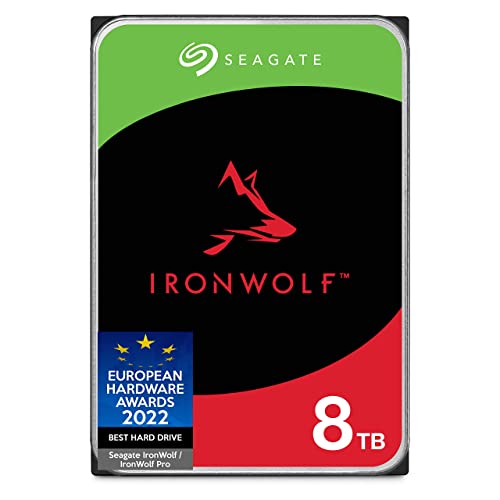
Best budget: Seagate IronWolf 8TB
The entry point that’s still an actual NAS drive. Around $300 gets you 8TB of CMR recording (more on why that word matters below), a 180TB-per-year workload rating, a 3-year warranty, and, rare at this price, three years of Seagate’s Rescue data recovery service in the box. I ran IronWolf drives in my own studio server for years and they just… ran. Four of these in a 4-bay gives you roughly 21 usable terabytes in RAID 5, which is a lot of 4K before proxies even enter the chat.
The honest math problem: at $37.50 per terabyte, this barely undercuts the 16TB Pro below it. You’re saving per drive, not per terabyte. If the total budget allows it, skip this tier. If four drives at $300 is what gets your first array built this month instead of never, that’s a legitimate reason, and this is the right drive for it.
Best for most editors: Seagate IronWolf Pro 16TB
Confession time. Years ago on this very site I told you there was no need to buy the IronWolf Pro, because the regular line did the job for less. That was true then. It is not true now. In today’s market the Pro 16TB is somehow the cheapest new drive per terabyte you can put in a NAS, around $540 at the time of writing, or $33.75 per TB. Cheaper per terabyte than Seagate’s own enterprise Exos line at retail. The shortage broke the price ladder, and for once it broke in your favor.
What the Pro tier buys you: a 550TB-per-year workload rating (that’s “run a busy multi-editor NAS and don’t think about it” territory), a 5-year warranty instead of 3, rotational vibration sensors so eight of them can live in one chassis without shaking each other to death, and the same 3-year Rescue recovery service. Four of them is about 43 usable terabytes in RAID 5. Six is 73. One caveat: the sub-$600 listing rides a third-party Amazon seller right now, and everyone else wants $650-plus, so if the price looks different when you click, that’s the shortage doing shortage things.

The WD pick: WD Red Plus 12TB
Everyone has a drive brand they’ve been burned by and refuse to touch again. No judgment; mine’s a graphics card company. If Seagate is yours, the Red Plus line is WD’s honest NAS drive: CMR, the refreshed 12TB model (WD120EFGX) with a big 512MB cache, 180TB-per-year workload rating, 3-year warranty, around $460. It’s a fine drive that will serve a one-or-two-editor NAS for years.
Two things you need to know. First: it must be Red Plus or Red Pro. The plain “WD Red,” no suffix, is SMR, and SMR belongs nowhere near a RAID array (the full horror story is below). WD got hit with a class action in 2020 for quietly slipping SMR into Red drives, and the suffix system is the legacy of that mess. Second: skip WD Red Pro entirely right now. The 16TB Pro is sitting at $825 with a handful left in stock, which is shortage gouging, plain and simple. If you need the pro tier, the IronWolf Pro above is the same class of drive for hundreds less.

Max capacity: Seagate Exos M 30TB
This drive writes with a laser. I’m not being cute, that’s the actual technology: HAMR, heat-assisted magnetic recording, where a tiny laser heats each spot on the platter for a nanosecond so the write head can flip bits on media too stable to flip at room temperature. After fifteen years of “HAMR is coming, we promise,” it’s here, it’s retail, and it’s how Seagate crammed 30TB onto ten platters. An 8-bay full of these is 240 raw terabytes. That’s a small studio’s entire back catalog plus cache in one box.
Buy it for density, not savings: at about $1,200 it’s $40 per terabyte, worse value than the 16TB Pro. It’s an enterprise drive, so it’s loud (machine-room loud, closet-not-desk loud), and there’s no Rescue recovery service on the Exos line. And a practical warning that applies to every drive this size: a 30TB rebuild takes a long, long time, so single-parity RAID 5 stops being a reasonable bet. Run RAID 6 or SHR-2 and keep two drives’ worth of insurance. Backblaze’s Q1 2026 stats, for what it’s worth, show their 20TB-plus drives failing at 0.85% a year across 86,000 units, lower than their fleet average, so “new tech, must be fragile” isn’t the objection it used to be. A 32TB version technically exists at retail too, but street pricing on it is silly right now; grab it if it ever approaches its $730 list price.

The 2026 value play: manufacturer-recertified Exos 28TB
Here’s the pick that pays for the whole article, and there’s no affiliate link on it because the vendor doesn’t do Amazon. ServerPartDeals sells Seagate-recertified Exos drives: enterprise drives that went back to the factory, got re-tested and re-flashed by Seagate itself, and ship with a 3-year warranty and 30-day returns. The 28TB is $799. That’s $28.50 per terabyte, under everything else in this guide by a mile, from the exact drive family hyperscalers run hundreds of thousands of. StorageReview tested recertified enterprise drives and found them performing like new units. For a cost-conscious studio filling eight bays, the savings versus new Exos at retail is roughly $2,400. That buys a very nice backup target, or a very nice week off.
The catches, honestly stated: the warranty is 3 years through SPD rather than 5 through Seagate, recertified drives can arrive with some power-on hours on the clock, and if the idea of “refurbished” storage keeps you up at night, pay the new-drive premium and sleep. But the one thing you must not do: on that same recertified page sits an Exos X26Z 25TB at $619, the cheapest per-terabyte number on the site. It is host-managed SMR. It will not work in your Synology, your QNAP, or your UGREEN, at all, and the listing makes you check a box acknowledging that before purchase. Do not let the smallest dollar-per-TB number pick your drive. Read the recording-technology line. Every time.
How the five compare
| Drive | Capacity | Street price | $/TB | Workload rating | Warranty | Recovery service |
|---|---|---|---|---|---|---|
| Seagate IronWolf | 8TB | ~$300 | $37.50 | 180TB/yr | 3 yr | Rescue, 3 yr |
| Seagate IronWolf Pro | 16TB | ~$540 | $33.75 | 550TB/yr | 5 yr | Rescue, 3 yr |
| WD Red Plus | 12TB | ~$460 | $38.33 | 180TB/yr | 3 yr | None |
| Seagate Exos M (HAMR) | 30TB | ~$1,200 | $40.00 | 550TB/yr | 5 yr | None |
| Recert Exos (ServerPartDeals) | 28TB | $799 | $28.54 | 550TB/yr | 3 yr (SPD) | None |
What actually matters in a NAS drive
CMR or nothing. This is the one that kills arrays. Hard drives record in two ways: CMR (conventional, tracks side by side) and SMR (shingled, tracks overlapping like roof shingles to squeeze in more capacity). SMR is fine in a USB backup drive that gets written once. In a RAID array it is poison, and here’s the two-gear truth of why: when RAID rebuilds a dead drive, it writes to the replacement continuously for hours. An SMR drive handling sustained writes has to constantly stop and rewrite its overlapping neighbor tracks, so a rebuild that should take hours stretches into days… and worse, the drive can go so unresponsive mid-rewrite that the RAID controller assumes it died and kicks it from the array. One failed drive just became two, and now you’re reading data recovery forums at 3am. Every drive in this guide is CMR. When you shop anywhere else, find the recording technology in the spec sheet before you look at the price.
Workload ratings are real, not marketing. That “180TB/yr” number is the total data read plus written per year the drive is engineered (and warrantied) for. A solo editor scrubbing 4K off a 4-bay won’t threaten it. A three-editor shop hammering the same array with dailies, proxies, renders, and nightly backups absolutely will, and that’s what the 550TB/yr pro tier is for. Count your seats before you count your terabytes.
Buy identical drives, and buy one more than you need. Arrays are happiest with matching models and firmware. And when a drive dies (it’s when, not if… even the good fleets run over 1% failures a year), the last thing you want is to discover your model is out of stock in a shortage while your array runs degraded. A cold spare on the shelf is the cheapest insurance in this whole article.
RAID is not a backup. Say it with me. RAID protects you from a dead drive. It does ZERO against deletion, ransomware, a fried NAS power supply, or theft. The array holds the working copy; a real backup lives elsewhere. I wrote a whole RAID explainer if you want the levels broken down, and the offsite half of the story is in the archiving guide linked below.
FAQ
Can I just use regular desktop drives in my NAS?
Physically, yes. They’ll spin. But desktop drives lack the vibration sensors for multi-drive chassis, often park their heads aggressively in ways RAID hates, carry shorter warranties with lower workload ratings, and (the killer) many cheap ones are quietly SMR. In a single-drive enclosure, sure. In an array holding client work, spend the extra 10%.
How many terabytes do I actually need?
Do the math on your actual footage instead of guessing: our video storage calculator has the GB-per-hour numbers for every codec you’re likely to shoot. Rough rule from that page: an hour of UHD ProRes 422 HQ is about 400GB, so a doc project with 40 hours of dailies is 16TB before proxies, renders, or backups. Then double it, because you will fill it. Everyone fills it.
Should I wait for the shortage to end?
If you’re expanding for comfort, waiting is defensible; analysts point at 2027. If a project needs the space now, or you’re running with no redundancy, no. Data loss costs more than the markup, and degraded arrays don’t care about market cycles.
7200 RPM drives are loud. Do I care?
Every drive in this guide is 7200 RPM class, and a NAS full of them has a personality: seek chatter, spin-up whoosh, the occasional mystery thunk. If the box lives on your desk, you will hate your life. Put it in a closet, run a longer cable, and the problem evaporates. (The old “Red Plus is the quiet 5400 RPM option” advice is dead, by the way… the current 12TB spins at 7200 like everything else.)
Where this fits in your workflow
The box these go in is covered in the NAS guide, the “wait, which RAID level” question in the RAID explainer, and what happens to projects when they wrap (tape, cloud, or shelf) in Archiving Projects Without Losing Your Mind. Working drives for your desk are in the portable SSD guide.
And that’s it! As always, what you see here is what works for me, my clients, and my crew. Buy CMR, match your models, keep a spare, and remember the array is the working copy, not the backup. Questions, or a drive you’ve run for 40,000 hours without a hiccup? Comments are open. The rest of our buyer’s guides live on the Gear Guides page.