
Every editor who outgrows the pile of external drives on their desk ends up at the same fork in the road: QNAP or Synology. Both make a box full of hard drives that lives on your network. Both will hold your media, run your backups, and survive a dead drive. And if you ask ten people which one to buy, you’ll get ten answers about Docker containers and home labs from people who have never scrubbed a 4K timeline over SMB in their life.
We’ve recommended both brands for years in the guide on building a video editing server on a budget. This page answers the narrower question: for cutting video specifically, which brand wins, at which price, and why.
TLDR
Synology sells the easier NAS. QNAP sells the faster edit bay. For video editing, QNAP wins two of the three tiers that matter: the 4-bay tier, because Synology removed the expansion slot that would ever let its box grow past 2.5GbE, and the Thunderbolt tier, because Synology has never made a Thunderbolt NAS at all. Synology’s win is the small team that values a calm, appliance-grade operating system over raw throughput, and its DS1525+ is the cheapest sane way to get a 5-bay editing server on 10GbE.
| Tier | QNAP | Synology | My pick |
|---|---|---|---|
| Solo editor, 4-bay | TS-473A (~$888) | DS925+ (~$750) | QNAP, for the 10GbE path |
| Small team, 10GbE | TS-855X ($1,549) | DS1525+ (~$980) + 10GbE module | Synology for 1 or 2 editors, QNAP for 3+ |
| Thunderbolt studio | TVS-h874T (out of retail, see below) | Nothing. Not one model. | Neither, today: the UGREEN DXP8800 Plus ($1,510) |
Prices are early-September 2026 snapshots, and storage pricing has been jumpy all year. Check the live listings before you commit. Now let’s get into why each of those calls lands the way it does.
The 4-bay tier: TS-473A vs DS925+
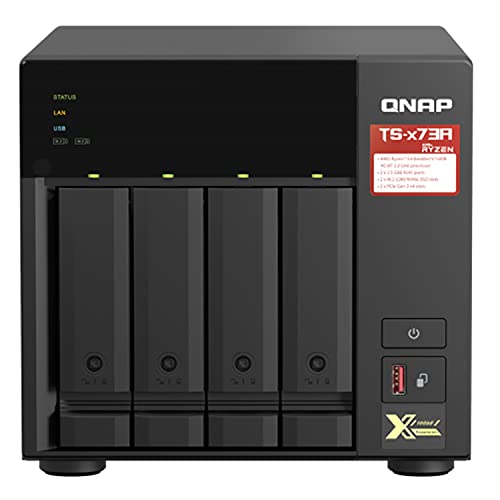
On paper this looks close. The Synology DS925+ is about $750, runs a Ryzen V1500B with ECC memory, and moves data at 522/565 MB/s sequential over its two 2.5GbE ports with SMB multichannel. The QNAP TS-473A is $887.85, runs a Ryzen quad-core of its own, and ships with the same dual 2.5GbE ports. About $130 apart, similar CPUs, similar bays. So flip a coin? Not quite.
The difference is what happens in year two. The TS-473A has a PCIe Gen 3 slot and two M.2 NVMe slots. That slot takes a $120-ish 10GbE card (the dual-port Intel X550-T2 from the server guide) and quadruples your real-world throughput the day you need it. The DS925+ has no PCIe slot. None. Synology’s previous 4-bay, the DS923+, had one, and the 925+ deleted it. Whatever this box is on the day you buy it is everything it will ever be: a 2.5GbE machine, forever, with a ceiling of about 280 MB/s down one port.
For an office file server that ceiling is fine. For an edit bay it’s three or four streams of UHD ProRes 422, which sounds like plenty until you’re stacking a multicam or pulling while your assistant is offloading. If there is any version of your future that includes a second editor or a 10GbE switch, the QNAP is the only 4-bay of these two that can meet you there.
Featuring an AMD Ryzen V1500B quad-core processor. The TS-x73A features two 2.5GbE RJ45 ports and...
Buy the DS925+ if you know yourself and you know you’ll never pass 2.5GbE. It’s a pleasant machine to live with, DSM is the best NAS software in the business, and solo editors cutting 1080p or proxy-based 4K will be happy with it for years. That’s a real audience. I just want you picking the ceiling on purpose.

The team tier: DS1525+ vs TS-855X
This is the one tier where I’ll split the verdict, because the two boxes are solving different sized problems.
The Synology DS1525+ is about $980, and unlike its little brother it kept its expansion: add the E10G22-T1-Mini module for about $120 and you have a 5-bay, 10GbE editing server for around $1,100. For one or two editors, that’s the value play in this entire article. It’s the setup I point most small shops at first.

The QNAP TS-855X is $1,549 and built for the next size up: eight bays (six 3.5″ plus two 2.5″), an 8-core Atom C5125, ECC support up to 128GB, 10GbE native on the board plus two 2.5GbE ports, and two PCIe slots still free after all that. That last part matters. When editor number three shows up, you drop in a second 10GbE card instead of shopping for a new server. The DS1525+ spends its only expansion slot getting to 10GbE in the first place.
So: one or two editors, buy the DS1525+ and the module. Three or more seats, or three-plus simultaneous 4K streams, buy the TS-855X and stop thinking about it. One warning on the QNAP: Amazon’s listings for it are a mess of used units and marked-up third-party sellers right now, which is why I’m linking Adorama at the actual $1,549 list price instead.
The Thunderbolt tier: there is no fight
Synology has never shipped a Thunderbolt NAS. Not in 2026, not ever. So if the thing you want is a box of drives that plugs into your Mac Studio with one cable and also serves the rest of the room over Ethernet, QNAP is the entire category between these two brands. The catch, as of September 2026, is that you can’t buy the QNAP. The TVS-h874T was the flagship here (eight bays, a 12-core i7, 32GB of RAM, two Thunderbolt 4 ports, $3,089), and it has fallen out of retail: no Amazon buy box, nothing at Newegg, and Adorama’s special-order page has been showing a stale ship date for months. QNAP hasn’t announced a replacement tower either. Its only new Thunderbolt box is the all-flash TBS-h574TX NASbook, which has no hard drive bays and is a different animal.
Which is why the studio pick in the server guide is now a third brand. The UGREEN DXP8800 Plus is eight bays, two Thunderbolt 4 ports, two 10GbE ports on the board, a 10-core i5, and $1,509.99 at Amazon, sold through UGREEN’s own storefront. It gives you the exact shape the h874T sold, one cable to the Mac and Ethernet to the room, at less than half the money. You give up QuTS hero and ZFS for UGOS Pro, which is younger and plainer, and it ships with 8GB of RAM you’ll want to upgrade. If you need Thunderbolt and a NAS in one box this year, that’s the buy.
One thing to understand about any of these before you spend the money: NAS Thunderbolt is not a true DAS connection. It runs IP over Thunderbolt, which means your Mac sees a network share over a virtual ~20Gb link, not a local volume. On the QNAP, measured throughput landed around 1.3 GB/s from a single SSD and about 1.7 GB/s from a RAID array. That’s DAS-class speed with NAS semantics, and the practical upside is real: you get Thunderbolt speeds at your seat while the rest of the team hits the same storage over the LAN, plus Ethernet passthrough so a laptop needs exactly one cable.
About Synology’s drive lock (the internet is out of date)
If you’ve researched this comparison anywhere else, you’ve read that Synology blocks third-party hard drives. That was true for about six months, and it isn’t anymore. Here’s the actual timeline, because most pages covering it stopped updating in the angry phase.
In April 2025, Synology started requiring its own branded or validated drives on the new Plus models, including the DS925+ and DS1525+. Unverified drives, and that included standard IronWolf and WD Red Plus disks, blocked DSM installation outright. The backlash was loud and deserved. In October 2025, Synology reversed it: DSM 7.3 restored full support for third-party 3.5″ hard drives and 2.5″ SATA SSDs, and current units ship on DSM 7.4 with the reversal intact. Standard Seagate and WD drives go into a 925+ today without a complaint.
What survived the reversal: M.2 NVMe storage pools still require drives from Synology’s compatibility list (using NVMe as cache is fine with anything). That’s the accurate 2026 state of it, and it’s worth a mental asterisk next to Synology’s name, because a company that tried a lock-in once has told you something about how it thinks. But buying a QNAP in 2026 specifically to escape a drive lock is solving a problem that no longer exists. Our NAS hard drive picks work in either brand.
The software: DSM vs QTS (and QuTS hero)
DSM is the reason people love Synology. It’s the closest thing to an appliance in this market: clean, coherent, hard to break, with the best mobile apps and the least googling per task. Its party trick for editors is SHR, Synology’s hybrid RAID, which lets you mix drive sizes in one pool and actually use the capacity. If your drive collection is three sizes of leftovers, SHR is the only game in town.
QNAP gives you two operating systems and a choice. QTS is the standard one. QuTS hero is the one I care about: it’s ZFS, with end-to-end checksums, snapshots, and inline compression. Checksums mean the file you archive is bit-for-bit the file you restore three years later, and for archival masters that’s not a luxury. The TS-473A, TS-855X, and TVS-h874T all run it. The cost is RAM: ZFS wants a lot of it, which is why QNAP’s ECC-to-128GB spec on the 855X isn’t marketing fluff. QNAP’s interface is busier and occasionally annoying. It also simply does more.
The security question QNAP has to answer
QNAP’s ransomware history is real and I’m not going to launder it. DeadBolt encrypted over 3,600 internet-exposed QNAP boxes in 2022, after the Qlocker and ech0raix waves before it. Synology’s record over the same stretch is a lot cleaner. In 2025, researchers at Pwn2Own Ireland demonstrated seven zero-days against QTS and QuTS hero; QNAP patched them in November with no exploitation seen in the wild. That’s the pattern: QNAP gets hit, QNAP patches, and the victims are almost always boxes exposed to the open internet.
Which points at the fix. An editing NAS has no business being reachable from the internet in the first place. Keep it LAN-only: no port forwarding, no UPnP, remote access through a VPN like Tailscale if you need it. Deployed that way, every attack listed above dies at your router, and the security gap between these brands shrinks to nearly nothing. If you want a box you can carelessly expose to the world, buy the Synology. Better plan: don’t expose either.
Feeding it: the network is half the purchase
A 10GbE NAS on a gigabit network edits like a gigabit NAS. Real-world 10GbE moves around 1,100 MB/s, which is a dozen-plus streams of UHD ProRes 422 and the difference between working off the server and copying everything local first. The client side is its own small shopping list (a switch, plus an adapter like the OWC Thunderbolt 4 10G for Thunderbolt machines), and I’ve already done that math in the 10GbE for video editing guide. Drives are the other half of the bill of materials; RAID choices are covered in the RAID explainer. And if a vendor is steering you toward a SAN at this headcount, SAN vs NAS for post-production is the piece to read first.
In conclusion
Buy Synology if you want the calmest possible ownership experience, you’re mixing drive sizes with SHR, and your bandwidth needs are known and modest: that’s the DS925+ for a solo seat, or the DS1525+ with the 10GbE module as the best-value small-team server here. Buy QNAP for everything else: the TS-473A if you want a 4-bay that can grow, the TS-855X when the team is real. If Thunderbolt-plus-LAN is the shape of your studio, QNAP’s box for that has left retail, so the pick is the UGREEN DXP8800 Plus from neither brand. Keep whichever one you buy off the open internet.
And that’s it. This is what I’d buy with my own money at each tier; your codec, team size, and tolerance for menus may move the needle. If you’re building out the whole server from scratch, start with the editing server guide and come back here for the brand call. Questions about a specific setup? Leave a comment.