
An AI influencer is a character that has to look like the same person on Tuesday as it did on Monday, in a different outfit, a different room and a different clip. Generating one good face is easy; generating the same face three hundred times is the hard part. Higgsfield rebuilt its AI Influencer studio around that job on October 3, 2026, and paired it with a trained-identity layer (Soul ID), a motion-transfer tool (Genjutsu) and a film environment (Cinema Studio 4.0) that all read the same character. This guide walks the pipeline end to end on Higgsfield: build the character, lock the face, put it in motion, give it a voice, finish it in the NLE, and label it so it stays on the right side of the platforms and the FTC.
Last updated: October 2026. Some links below are affiliate links. Buy through them and it helps keep the site running, at no extra cost to you. Features, prices and terms checked October 12, 2026, on higgsfield.ai, its help center and its October 3 launch post; the studio changes often, so read every spec as current at the time of writing.
TLDR
If you just want the answer: build the character in Higgsfield‘s AI Influencer builder (19 menu settings, no prompt, 1.12 credits per character, and you get a portrait and a full-body shot back), generate twenty or more portraits of it and train a Soul ID so the face holds across every later generation, then animate it with Genjutsu’s motion transfer from a reference clip (4 to 30 seconds, 480p / 720p / 1080p) or cast it in Cinema Studio 4.0 for 30-second scenes with native audio. The Plus plan ($47 a month billed annually, $59 monthly) is the tier that opens every model and gives 30 free AI Influencer generations to start; Starter ($19) gets 10 and the fast Seedance models only. Two rules before the first post: anyone whose face or voice you upload has to have given permission (Higgsfield’s terms say so in writing, and so does the law in most places), and the account gets labelled as AI on Instagram, TikTok and YouTube before the platforms do it for you. Signing up through our link gives a personal discount of up to 50%, active for three hours from the moment you log in.
What “consistent” means on Higgsfield, in three layers
Higgsfield gives you three ways to keep a character the same, and the pipeline below uses all three in order. A reference image anchors one generation: good for a single shot, drifts across many. An Element is a saved character, location or prop you call with @ inside a prompt, so it rides along into Seedance and Cinema Studio scenes. A Soul ID is a trained identity: you feed it 20 to 80 photos of one face, it learns the face in a few minutes, and from then on that face appears in every Soul 2.0, Soul Cinema and Seedance generation you point it at, regardless of lighting, angle or style. Higgsfield’s own help center describes the result as “clearly the same person” rather than pixel-identical, which is the right expectation, and far better than a reference-only workflow manages.
The order matters. Design the character first, so you have something to photograph. Train the identity second, so the face is locked before you spend video credits. Animate third. Skipping to video with a single reference image is how an account ends up with four slightly different people in its grid.
Step 1: design the character in AI Influencer
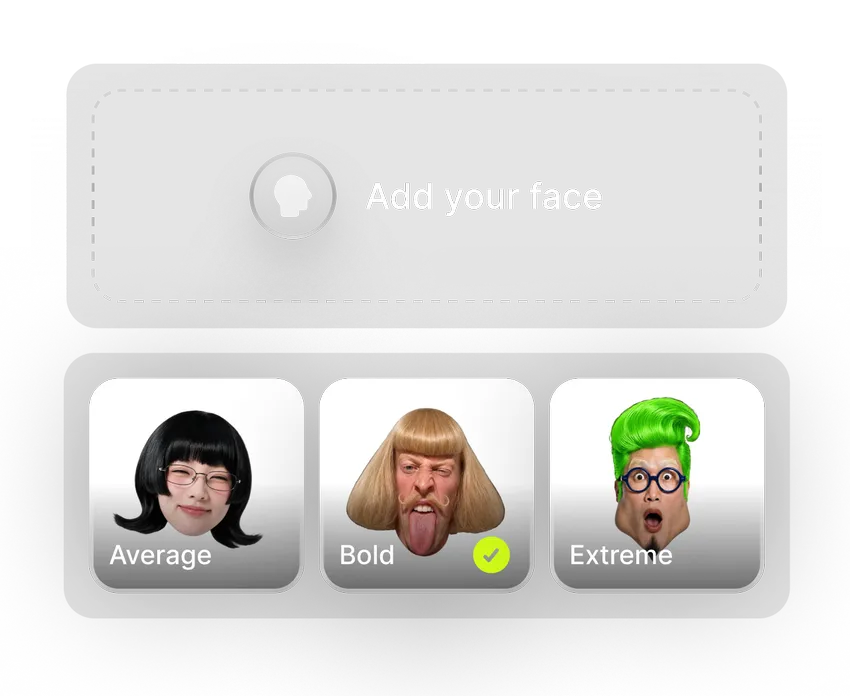
Open AI Influencer from the top navigation (higgsfield.ai/ai-influencer-studio) and pick Influencer builder. The October 3 rebuild replaced prompts with 19 menu settings and a feed of finished characters you can start from; select one in Explore and its settings load into the builder for you to adjust.
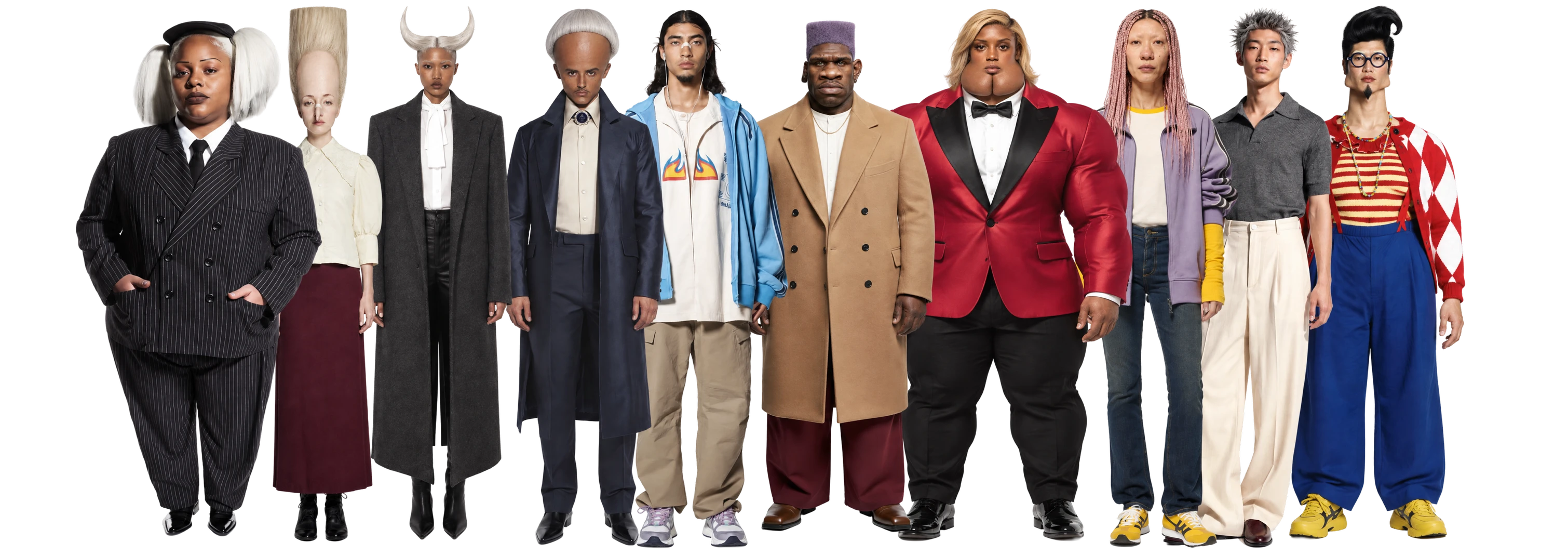
The first setting matters most. Character type is a three-level scale: Average builds an everyday-looking person for lifestyle posts, UGC-style ads and host formats; Bold adds features that register in a feed while the character stays approachable; Extreme produces an outlier built for comedy and meme formats. Higgsfield’s reasoning, from the launch post, is that an ordinary character gets scrolled past and an over-engineered one pushes viewers away, and the setting lets you choose where on that line to sit. The rest of the panel covers identity and body (five gender options, six ethnicities including Mixed, three age bands, an eight-tone skin palette, three heights and six builds, proportions), then face, hair and style (25 features from freckles to jug ears, eight facial-hair options, seven head shapes, eleven eye shapes, 21 hairstyles, 14 distinctive features such as a gold grill or elf ears, seven styles and six accessories). Several fields take more than one option at once. Randomize fills all 19 in one click, which is the fastest way to find a direction before you refine.



Upload your photo is an optional field above the settings: the character keeps the facial features of the photo, so a creator can run an AI double of themselves. Follow Higgsfield’s instruction on that field to the letter: a photo of yourself, or of someone who has given you permission to use their face.
Generate costs 1.12 credits per character (about six cents at the plan rate of 20 credits per dollar) and returns two images, a close-up portrait and a full-body shot of the same person. The Character Parameters panel next to the result lists every setting, Recreate reruns them for a new take, Download saves both images, and the result menu’s Create element saves the character for reuse. That element is what you will call with @ in every later scene.
Step 2: lock the face with Higgsfield Soul and a Soul ID
A saved element keeps the character’s look available; a Soul ID keeps the face identical. Higgsfield’s guidance for an invented character is to generate a batch of its portraits first and train the identity on 20 or more of them (up to 80), then use it in Soul 2.0 and Soul Cinema. Training takes a few minutes, after which the character appears in the Character tab when you generate, and it carries into Seedance video automatically as an Element.
The photo set decides the quality of the identity, and the help center’s rules are worth copying into your checklist: varied angles and expressions rather than one repeated pose, a clearly lit face with no heavy shadows, at least one full-height shot, no sunglasses, hats or scarves, one subject per photo, and (for a real person) recent photos from the last four or five months. Higgsfield says a smaller clean set beats a large inconsistent one. For an invented character that means generating thirty portraits with Recreate across several lighting setups and keeping the twenty best, not training on the first twenty the studio produces.
Two limits to design around. A Soul ID holds one person, so a two-character format uses Elements for the second (Higgsfield has a separate guide on two consistent characters in one scene). And the trained identity lives inside Higgsfield: it is not a downloadable file, so the images and videos you generate are your assets and the identity itself stays on the platform.
Step 3: put it in motion with Genjutsu, or cast it in Cinema Studio
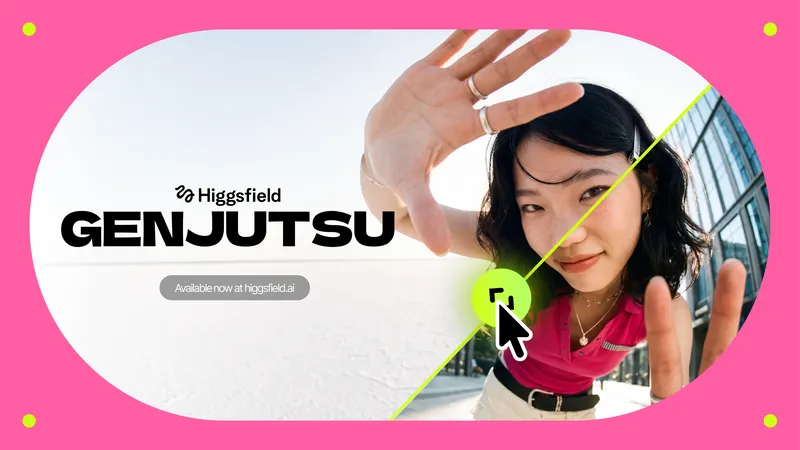
The Motion tab inside AI Influencer runs Genjutsu on the finished character in two modes. Motion transfer pulls the movement out of a reference video, 4 to 30 seconds long, and applies it to your character, which performs it frame for frame; up to 30 images of characters, products or clothes ride along, a Style field applies a look, and a prompt stays optional. Objects swap replaces one element in an existing clip, a product, an outfit or a prop, and keeps the rest of the footage. Output is 480p, 720p or 1080p, and the credit cost shows on the Generate button before you confirm. The Trending Genjutsu feed in Explore is a format library: a motion already circulating can be rerun with your character in it.
For a performance of your own, record yourself doing the movement and use Motion Control with the character’s image and your recording as the reference; the character follows your movement and keeps its own look. Movement templates are there if you would rather not perform it.
For anything longer than a trend clip, the character goes to Cinema Studio 4.0, where it shows up in the media picker under its own AI Influencer tab next to Uploads, Elements and Generations. Add it to a scene, reference it with @ in the scene description, and it holds its role across shots. Cinema Studio 4.0 runs on Seedance 2.5: clips up to 30 seconds, up to 50 references in one generation, native audio (effects, speech, music) in the same pass, and a Director’s Panel for genre, era, camera, lens, color palette and lighting. The Extend modes continue an uploaded clip in either direction and Edit Video makes regional changes without regenerating the shot. One configuration, as Higgsfield puts it, covers a social account, a Genjutsu clip and a film scene.

Step 4: give it a voice
Talking-head formats go through Lipsync Studio (Video, then Create Talking Clips): upload the character’s image or a clip, type or generate what it says, pick a model and generate. The model list on October 12 runs from Kling 2.6 Lipsync and Wan 2.5 Speak (image to video, up to 1080p with audio) and Higgsfield Speak 2.0 (priority-queue speed) to Kling Lipsync and Sync Lipsync 3 for lip sync on existing footage, the latter up to 4K, with scene templates such as Selfie, Podcast and Car Talking. The voice itself comes from Audio: text to speech from built-in presets, voice change, translation and re-voicing in 18 languages, or a custom voice cloned from an MP3 or WAV sample (your own voice, or one you have permission to use, per Higgsfield’s instruction). Cinema Studio and Seedance 2.5 generate speech natively inside a scene, so a scripted line can be part of the generation rather than a pass afterwards. The voice is usually what exposes an AI influencer, so pick one voice and keep it: a character that changes voice between clips reads as a different person faster than one that changes its hair. Our AI voice guide covers what the cloned-voice tiers at the dedicated voice vendors buy you if you need a voice Higgsfield does not have.
Step 5: finish it in the NLE
Everything above produces an MP4 at up to 1080p. A channel still needs captions, a brand kit, a music bed, an end card and a vertical, square and horizontal version of each clip, and that is editing work. Higgsfield’s plugins for DaVinci Resolve (version 19 or newer) and Premiere Pro 2025 or newer put Reframe (9:16, 16:9, 4:3, 3:4, 21:9, 1:1 with subject tracking), Remove Background, Upscale to 4K or 8K, Draw to edit, Edit Video and the generators in one panel inside the NLE, with results landing in the Media Pool or the project panel. The sequence we would run: generate at 1080p, upscale the keepers in the panel, reframe once per platform, and cut captions and music in the timeline. Inspect the file before import (Higgsfield publishes neither the frame rate nor the codec of its downloads) and conform it to the timeline yourself; our gen-AI footage guide has the ten-second check. The full tool-by-tool read of Higgsfield’s October lineup is in our Higgsfield review for editors.
Step 6: label it, and keep the account legal
Three things keep the account legal. First, the platforms: Instagram renamed its account label to “AI-generated profile” on August 31, 2026 and now reduces the reach of accounts that feature an AI-generated person without the label (creators who use the label are not penalized for it); TikTok requires the AI-generated toggle on realistic synthetic video; YouTube requires the “AI use” disclosure in Studio for realistic AI-generated or altered content, applies labels automatically where it finds C2PA metadata (which Higgsfield’s terms, section 6.4, say it may embed), says disclosing “won’t limit a video’s audience or impact its eligibility to earn money,” and reserves label, removal or Partner Program suspension for creators who consistently do not disclose. Label the account and the clips yourself and the platforms have no reason to act.
Second, what the character may say. The FTC’s Consumer Reviews and Testimonials Rule (16 CFR Part 465, announced August 14, 2024 and in force since October 21, 2024) prohibits reviews and testimonials “by someone who does not exist, such as AI-generated fake reviews, or who did not have actual experience with the business or its products,” with civil penalties for knowing violators, and the Endorsement Guides still require the usual material-connection disclosure. An AI character can present a product; it cannot claim to have used it, and a brand deal still gets the #ad.
Third, the faces. Higgsfield’s Terms of Use (last updated July 26, 2026, section 5.3) make you warrant that you have “obtained all consents, releases, and permissions required under applicable law from each individual whose face or voice is included” in anything you upload, and the Soul ID guide repeats it in plain words: only your own photos, or someone who has given permission. That is also the line between an AI influencer and a deepfake. The same terms (section 4.4) give you full commercial rights to the output on every plan and let Higgsfield train on your uploads and generations unless you are on a Team or Enterprise plan; a creator building a persona for a client should read that clause before the client’s product photos go up.
What it costs, and which plan
| Plan | Annual / monthly | Credits per month | AI Influencer free generations | What else matters here |
|---|---|---|---|---|
| Free | $0 | 0 | None | Visible watermark on every generation; not a channel |
| Starter | $19 / $19 | 270 | 10 | Seedance 2.0 Fast and Mini only, selected models, no Genjutsu free generations |
| Plus | $47 / $59 | 1,200 | 30 | All models and features, three Genjutsu generations at 720p, 5,000 Soul V2 and Cinema free generations, 7-day Unlimited on Kling 3.0 and Nano Banana 2 |
| Ultra | $99 / $129 | 3,000 | 30 | Adds 7-day Unlimited on Nano Banana Pro at 2K and 4K, 10,000 Soul free generations |
| Team | From $65 per seat | 1,000 per seat, pooled | Shared workspace, priority queue, indemnification, “No training on your data” |
The credits are the budget. A character costs 1.12 credits, so the design stage is close to free: thirty portraits for a Soul ID set is about 34 credits. Video is where the credits go: Genjutsu and Cinema Studio generations are priced by resolution and length and the cost shows before you confirm, and Plus’s own card estimates about 80 Seedance 2.5 videos from 1,200 credits. Subscription credits reset each cycle and do not roll over, Unlimited models apply on the website only and run in the standard queue, and anything generated through MCP or the plugins deducts credits. Plus is the plan for a creator running one persona; Ultra pays off when a channel posts daily; Team is the only non-Enterprise tier that keeps your uploads out of training. Prices read on the pricing page on October 12, 2026 and exclude tax. Our link carries a personal discount of up to 50% on any plan, valid for three hours after you first log in, so settle the tier before you sign up.

Side by side: the three ways to keep a character
| Method | How you set it up | What holds | Where it works | Use it for |
|---|---|---|---|---|
| Reference images | Attach up to 30 (Genjutsu) or 50 (Cinema Studio 4.0) images to a generation | One generation at a time; drifts across many | Genjutsu, Cinema Studio, Seedance | A single trend clip or a product swap |
| Element | Create element from any generation; call it with @ in a prompt | Look and wardrobe, scene to scene | Seedance, Cinema Studio, Supercomputer | Recurring locations, props, a second character |
| Soul ID | Train on 20 to 80 portraits of one face (a few minutes) | The face itself, across style, angle and lighting | Soul 2.0, Soul Cinema, Seedance video as an Element | The persona that carries the account |
FAQ
Do I need to write prompts to create an AI influencer on Higgsfield?
No. The character is configured from 19 menus, and a prompt stays optional in the Motion tab. Cinema Studio scenes take a description, with the character referenced by @.
Can I make an AI influencer from my own face?
Yes. Upload your photo is an optional field in the builder; the character keeps the facial features of the photo. Use your own photo or one from someone who has given permission to use their face, which Higgsfield’s terms require you to warrant.
How much does it cost to create an AI influencer with Higgsfield?
A character is 1.12 credits, about six cents. The plan is the real cost: Plus at $47 a month billed annually ($59 monthly) with 1,200 credits and 30 free AI Influencer generations is the practical floor, because Starter locks you to the fast Seedance models. Video generations are priced by resolution and length and the cost shows before you confirm.
How many photos does a Soul ID need?
Twenty or more, up to 80, of one face: varied angles and expressions, clear lighting, at least one full-height shot, no sunglasses or hats, one subject per photo. For an invented character, generate the portraits first and train on the best twenty.
Can I use an AI influencer commercially?
Yes, on every Higgsfield plan: the Terms of Use dated July 26, 2026 give you commercial rights to outputs with no attribution. The limits come from elsewhere: releases for any real face or voice you upload, platform AI labels, and the FTC rule against AI testimonials that claim an experience the character never had.
Does the AI influencer work in Cinema Studio?
Yes. Characters appear under an AI Influencer tab in Cinema Studio’s media picker and are referenced with @ in the scene description, so one persona holds across a 30-second scene and across shots.
In conclusion
The October rebuild made Higgsfield the first platform where the whole AI-influencer pipeline sits in one account: a menu-built character, a trained identity that keeps the face, motion transfer from any clip, a film environment that casts the same persona, a voice, and a plugin that drops the result into the NLE. Run it in that order, train the Soul ID before you spend a video credit, label the account on day one, and the character will still be the same person in month six. The plan to start on is Plus, and the up-to-50% personal discount through our link is live for three hours from your first login. We will re-read the studio, the prices and the terms in January 2027 and update this page.