


“Agencies are dead”, a phrase bantered around our industry a lot. I don’t think they are dead but definitely redefined, as brands migrate to an “in-house” model. Disney’s Yellow Shoes is a great example. Additionally, “in-house” doesn’t necessarily mean doing everything yourself. What this means is to bring the creatives to you. The freelance hiring pool is deep and the talent is phenomenal. All commercial and theatrical productions are made using freelancers and the work they produce is the content we consume daily. Now, to utilize an in-house model to the best effect, you need to hire talented internal video producers as well as have a solid marketing/strategy team. Without these two elements, the in-house model will not work and you are better off hiring an agency.
Just to clarify, “in-house” does not mean all content will be created in-house. Your large evergreen campaigns and product launches will be outsourced to a production company as there is too much legal risk. If someone is injured on set you do not want your company to be liable, that needs to fall on the production company and not your brand. “Wait, I thought you said “in-house” so why are you telling me to hire another company?” This is a valid point, however, you are now directly hiring a production company as opposed to your agency hiring a production company. This saves you money as there will be no “middleman fee” as I like to call it.
Before I dive into what exactly your in-house team will primarily be doing (micro/social content). We need to talk about your evergreen campaigns and product launches. The stuff in which you will need to hire an external team.
You might be asking: “How do you come up with the creative?” “How do you write the spot?” “Don’t I need an agency to do this?” No. You don’t. This is where your in-house producer and your marketing team come into play. Your producer will hire a freelance art director and a copywriter and work with them to develop the creative based on your current marketing strategy. Those three individuals are your “agency”. Once an idea is finalized, they will reach out to a production company and they will find the best director to fit your brand. Once the director is involved, the creative will be refined until it is in a place where everyone is happy. Gone are the days of having an agency make all the creative choices while you sit in the back seat. You are involved throughout the entire creative process.
Your production company is aware that you are an in-house team and will offer solutions and plans to maximize the content that comes out of your days on set. While the video team is filming in the front, the photo team might be taking product photos in the back. Additionally, the production company will plan the shoot to allow for high-quality product “b-roll” for your producer to make micro-content within your in-house studio. In-house isn’t as nearly as hard as it sounds!
Okay, but what is this micro/social content I’ve been mentioning? Where does that come into play? As we both know, having a social presence isn’t an option. It is a necessity. Brands need to crank out content to keep customers engaged and remind them to buy your product. Previously, agencies would create all the micro/social content for you but as we both know, the overhead cost for an agency is just too damn high. Now it is time to be resourceful and put your in-house team to work. You already have a great finished ad from your production company, all the RAW footage, that spicy b-roll, and some crispy photography…. but you don’t have any tools to create anything and I guarantee you that your IBM think-pad will not cut it (literally). Additionally, what if you want to shoot some customer testimonials, make a quick video, or film some little bits of content? This is the part where we build your in-house studio.
This is how you start
The whole point of creating an in-house studio/agency is to save money. Sure, if your CFO says you can buy a $40,000 RED camera then go ahead. But, I believe most companies are trying to save the most amount of money possible, especially in today’s turbulent climate. I am going to spec out what will get you the highest quality looking videos for the lowest cost. This is not an easy thing to do by just reading amazon reviews alone. You need to consult the professionals and the people who use these tools to make a living… like me! Anyway, let’s get into it.
The home video editing studio, at a glance
Short on time? Here’s the whole edit bay in one list. Every piece gets its full breakdown (and the why) further down, but this is what a lean, pro-quality home video editing studio needs:
- The editing computer. An Apple Mac Studio, or a comparable workstation. This is the heart of the room, so don’t cheap out here.
- Two color-accurate monitors. One to edit on, one for your scopes, bins, and timeline. Almost every working editor runs two.
- A real mouse and a graphics tablet. A Logitech MX Master, plus a Wacom if anyone’s doing design or motion work.
- Shared storage. A NAS that holds every project and backs itself up to the cloud.
- Your software. Adobe Creative Cloud, or DaVinci Resolve and Final Cut if that’s your house.
- A chair you can live in. Editing is a ten-hour-a-day sport, so your back will thank you.
The post-production suite: your edit bay
Due to the sheer length and amount of products you need, I will be splitting this article into 2 parts. In part 1, we will be discussing post-production. Why start with post? In most cases, brands won’t need production equipment as they can afford a production company to take care of that (though sometimes this is not the case which is what we’ll discuss in part 2). However, all in-house teams need to have the equipment to create simple videos, short motion graphics, and the ability to securely store your brand’s media assets.
The Edit Station: Apple Mac Studio (M5 Max)

For years I edited on a custom-built Windows PC and swore up and down that it destroyed any Mac… then Apple Silicon showed up and that whole argument died.
The Mac Studio is the heart of a serious edit bay. The M5 Max config (36GB and a 512GB SSD at $2,499 to start; go to 64GB if you stack effects) chews through multicam 4K, ProRes, and a stack of effects without flinching, and it does it nearly silently. If editing is your day job, this is the one to buy.
On a budget? The Mac Mini M5 Pro

Don’t sleep on the Mac Mini. The M5 Pro version costs a fraction of the Studio and gets shockingly close in real-world editing. The 24GB/512GB base at $1,699 is already a capable edit bay; if you bump one thing, make it the memory. For a one-person home studio cranking out social and micro-content, it’s all the machine you need.
The Peripherals: Logitech MX Master and Wacom
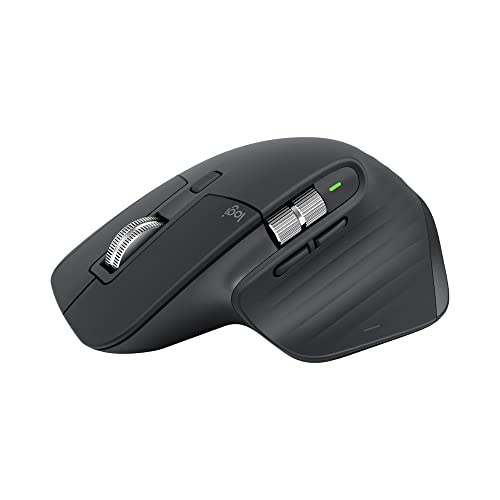
For the love of God do not force someone to use the Apple Magic Mouse. I hate it, editors hate it, everyone hates it. Buy the Logitech MX Master 3S. Lots of editors use it and it won’t give you carpal tunnel like the aforementioned Magic Mouse. Make sure to buy a mouse pad too. It increases pointer precision and provides a soft surface for your palm to rest. I recommend this mouse pad by SteelSeries. I use it every day and love it.
If you require graphics creation, I recommend investing in a Wacom Intuos Pro (2025) tablet. They greatly improve efficiency, speed, and design for creating graphics and motion graphics. Your motion graphics and design people will love you for it. If you want extra brownie points, get a Cintiq Pro 22. Though expensive, this is the industry-standard tool for the design and motion graphics world.
I would not invest in an additional keyboard. The Apple Magic Keyboard is perfectly adequate.
-
 Buy Now$89.99
We earn a commission if you make a purchase, at no additional cost to you.
10/02/2026 03:29 am GMT
The Monitor: Apple Studio Display 27″ 5K Retina Monitor
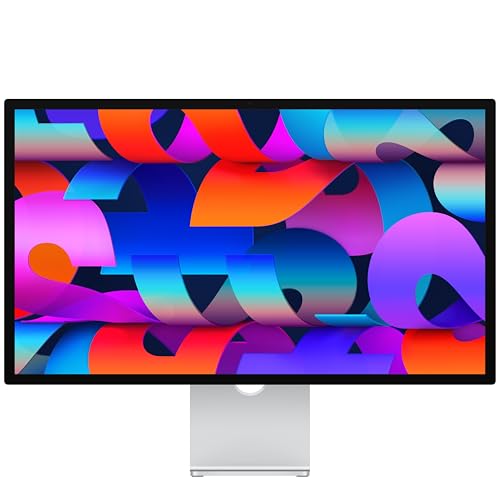
Though you can edit on only one screen. Almost all editors edit on a minimum of 2 screens. It greatly improves efficiency and editor comfort. Remember, editing is a creative process and as such, it is hard to create when you are uncomfortable in your surroundings. Your editors will thank you and will without a doubt be happier, faster, and more creative.
I talked about great monitor alternatives in this post and they are my personal go-to when people ask me what monitor they should buy. However, since you got the new Mac Studio… you might as well get the matching screen.
Again, you don’t have to buy a 2nd monitor but I do recommend it.
The Server: Synology DS1525+
Synology is the easiest NAS to live with, and I’ve set up more of them than I can count. The DS1525+ is a 5-bay box. Drop a 10GbE card in it and it connects to your Mac Studio over a single network cable, fast enough to edit straight off the server. It’ll hold every project you throw at it and back itself up to a cloud service of your choice without you having to lift a finger. If you want to go deeper on speccing out a proper editing server, I wrote a full guide here.

The Software: Adobe Creative Cloud
This is the standard for video editing… and any creative field. Any editor, designer, producer, or motion graphics artist you encounter will require Adobe Creative Cloud to be installed. Yes, there might be alternatives like FCPX or DaVinci Resolve but the pros use Adobe and so should you.
Buy here: Adobe Creative Cloud
The Chair: Herman Miller Embody

This is the one piece of gear I’ll get evangelical about. I now sit in a Herman Miller Embody and it is the best chair I have ever owned. I’d buy it again in a heartbeat even if it cost three times the price. Editing is hours and hours in the same seat, and the Embody is the only chair that leaves my back feeling fine at the end of a 12-hour day. If your budget stretches to one nice thing for the edit bay, make it this.
Not quite there on price? The Herman Miller Aeron is the classic for a reason. I sat in one for years and it lives up to the hype. And if both are out of reach, a solid gaming chair will get you started. The Corsair TC100 Relaxed is a well-reviewed budget pick with a wide, comfortable seat that holds up through long edit days, and it comes in well under $250.
In Conclusion
We made it! Part 1 is done. You now have everything you need for your post-production studio. This was the easy part, however. In Part 2 we will go over everything you need for your in-house production studio. We will cover what camera, lens, audio equipment, and all the miscellaneous items you must have for the perfect video studio. And, as budget is a concern, we will build it all for under $12,000 without sacrificing any quality. Additionally, I am going to go over why you should consider an agency and how that might be better for your brand. Again, an “in-house“ solution might not be for every brand and you need to consider some potential downfalls of not having an agency and not just go “in-house” because everyone else is doing it.


