


Every Resolve editor hits the same fork about six months in. You’ve got the shortcuts down, the mouse is doing too much of the work, and Blackmagic keeps showing you that little panel with the dial. Then you look at the price, notice a second, bigger keyboard next to it for $669, and a third option from a Danish company that just prints the shortcuts on the keys. Three products, three completely different ideas about what “a keyboard for Resolve” even means. Still choosing the app? Final Cut Pro vs DaVinci Resolve settles the Mac question first.
This is the decision guide I wish existed when I first looked. It covers the Speed Editor, the Editor Keyboard, and the Logickeyboard boards, plus the $27 answer nobody talks about and the case for buying none of them. If you want a general editing keyboard that isn’t Resolve-specific, that’s the keyboard guide. If you’re shopping for a jog wheel or a grading surface, those live in the controllers guide and the control surfaces guide. This one is only about the things with keys.
One thing to get out of the way first, because it changes the whole decision: both Blackmagic boards ship with a DaVinci Resolve Studio activation key in the box. That’s a $295 license. So the “$435 Speed Editor” is a $140 piece of hardware if you were going to buy Studio anyway, and the “$669 Editor Keyboard” is $374. Keep that in your head. It’s the reason the cheapest option here is not the obvious one.
Last updated: September 2026. Prices and stock were checked on September 2, 2026. Some links below are affiliate links. Buy through them and it helps keep the site running, at no extra cost to you. I only point at gear I’d be comfortable handing to a friend.
TLDR
If you just want the answer: buy the Speed Editor if you need Studio anyway, cut multicam or interviews, or want something wireless next to a laptop. It’s $435 with the license, so the hardware costs you $140, and it sits beside whatever keyboard you already like. The Editor Keyboard ($669, license included) is for people who cut in Resolve all day, every day, on the default shortcuts, and want the best search dial in the category built into their main board. The Logickeyboard Astra 2 (about $150) is a normal, good typing keyboard with the Resolve map printed and backlit on the caps, which is the right buy while you’re still learning it. And if you edit on a MacBook, a $27 printed cover gets you 80 percent of the Logickeyboard idea. Details and the “skip it” cases below.
Buy the Speed Editor if you cut multicam, work wireless, or need Studio anyway
The Speed Editor is 43 keys and a dial, about the footprint of a paperback, and it’s built for the Cut page. If the question is the Speed Editor against a TourBox or a Stream Deck rather than against a keyboard, that comparison sorts it by NLE. Source Tape mode plus the dial is the fastest way I know to get through four hours of interview footage: scrub the whole bin as one long tape, mark in and out on the dedicated keys, and Smart Insert or Append drops it on the timeline without touching a mouse. The multicam keys (1 through 9, with live override on the same key row) are the other big reason to own one. Switching angles by tapping a camera number while the timeline plays turns a tedious job into something close to fun.
Connectivity is Bluetooth or USB-C, with a built-in battery that runs well over a week between charges, and at 1.3 pounds it goes in a laptop bag. That’s the wireless-on-a-laptop case: a MacBook Pro, the Speed Editor, and no keyboard tray. It needs Resolve 17 or newer, and it runs on macOS 13 and up, Windows 10 and 11 (including ARM), and Rocky Linux.
Now the downsides, because there are real ones. The key layout is Cut-page thinking: there’s a dedicated Smooth Cut key, which most of us use twice a year, and no plain Overwrite or Go To In/Out, which we use two hundred times a day. On the Edit page you get the dial, transport, and in/out, and the edit-mode keys keep their Cut-page meanings, so if you never touch the Cut page the Speed Editor becomes an expensive jog wheel. Windows users should plan to run it wired; Bluetooth pairing on Windows drops out often enough that I’d treat the cable as the default there. And it’s Resolve only. Premiere and Final Cut don’t see it, with one exception I’ll get to in the FAQ.
Price history matters here. It launched in late 2020 at $295 without a license, got relisted a year later at $395 with the Studio key included, and now sits at $435 with the key. Old bare stock still floats around the used market, so if a listing doesn’t say the activation card is in the box, assume it isn’t. The Amazon listing below does, and Blackmagic’s own spec sheet lists the key under what’s included for the current product.

The Editor Keyboard is for full-time Resolve editors on the default map
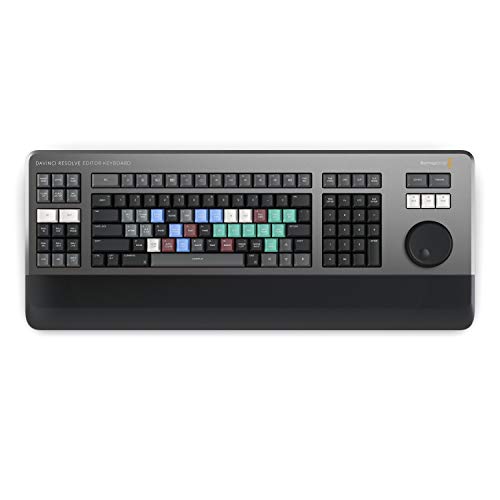
This is the one you buy when Resolve is your only NLE and you’ve decided to stop fighting it. It’s a full QWERTY board machined out of metal, 19 inches wide, 3.3 pounds, wired USB-C only, with two USB-A ports on the back for a mouse. The search dial is the best in this category and it isn’t close: it has an electronic clutch with physical end stops, so shuttle mode has a real detent at zero and jog has weight. Around it sit a timecode keypad (type a number, hit F or TC, you’re there), bin-sort keys, a full bank of edit-mode and trim keys, and JKL where your hand expects it. One board replaces a keyboard plus a Speed Editor, and if you already own this you do not need the Speed Editor too.
What’s wrong with it is everything that isn’t editing. The mechanical switches are loud enough to be a problem in a client session. There’s no backlight, which is an odd omission on a $669 board aimed at people who work in dim rooms. The arrow keys are jammed into the main block and the right Shift and Command keys are undersized, so typing a title card means missed keys until your hands relearn it. And it’s married to the default shortcuts: if you run a heavily remapped layout, the printed legends are wrong and the dedicated keys fire the stock commands. Plenty of them end up resold, their owners back on a normal board with a Speed Editor beside it, and I understand why.
Price has moved around. It was $995 at launch in 2019, dropped to $595 in 2021, and climbed back to $669 in the last year or so. The Studio key is in the box, so the hardware is $374 if you needed the license. The link below goes to Adorama, which has it in stock at $669 with the Studio code in the box. Amazon carries it too, but only through a third-party seller with a couple of units, which is normal for Blackmagic gear; it rarely sits in Amazon’s own warehouse.
Black Magic Design's Davinci Resolve Editor Keyboard is the perfect tool for fast video editing. ...
Logickeyboard if you’re learning the map or you type as much as you cut
A Logickeyboard has no firmware, no dial, and nothing Resolve-aware inside it. It’s a normal scissor-switch keyboard with 160-plus Resolve shortcuts printed on color-coded caps under a five-level backlight. That sounds like less, and it is less, but it’s the right amount of less for two kinds of editors. The first is anyone still learning Resolve’s default map: the answer to “what’s ripple delete again” is glowing under your finger, and after a few months you stop looking, which is the point. The second is anyone who cuts on the Edit page and spends real time typing (titles, metadata, notes to the colorist, Slack), because the Blackmagic board is a bad typing keyboard and this one isn’t.
The Astra 2 for Mac is the one linked below: wired, full-size with a numpad, built-in USB hub, about $140 to $160 depending on which reseller has it that week. There’s a Windows version at $150 with the Windows legends. If you want Bluetooth on a Mac, the Titan Wireless is the same idea in a slim layout, $150, with a battery rated around 300 hours with the backlight off and closer to 40 with it on low. All three are third-party sellers on Amazon (Sweetwater has two of them), which is how Logickeyboard distributes in the US.
Downsides are the ones you’d guess. The legends are the default map, so remap heavily and you’ve paid for wrong labels. The switches are fine, not special. And once the shortcuts are in your hands the printing is decoration, at which point a $110 MX Keys from the general keyboard guide is the better keyboard. Buy the Logickeyboard for the learning year, not for life.

The $27 answer: a printed cover for the MacBook you already own
If the Logickeyboard appeals to you and you edit on a MacBook Pro, try this first. The JCPal Resolve cover is a 0.3mm silicone skin with 120-plus shortcuts screen-printed on it, up to three per key, color-coded by modifier. It fits the 14 and 16 inch MacBook Pro from M1 through M5 and the 13 and 15 inch Air from M2 on, it’s $27, and it’s in stock from the maker. You lose a little key feel under silicone, the printing is small, and it covers nothing on a desktop keyboard. But it’s the cheapest way to find out whether printed shortcuts help you before spending $150 on a board that does the same thing with a backlight. Editors Keys makes the same product for older MacBooks, but its Amazon listing is a generation behind and down to single units, so JCPal is the one to buy today.

Skip all of it if you’re multi-NLE, heavily remapped, or Premiere-first
Some of you should close this tab with your wallet intact. If you bounce between Resolve, Premiere, and Avid in the same week, every option here is either dead weight in two of those apps (the Blackmagic boards) or labeled wrong in two of them (the Logickeyboard). If you’ve built a custom shortcut layout you love, the printed legends and the dedicated keys both assume you haven’t. If Premiere is your main app and Resolve is where you grade, the Speed Editor’s Cut-page keys will gather dust and you’d be better served by a controller that works in every app, which is the controllers guide‘s job. And if you already own the Editor Keyboard, you’re done. Its dial and edit keys cover everything the Speed Editor does except go in a bag.
One more product to rule out on purpose: Blackmagic also sells a Replay Editor at $559, which is a Speed Editor-shaped panel built for live sports and news multicam. Unless you’re cutting replays during a game, it isn’t for you.
How they compare
| Board | What it is | Dial | Connection | Studio key | Price (hardware net of license) |
|---|---|---|---|---|---|
| Speed Editor | 43-key Cut-page panel, sits beside your keyboard | Yes, jog/scroll/shuttle, no clutch | Bluetooth + USB-C, battery | Included | $435 ($140) |
| Editor Keyboard | Full metal QWERTY with edit, trim, and timecode keys | Yes, clutch with end stops | USB-C wired only, 2x USB-A hub | Included | $669 ($374) |
| Logickeyboard Astra 2 | Normal scissor keyboard, Resolve legends, backlit | No | USB wired, built-in hub (Titan: Bluetooth) | No | $140 to $160 |
| JCPal cover | Silicone skin with printed shortcuts for MacBook Pro/Air | No | n/a | No | $27 |
What matters when you pick one
Do the license arithmetic first. Studio is $295 and you want it: the paid features (noise reduction, the Neural Engine tools, HDR grading, higher frame rates and resolutions) are the ones working editors hit within a month. The full argument is in Studio vs free. If that $295 is already in your budget, the Speed Editor costs $140 and the Editor Keyboard costs $374, and the Logickeyboard at $150 is suddenly the same price as a Speed Editor that also comes with a dial. If you already own Studio, the numbers flip back: $435 and $669 are the real prices, and the Logickeyboard is the value option again. Most of the “is the Speed Editor worth it” arguing online is two groups who did this sum differently.
Which page do you live on? The Speed Editor was designed around the Cut page and it shows. If your day is Source Tape, sync bins, and multicam, it’s the best thing here. If you cut on the Edit page with trim modes and a three-point workflow, the Editor Keyboard’s key bank matches the way you already work, and the Speed Editor is mostly a dial. Decide this before spending money. The Cut page is good, but “I’ll switch to it once I own the panel” is how a lot of these end up on eBay.
Default shortcuts or custom? Both Blackmagic boards and both Logickeyboard layouts assume the stock map. Resolve lets you remap almost everything, and if you’ve done that, only the dial and transport controls survive intact. Editors coming from Premiere or Avid who imported those keysets should read this twice.
Wired or wireless, and which OS. The Editor Keyboard is wired and that’s that. The Speed Editor is wireless on a Mac and should be wired on Windows. Logickeyboard’s Astra 2 is wired and the Titan is Bluetooth on Mac only. If your bay is a Windows tower under the desk, plan on cables and buy the Windows Astra rather than the Mac one, because the modifier legends differ.
The dial is the product. If you take one thing from this guide, it’s that the search dial is why the Blackmagic boards exist and the keys are secondary. The Editor Keyboard’s clutch dial is better than the Speed Editor’s, which is better than any jog wheel on a general-purpose controller. If you don’t scrub footage for a living, you don’t need either one, and a Logickeyboard or a cover is the whole answer.
The Micro Panel question, and the other things with a dial
Every few weeks someone asks whether the Micro Color Panel is a better buy than the Speed Editor. Different tool. The Micro Panel is a color surface: trackballs, rings, and the Color page controls, and it works with free Resolve. It has nothing to offer an edit. If you grade more than you cut, it’s the better $559, and the control surfaces guide covers it and the Mini Panel above it. If you cut more than you grade, it’s the wrong panel entirely.
Then there’s the app-agnostic crowd: TourBox, Loupedeck, Stream Deck, Logitech’s MX Creative Console. They’re not keyboards, they’re a second instrument that sits next to one, and the useful thing about them is they work in Premiere, Resolve, After Effects, and Lightroom on the same day. A TourBox Elite is the one I’d point a multi-app editor at, and the controllers guide ranks the rest, including the discontinued ones to avoid on the used market.
FAQ
Does the Speed Editor come with DaVinci Resolve Studio?
Yes, the current product does. Blackmagic’s spec sheet lists a Studio activation key under what’s included for both the Speed Editor and the Editor Keyboard, and the Amazon listing linked above says so in the title. The catch is history: the first year of Speed Editors shipped without one, and some of that stock is still around used. If a listing doesn’t mention the license, assume it’s a bare unit and price it accordingly.
Does the Speed Editor work with Premiere Pro or Final Cut?
Not natively. Blackmagic encrypts the USB handshake, so the panel is invisible to other apps out of the box. On a Mac, the free, open-source CommandPost app has driven it in Premiere and Final Cut since late 2023 by translating its keys into shortcuts, and it works. On Windows there’s nothing. If Premiere is your main app, buy a controller that’s built for that job instead.
Do I need Studio for the Speed Editor to work?
No. Free Resolve 17 and newer recognizes the panel and all its keys. But since the current box includes a Studio key, you’ll have Studio anyway.
Speed Editor or Editor Keyboard if I own neither?
Speed Editor, unless Resolve is your only NLE and you cut on it every working day. It’s $234 cheaper and portable, and it lets you keep a keyboard you can type on. Move up to the Editor Keyboard when you find yourself wishing the dial had a clutch and the timecode pad was under your right hand, which is a feeling you’ll recognize if you get there.
Is the Logickeyboard worth it over a cheap keyboard cover?
On a desktop, yes, because a cover only exists for MacBooks and Apple’s Magic Keyboard. On a MacBook, start with the $27 cover. If you find yourself reading the keys every day for a month, the Logickeyboard’s backlight and full-size layout are the upgrade. If you stop reading them after a week, you’ve saved $120 and learned that you didn’t need the printing.
Where this fits in your setup
A Resolve keyboard is the last input decision, after the mouse and the general keyboard, and well after the machine. If the Resolve bay itself is still being built, the Resolve PC build guide and the Mac guide come first.
And that’s it! As always, what you see here is what works for me, my clients, and my crew. No panel will make you a faster editor than knowing your shortcuts cold, but the right one takes the mouse out of the loop for the parts of the day that don’t need it. Got one of these on your desk? Tell me which and whether you’d buy it again in the comments. The rest of our buyer’s guides live on the Gear Guides page.


