


Throwing on The CMO Podcast in the car still gets me in the spirit for the day, and at some point every regular listener has the same thought: I could do this. You can. What nobody spells out is the order, so that is this guide… eight steps, with the gear folded into one of them instead of being the whole article.
TLDR
If you just want the answer: decide what the show is and who it is for before you buy anything (1), pick a name you can say out loud and make square artwork (2), buy one dynamic mic, one interface, a cable, an arm and closed-back headphones, once (3), record in a soft room with the mic close and one track per voice (4), edit in Fairlight or Audacity and master to Apple’s loudness target (5), pay a host for an RSS feed (6), paste that feed into Apple, Spotify, YouTube and the rest (7), then launch with three episodes and keep the cadence you promised (8).
Last updated: October 2026. Some links below are affiliate links. Buy through them and it helps keep the site running, at no extra cost to you. Apple’s published specs were read on October 17, 2026, and every gear price here is Amazon’s from that same day.
Step 1: Decide the show
Before a single dollar leaves your account, write one sentence: this is a show about X, for Y, and each episode does Z. If you can’t fill that in, the mic will not help. “A show about post-production for editors who want to run their own shop, where I interview one owner per episode about the money” is a podcast. “A show where my friend and I talk about stuff” is a group chat with an RSS feed.
Then settle the format. Solo, co-host, or interview? Interview shows are the easiest to keep going because every guest hands you an episode, and the hardest to make sound good because you are recording someone else’s room. Solo shows are the reverse. Co-host shows depend entirely on whether the two of you are still friends in a year.
Length and cadence come from the format. A tight solo show at twenty minutes a week is more sustainable than a ninety-minute interview show you promised weekly and quit after episode five. Pick the cadence you can hold through a bad month. And run the test I run on every idea: would I listen to this if someone else made it? Be brutal now; it is cheaper than being brutal at episode twelve.
Step 2: Name it and make the artwork
The name has three jobs: say what the show is, survive being said out loud on someone else’s podcast, and still be available. Search Apple Podcasts and Spotify for it before you fall in love. A pun that only works written down is a bad podcast name, because podcasts get recommended by mouth.
Artwork is square and it has to read as a thumbnail, which means a short title in big type and one strong color. The spec is on Apple’s artwork guide, and your host’s upload validator will enforce the exact size. The part people skip is that the cover gets judged at phone-icon size, so design at that size first. If you can’t draw, pay someone for one square image; it is the only visual most listeners will ever see.
Step 3: Buy the gear once
One mic, one interface, one cable, one arm, one pair of headphones. Buy them once and never think about them again. The most important piece is the microphone, and without a decent one your audio will sound like… a tin can. You don’t need a Neumann, and for a podcast you don’t want a condenser at all. A condenser picks up the room right along with your voice; a dynamic mostly hears what is right in front of it, not the fridge in the next room. Unless you plan on recording instruments or John Legend, a dynamic like the Shure SM7B ($439) is the way to go.
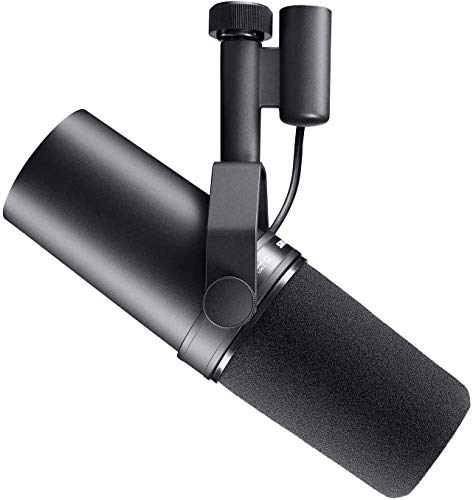
One thing to know before you order: the SM7B is a low-output mic that wants about 60 dB of clean preamp gain, which is why so many people run it through an inline booster. The SM7dB ($549) bakes that booster into the mic body, and this comparison tells you which of the two to buy for your interface. If $439 is not happening yet, the Rode PodMic ($86) is a dynamic that sounds like far more than $86, and the PodMic USB ($190) skips the interface entirely. The current slate with prices, from the cheapest USB mic up, is in the best podcast microphone guide; pick there, then come back.
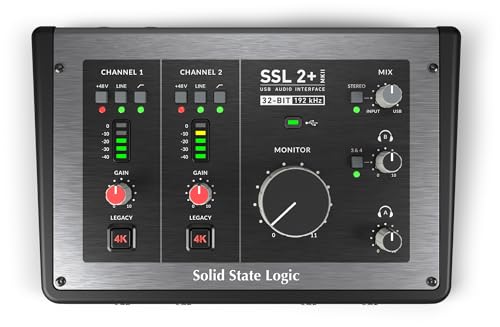
Whatever sits between the mic and your computer matters almost as much as the mic. You could run it into something cheap like a Behringer XENYX 802S… but in my opinion they sound tinny and lack that golden tone that we all know and love. I have run the original SSL 2+ daily for years and never been happier; the SSL 2+ MKII is the same box with the current updates. Tiny on the desk, amazing mic preamps, a “4K” button that makes everything creamy, and two headphone outputs, which a two-person show uses every episode. The wider field is in the recorders and interfaces guide.
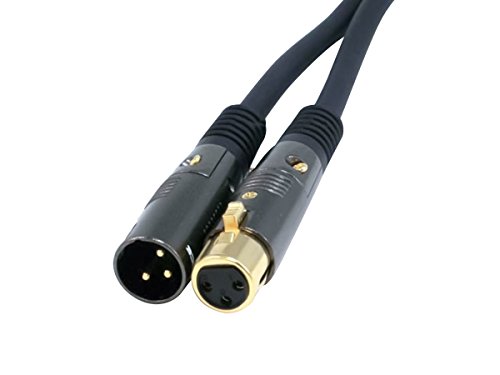
The cable is an XLR, and you only need one per mic. Learn to wrap it over-under (the video below) before you touch it, because a cable wrapped in a loop around your elbow is a cable that fails in a year.
Balanced Audio cables utilize impedance balanced lines that reduce EM and RF noise.

A boom arm puts the mic where your mouth is and keeps it there, which matters more with two people than one, because the arm is how you get both mics at the same distance. Get whatever fits the budget. I have been very happy with the Rode PSA1: strong, sturdy, and it does not pass desk thumps into the recording.
- Broadcast-style Professional Studio Desk Boom Arm with Standard Microphone Threading
- Over 3' Horizontal Vertical Reach
- 360-degree Rotation

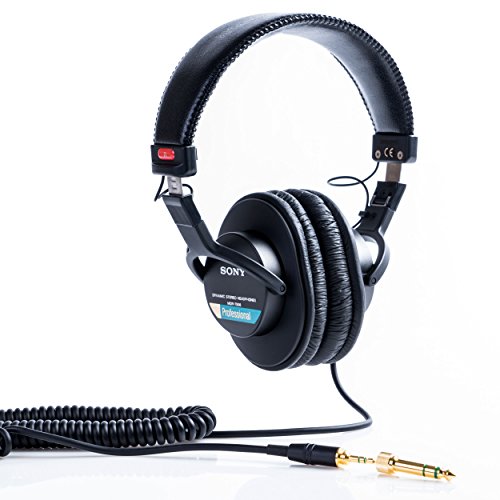
As a self-proclaimed audiophile, I’m a huge fan of the Beyerdynamic DT 1770 Pro. However, they are pricey. That’s why I’m going to be listing a few choices for all budget ranges. Personally, my pick is the cheaper Beyerdynamic DT 770 Pro. You will find these headphones in practically every studio in Los Angeles. They will last for decades and sound unbeatable for the price. If that is still too high, I would recommend the Sony MDR 7506 which I also talked about in this article about the best headphones for mixing. If you already own a 7506 or an M50x, this comparison tells you whether to keep using it.
|
Budget Choice
|
Best Value

|
Best Performance

|
|
$113.00
|
$199.99
|
$449.99
|
Two of today’s prices for the table: the MDR-7506 is $113 and the ATH-M50x is $159. Both are closed-back, which is the one requirement: open cans leak your own playback straight into the mic.
Step 4: Record it
The room comes before the mic. A dynamic rejects most of a room, and a bare office with a hardwood floor will still put a slap echo under every sentence. Record in the softest room you have. A closet full of clothes beats a living room, and if the living room is all you have, a rug, a couch and a blanket hung behind the mic get you most of the way. No plugin fixes it later.
Then the distance. An SM7B wants your mouth a fist-width from the grille, talking slightly across it rather than straight down the barrel. Closer and every P pops; farther and you are cranking gain to reach a voice that is now mostly room. Set the gain so your normal voice peaks well below the top of the meter, with headroom for the laugh, and leave it alone for the session.
One track per voice, always. Two people on one track means one fader for two mouths. The SSL has two inputs for exactly this. For remote guests, the rule is the same with one twist: everyone records locally. Riverside and Descript both capture each participant on their own machine and upload separate tracks afterward, so a bad Wi-Fi moment does not end up in the episode. Zoom works in a pinch, and it sounds like Zoom. Whatever you use, have the guest wear headphones so their speaker does not feed your voice back into their mic. If a guest will be a regular, the remote kit post covers what to tell them to buy.
Step 5: Edit and master it
Resolve’s Fairlight page is free, it is a real DAW, and if you cut video already it is the one you want; Resolve Studio ($295, one-time) adds the noise-reduction and dialogue tools, and a podcast does not need them on day one. Audacity is free and uglier and will also do the job. Descript edits audio by editing the transcript, which is the fastest way through a ninety-minute interview if you are not a sound person. The edit is where you cut the dead air, the false starts, and the six minutes of settling in at the top that nobody wants to hear.
Mastering a podcast is a loudness problem, and Apple has published the target: around -16 dB LKFS with a tolerance of plus or minus 1 dB, and a true peak no higher than -1 dB FS. Put a loudness meter on the output (Fairlight has one), aim at -16, catch the peaks with a limiter at -1, done. Do it per episode, because a guest-heavy episode and a solo rant will not land in the same place by accident. One master at Apple’s target is what I ship everywhere.
Export follows Apple’s audio page too. Feeds take MP3 or AAC, and for stereo MP3 Apple’s range is 128 to 256 kbps (mono, 96 to 128). I export stereo at 128 for a talk show; plenty for voices, and the smaller file stretches your hosting hours.
Step 6: Host it and get an RSS feed
“Can’t I just upload it to Spotify?” That is sort of what a host is. A podcast host stores the audio, builds the RSS feed that every app reads, serves the downloads, and counts them. You upload one file, write the show notes, press publish, and the feed updates in every app at once.
Buzzsprout and RSS.com both have free plans with limits that push you to paid once the show is real. Transistor has no free tier, and it is what I would pay for if I were starting today. Spotify for Creators hosts for free and lists you on Spotify automatically, with the catch that you will still submit the feed to Apple yourself. I am not printing plan prices because every one of these changes them more often than I refresh this post; the current plan page is the source. Whichever you pick, check that you can export your feed and keep your episode URLs if you ever leave, before the credit card goes in.
Step 7: Submit it everywhere
With a feed URL in hand, start with Apple Podcasts Connect. Apple wants a public feed with one audio file per episode and a permanent GUID for each, and case-sensitive category tags, so copy those from Apple’s list. Apple reviews new shows against its content guidelines and emails you when the status changes; the status also shows in Connect. There is no published review time, so submit a week or two early and let it sit.
Spotify lists you automatically if you host on Spotify for Creators; otherwise your host has a per-platform submit button and Spotify is one click. YouTube ingests RSS too, through Studio under Content, then Podcasts, then “Connect to RSS feed”, and the rules are specific: audio-first creators only, in select countries, and the feed cannot carry baked-in ads (a sponsor read you disclose is fine). Each episode becomes a static-image video, uploaded private first so you can check it, and edits you make to the feed later do not flow through on their own. Amazon Music takes the same feed through its podcaster portal, and Pocket Casts has a submit form, since it no longer imports Apple’s directory. Do all of them in one sitting.
Step 8: Launch and keep going
Launch with three episodes, not one. A listener who likes episode one wants episode two right then, and three episodes look like a show instead of an experiment. Then hold the cadence from step 1, whatever you said; the number matters less than it being true. Shows die in the gap between episode four and five, and the way through it is a bank of two finished episodes you never touch.
Every episode gets show notes with the guest’s name, the links you mentioned, and a transcript. Descript gives you the transcript as a byproduct of the edit, and your host may too; post it. It is how search finds a talk show, and how the guest’s audience finds you when they share it.
Money comes later and comes from scale. As of January 7, 2026, Spotify’s Partner Program wants at least 3 published episodes, 2,000 consumption hours and 1,000 engaged listeners before it pays out. For most of us the podcast is the thing that gets us the client, the speaking slot, or the Patreon, and that pays long before the ads do.
FAQ
Free or paid hosting?
Free to find out whether you will do episode four. Paid once you know you will. The free plans cap upload hours or stop hosting older episodes, and those limits show up right when the show starts working. Moving hosts later is annoying, so if you are already sure, start paid.
Should I make it a video podcast?
Only if you will watch the edit. Video doubles the work per episode (framing, lighting, a cut that has to look right as well as sound right), and the audio feed is still what most listeners use. Start audio-only, and if you want a YouTube presence, let YouTube’s RSS ingestion make the static-image versions for you in step 7. Add cameras once the show has an audience that asks for them.
How long should an episode be?
As long as the material, then ten minutes shorter. A solo show rarely needs more than twenty or thirty minutes; a good interview can hold an hour. The failure mode is the ninety-minute episode that would have been a great fifty, so cut the warm-up and ship the version you would listen to.
Do I need a release from guests?
Yes, in writing, every time. Recording consent is state-specific and some states require every party to agree, so the release should say the guest consents to being recorded, that you can edit the conversation, that you can use their name and likeness to promote it, and that you own the episode. One page, signed before the session. A guest who balks at that is a guest who will ask you to pull the episode later.
And… we are live.
That is the whole order: show, name, gear, room, edit, host, submit, repeat. The gear step is the one everyone agonizes over and the one with the clearest answer, so buy it once and move on. But remember, no amount of fancy gear will make you successful. You will only be as good as the content you put out, not the microphone you speak into. If you have questions about any step, leave a comment and I will answer it.


