Back in the keyboard guide I promised the control surface roundup was coming. Well, here it is, and let’s open with the thing nobody selling you a panel will say: a control surface will not make your grades better. Not one node better. What it does is make you faster, and it moves your hands off the mouse-scrub-click loop that turns a 300-shot grade into a wrist injury with a deadline. Speed and comfort are real money if you grade for a living. If you don’t… well, we’ll get to that.
The timing for this guide is not random. The control surface market just had a weird two years: Logitech bought Loupedeck and then killed the entire hardware line, Blackmagic’s panel prices jumped with the 2025 tariffs, and half the “best control surface” articles on the internet are still recommending products you literally cannot buy new. Somebody needed to write the current one. Hi.
Last updated: July 2026. Some links below are affiliate links. Buy through them and it helps keep the site running, at no extra cost to you. I only point at gear I’d be comfortable handing to a friend.
TLDR
If you just want the answer: the Blackmagic Micro Color Panel at $559 is the first real grading panel worth owning, with three actual trackballs in a keyboard-sized footprint. If you want to spend a third of that to find out whether surface life is even for you, the Elgato Stream Deck + is the $200 experiment. And there’s a value trap hiding in this category that turns the pricing completely upside down. It involves a $295 software license, and Blackmagic only puts it in some of the boxes. Details below.
First, the license math (read this before buying anything)
DaVinci Resolve Studio costs $295 as a standalone license. Here’s the thing Blackmagic doesn’t put in a comparison table for you: the $435 Speed Editor and the $2,319 Mini Panel still ship with a Studio activation card in the box. The $559 Micro Color Panel does not. Run the numbers on that. If you don’t own Studio yet, the Speed Editor is effectively $140 of hardware, and the Micro Color Panel is effectively an $854 purchase ($559 plus the $295 license you were about to need). The panel still works with the free version of Resolve (19 and up), so nobody’s locking you out. But when you’re comparing prices in this category, always ask “is the license in the box?” It swings the real cost by three hundred bucks.
Best first grading panel: Blackmagic Micro Color Panel
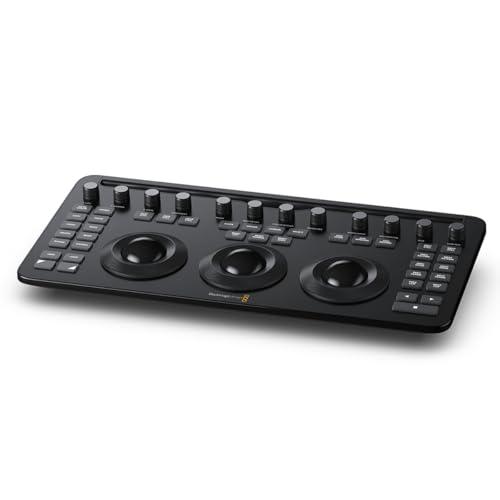
Three weighted trackballs, twelve knobs, USB-C or Bluetooth, and it fits in the keyboard slot of a backpack. That’s the pitch, and it landed: when this shipped in 2024 at $509 it killed the four-figure entry price for real trackball grading, and even at today’s $559 (thank the tariffs) nothing touches it for a first panel. Lift, gamma, gain on physical wheels changes how grading feels in a way that’s hard to oversell… your eyes stay on the image instead of the cursor, both hands work at once, and a white balance you’d mouse around for five seconds happens in one. It even works with Resolve on an iPad, which makes it the only panel here that belongs in a DIT cart AND a suite.
The trade-offs are real. It’s Resolve-only: plug it into a Premiere machine and it’s a paperweight. No license in the box, per the math above. And without the Mini Panel‘s screens and soft keys, the deeper functions live on shift-key combos that take genuine weeks to get into your hands. It’s still the right first panel. It’s just not magic. (It’s also the same panel I put in the color suite kit, where it has to share budget with a monitor that matters more.)
Best value (and it’s not a grading panel): DaVinci Resolve Speed Editor
Up front: the Speed Editor has zero trackballs. It is a Cut-page editing surface with a jog wheel and a bank of trim keys, and if you buy it expecting to grade with it, you’ll be sad. So why is it in a grading surface guide? Because of the box. At $435 with the Studio activation card included, it’s the cheapest legitimate path to a Resolve Studio license in 2026, and Studio is the thing every Blackmagic panel buyer needs anyway (the free version caps GPU count and locks the fancy AI tools). Buy it for the license, discover the search dial is great for review passes and multicam, and suddenly the $140-after-license hardware is one of the better accidental purchases in post.
Cons: not a color tool, obviously. Cut-page-centric, so Edit-page devotees use maybe 60% of it. And the price has crept up from its long-running $295 to $435, which stings even with the license math still working out. If you already own Studio, skip this slot entirely and put the money toward the panel.

Best budget experiment: Elgato Stream Deck +
“A streamer gadget? In my grading suite?” Hear me out. The Stream Deck + is eight LCD keys, a touch strip, and (the part that matters) four real rotary dials, for $199 list and regularly closer to $160 on sale. Map the dials to color temp, tint, contrast, and saturation and you’ve got printer-lights-style adjustment on physical knobs for a tenth of what that sentence used to cost. The Elgato Marketplace has actively maintained Resolve integrations (there’s a whole community building color-panel profiles, with updates as recent as last month), and unlike everything Blackmagic makes, it works in Premiere, After Effects, OBS, your DAW, everywhere. As a “do I even like hardware control?” experiment, it’s the cheapest real answer in the category.
Eyes open: dials are not trackballs. You’re adjusting one parameter at a time, not rolling a color wheel through two axes, and no colorist would call it a grading panel. The deepest Resolve color plugin is Windows-only right now, so Mac folks lean on the more generic profiles. And like every macro deck ever bought, it only helps if you invest the setup evening. Fun fact for the category obituary: Logitech’s MX Creative Console costs the same $200 and got a free Resolve plugin in 2025, but it has one dial to this thing’s four, and its plugin drives editing functions more than color. The Stream Deck + is the one to get.

Best multi-app panel: Tangent Wave2
The one panel in this guide that isn’t married to Resolve. Three optical trackballs, nine knobs, three OLED display strips that show you what everything does, USB-powered, and driven by Tangent’s Mapper software, which supports a long application list: Resolve, Baselight, Premiere Pro, Avid, Silhouette, on and on. If you’re a freelancer floating between a Resolve suite and a Baselight room, or a Premiere-first editor who wants real wheels, this is the answer, and it’s been the answer for years because Tangent keeps supporting it instead of replacing it. Street price has drifted to $1,150 in 2026’s component market, above the old $902.50 list.
The gripes: it’s $300 more than the Micro Color Panel with fewer knobs and lighter-feeling hardware, and inside Resolve specifically, Blackmagic’s own panel integration is tighter (of course it is). No license in any box here either. Stock is the current annoyance: the Amazon listing below is a third-party pro-AV dealer with real stock at $1,150, and that is the sane place to buy it right now. Also, fair warning, Tangent Mapper configuration is a hobby unto itself. A rewarding one. Mostly.

The step-up: DaVinci Resolve Mini Panel
This is the panel you graduate to when the shift-key combos stop being cute. Same three weighted trackballs, but now with two 5-inch screens and banks of soft keys, so secondaries, the Color Warper, node navigation, and window controls get dedicated physical buttons instead of keyboard gymnastics. For a full-time colorist billing grades every week, the Mini Panel is where the speed argument fully pays off; it’s the standard “serious freelancer / small facility” panel for a reason. $2,319, and yes, the Studio license IS in this box, which knocks the effective price to about two grand even.
Should most readers buy it? No, and that’s the point of putting it here: $2,319 is four Micro Color Panels, it’s Resolve-only, it eats serious desk space, and it makes zero pixels look better. It makes a working colorist faster. If that sentence describes your invoices, you already knew this panel existed. (And above it sits the $33,915 Advanced Panel, which exists for facilities and for making the Mini look reasonably priced. It works.)

How the five compare
| Surface | Trackballs | Works with | Studio license in box | Street price | Real cost if you need Studio |
|---|---|---|---|---|---|
| Blackmagic Micro Color Panel | 3 | Resolve only (incl. iPad) | No | $559 | $854 |
| DaVinci Speed Editor | 0 (edit surface) | Resolve only | Yes | $435 | $435 (~$140 hardware) |
| Elgato Stream Deck + | 0 (4 dials) | Anything | No | $160 to $200 | n/a |
| Tangent Wave2 | 3 | Resolve, Baselight, Premiere, more | No | $1,150 (Amazon) | $1,445 |
| DaVinci Mini Panel | 3 + screens/soft keys | Resolve only | Yes | $2,319 | $2,319 (~$2,024 hardware) |
The Loupedeck obituary (and who else didn’t make the list)
If you came here looking for the Loupedeck CT: I’m sorry. Logitech bought Loupedeck in 2023 and ended sales of the entire hardware line in March 2025. Whatever stock you find now is leftovers with a support clock ticking. Its spiritual successor is Logitech’s MX Creative Console, covered above in the Stream Deck section, where it lost on dial count. The Monogram Creative Console (the modular one) isn’t here either: the company’s own store lists the Video Console as sold out with no price, and shipping waits have stretched into seasons. A panel you can’t buy isn’t a recommendation, it’s a museum plaque.
Who shouldn’t buy a panel at all
This category runs on aspiration, so here’s the skip list. Skip the panel entirely if any of these is you. If you haven’t bought a calibration probe yet, that $199 fixes your grades being wrong; a panel only fixes them being slow. Probe first. Every time. If you grade a handful of shots per project, mouse and scopes are fine, and the muscle memory a panel rewards never gets built at that volume anyway. If you’re a Premiere or Final Cut editor eyeing the Blackmagic gear: those panels do nothing outside Resolve, so your lane is the Wave2 or the Stream Deck +. And if buying the panel means skipping the Studio license, or worse, grading on an uncalibrated monitor, you’ve ordered dessert before dinner. The panel is the last purchase in a color setup, not the first.
FAQ
Does the Micro Color Panel work with the free version of Resolve?
Yes. It requires Resolve 19 or newer, free or Studio, and it runs on the free version without drama. The “you need Studio” pressure comes from the free version’s other limits (single GPU, no AI tools), not from the panel.
Does the Speed Editor really still come with the Studio license?
As of July 2026, yes: the current retail SKU at Amazon is explicitly the bundle with the Studio activation card, and Studio alone is $295. Check the listing title says so before you order, because if that bundle ever dies, the Speed Editor‘s value argument dies with it.
What’s the best control surface for Premiere Pro?
Tangent Wave2 if you want real trackballs (Premiere support comes via Tangent’s Mapper), Stream Deck + if you want dials and macros on a budget. The Blackmagic panels are Resolve-only, and no, Adobe’s new Color Mode doesn’t change that yet: third-party panel support there is still listed as “to be determined.” I wrote up what Color Mode actually means for working editors separately.
Is the Advanced Panel ever worth $33,915?
If you have to ask, no. It’s for facilities where the panel is furniture, the colorist is booked solid, and the client sits behind them on a very expensive couch. For everyone else it’s the reason the Mini Panel feels affordable, which might be its true function.
Where this fits in your suite
A surface is the speed layer of a color setup. The trust layers come first: the monitor, the calibration routine, and the room around them. On the input side, this pairs with the keyboard and mouse guides, and yes, you still need both next to any panel.
And that’s it! As always, what you see here is what works for me, my clients, and my crew. Master the free stuff first (scopes, shortcuts, a calibrated screen), and when the mouse becomes the bottleneck, you’ll know exactly which of these to buy. Got a panel setup you love? Comments are open. The rest of our buyer’s guides live on the Gear Guides page.