Every “creator kit” article on the internet stops at the camera. Body, lens, maybe a mic, grand total at the bottom, done. Then you get home, plug the card into a five-year-old laptop, and find out what the kit costs, because footage you can’t play back smoothly isn’t content yet. It’s just a full card.
This guide prices the whole pipeline for a solo creator who shoots and edits their own work: the camera, the cards, the reader, the SSD you edit from, the backup that keeps a project alive when a drive dies, and the machine that plays your timeline. Three tiers, at $1,500, $4,000, and $8,000, each one complete from pressing record to exporting the file.
One framing note before the picks. The edit half of this kit is where I live: the storage and workstation choices come from years of DIT work and my own post pipeline. The camera picks are research: the site’s camera guides, with pricing verified this week, not bodies sitting on my shelf.
Last updated: September 2026. Some links below are affiliate links. Buy through them and it helps keep the site running, at no extra cost to you. I only point at gear I’d be comfortable putting in a friend’s cart. Prices were verified on September 2, 2026, and they will drift.
TLDR
If you just want the answer: the $1,500 kit pairs the Panasonic Lumix G100D with a Mac mini M4, and really runs about $2,000 at list unless you take the cloud-backup route below. The $4,000 kit is the real hybrid setup: a full-frame Lumix S5 II feeding a Mac mini M5 Pro, at $4,448. The $8,000 kit is a raw-capable Nikon Z8 pipeline ending in a Mac Studio M5 Max, about $8,637 with rebates. The rest of this guide is what fills each slot, and where the compromises are.
The $1,500 kit (more like $1,900)
The uncomfortable math first. In 2026, $1,500 does not buy what it bought eighteen months ago. Apple raised Mac prices in June, and the NAND and hard-drive shortage pushed storage up across the board, so at list this kit comes to about $2,039. The way to claw it back lives in the backup slot.
The camera: Panasonic Lumix G100D with the 12-32mm kit lens
The G100D is the value pick from our Best Cameras Under $1,000 guide: $698 street with the 12-32mm kit lens ($748 list, with sales dipping to about $598), 4K30, and a Micro Four Thirds body light enough that you’ll carry it. The trades are what you’d expect at this money: the smaller sensor wants decent light, and the kit zoom is more convenient than fast. For a creator learning to shoot and cut at once, simple and light wins.

The alternative worth naming is the Nikon Z50 II, a nicer camera. But Nikon’s June 2026 price hike put the body alone around $1,149, which blows this tier apart before you’ve bought a single card. At the old pricing it was a contender; at the new pricing it isn’t.
Card and reader: Lexar Silver Pro V60 plus a basic UHS-II reader
One Lexar Silver Pro V60 128GB at about $80 covers the G100D’s bitrates with headroom. V90 cards cost roughly double, and this camera can’t use the extra speed, so don’t pay for it. For offload, a basic UGREEN UHS-II USB-C reader at about $28 empties a card far faster than the USB cable dangling off the camera.


The working SSD: Kingston XS1000 1TB
This is the drive you edit from. The Kingston XS1000 1TB is the value pick from our portable SSD guide: 1,050 MB/s over USB 3.2 Gen 2, which is plenty for 4K long-GOP timelines, in a drive that disappears into a jacket pocket. The catch is pricing: the shortage has it swinging from $65 to $130 at this writing, so if you catch the low end, buy it that day.

The backup: Seagate Expansion 4TB, or the move that saves the budget
The traditional answer is a Seagate Expansion 4TB desktop drive at about $130, shortage-priced like everything else with platters in it. The workflow is simple: every project gets copied to it before you format a card.

But the real budget move is to skip the drive entirely and run Backblaze B2 at $6.95 per terabyte per month. Zero hardware upfront, your backup lives outside your apartment, and while your library is a terabyte or two, that’s seven to fourteen dollars a month. This is the lever that pulls the kit back from $2,039 to roughly $1,700.
The edit machine: Mac mini M4, 16GB/512GB
The Mac mini M4 with 16GB and 512GB is $980 on Amazon now, and it’s still the pick. Apple replaced it with the M6 mini in September, but the M6 in the same 16GB/512GB configuration is $1,070 and the base $899 M6 comes with a 256GB drive that a 4K library fills in a month. The M4 is the cheaper of the two boxes with the drive you actually want, and nothing in this kit’s footage makes the newer chip worth the $90. Our Best Mac for Video Editing guide names the mini line the value desktop for editors, and the base M4 with 16GB cuts the G100D’s 4K files without drama thanks to dedicated media engines that chew through H.264 and HEVC. You bring your own monitor and keyboard, which is why it beats any laptop at this price for editing.

No microphone in this tier is deliberate: audio deserves better than a $30 afterthought mic, and our wireless mics for creators guide covers that slot at every budget.
Where the tier lands: about $2,039 at list with the hard drive. Swap in Backblaze B2, catch the G100D on one of its regular sales, and you’re at roughly $1,760. That’s what a “$1,500 kit” costs in 2026.
The $4,000 kit
This is the tier where nothing needs an apology. Full-frame camera, redundant cards, backup capacity measured in years, and an edit machine with headroom for effects and color work. It lands at $4,448, about eleven percent over the headline; most kit articles would leave the reader out of the total.
The camera: Panasonic Lumix S5 II with the 20-60mm kit lens
The S5 II is the best-overall pick from our Best Cameras Under $2,000 guide, and at about $1,798 with the 20-60mm it’s the most camera a hybrid shooter can buy at this tier: 24.2MP full-frame, in-body stabilization that lets you shoot handheld, and 10-bit internal recording. The editing-side caveat: it records long-GOP codecs only, which are harder on your edit machine than all-intra files. Its sibling, the S5 IIX, adds the edit-friendlier codecs, and our edit-ready camera buying guide breaks down when that upgrade is worth it.

If you shoot video only and never stills, the Sony FX30 at the same $1,798 is the other answer: cine menus, dual base ISO, and a cooling fan that means unlimited record times. You give up the viewfinder and any real stills capability.
Cards and reader: Lexar V90 two-pack plus ProGrade PG08
The Lexar Professional 2000x V90 128GB two-pack runs about $220 on sale, and it’s the same pick as our Run-and-Gun Documentary Kit for the same reason: the S5 II has two card slots, and a body with two slots recording to one card is a redundancy feature you paid for and turned off.

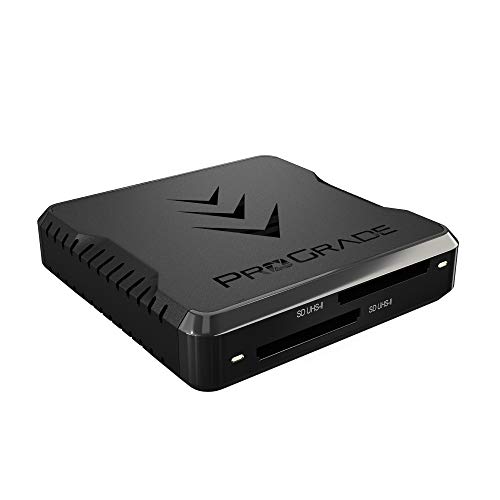
For the reader, the ProGrade Digital PG08 dual-slot UHS-II reader is $84.99 and offloads both cards at once. ProGrade discontinued the older PG05 SD reader; the PG08 is the current model.
The working SSD: Kingston XS1000 2TB
Same drive as tier one, double the capacity: the XS1000 2TB holds a full project’s worth of 10-bit footage. Our standing buy band is $200 to $270, but street prices have dipped as low as about $110 at this writing. Below $150, it’s the easiest yes in this article.
The backup: Seagate Expansion 16TB
A Seagate Expansion 16TB desktop drive runs about $450 right now, and “right now” is doing real work in that sentence: the HDD shortage has prices moving month to month. It holds years of a solo creator’s projects, and the workflow is one drag per project before cards get formatted.

The edit machine: Mac mini M5 Pro, 24GB/512GB
The Mac mini M5 Pro at $1,670 on Amazon ($1,699 list, shipping September 22) is the sleeper of the whole lineup. Our Best Mac guide calls it the value desktop for a reason: 15 CPU cores, a 16-core GPU, 307GB/s of memory bandwidth, and three Thunderbolt 5 ports in the same small box. It cuts the S5 II’s long-GOP 10-bit files comfortably and leaves headroom for grading and graphics work the base M4 would feel. The outgoing M4 Pro mini is still around from third-party sellers at $1,569, and $100 for the newer chip and the extra bandwidth is an easy yes.

Optional add: a Rode VideoMic GO II at $99 if you want on-camera scratch audio now. It’s not in the subtotal.

Where the tier lands: $4,448 without the mic. Every slot in it survives a camera upgrade later, which is the quiet argument for buying the pipeline properly the first time.
The $8,000 kit
Tier three is a raw video pipeline. Everything changes when the camera starts writing N-RAW: the cards get expensive, the reader gets specific, and the edit machine needs real compute instead of just media engines. It lands around $8,637 with current rebates, about eight percent over the headline.
The camera: Nikon Z8 with the 24-120mm f/4 S
The Z8 is the best-overall pick from our Best Cameras Under $5,000 guide, and the kit with the 24-120mm f/4 S is about $4,599 with current rebates ($5,197 without, and Nikon’s rebate calendar moves, so check before you assume). Internal N-RAW, a stacked sensor, and stills good enough for paid photo work make it the one-camera answer at this tier. It’s also the reason every other slot below looks the way it does.

The card: Lexar Professional Gold CFexpress 4.0 Type B 512GB
The Z8’s raw modes want CFexpress Type B, and 512GB is the practical minimum once you’re recording N-RAW; a smaller card turns into a mid-shoot offload ritual. The Lexar Professional Gold 512GB runs $375 to $400 at this writing: this class of card was around $125 in late 2024, and the NAND shortage roughly tripled it. It’s still the right card, but buy it knowing the price is a 2026 problem, not a Lexar problem.

The reader: ProGrade CFexpress plus SD, dual-slot
A ProGrade CFexpress Type B plus SD dual-slot reader runs about $150 and pulls a CFexpress card and an SD card without swapping hardware between them. A CFexpress card full of raw video moving through a slow reader is a coffee break per card; through a proper 10Gbps reader it’s minutes. ProGrade cycles through model numbers here (the USB4 version is the newest when you can find it in stock), so buy the current dual-slot CFexpress plus SD unit that’s shipping.

The working SSD: OWC Envoy Ultra 2TB
The OWC Envoy Ultra 2TB is the Thunderbolt 5 pick from our portable SSD guide, the slot it took over when LaCie let the Rugged SSD Pro5 die at retail. It pairs with the Mac Studio’s TB5 ports so raw timelines off the external feel like the internal drive: rated over 6,000 MB/s, IP67, five years of warranty. It runs $700, and OWC sells it directly on Amazon at list, so the gouge warning that shadowed the LaCie doesn’t apply here.

The backup: Seagate Expansion 24TB plus Backblaze B2
This is the exact combo from our archiving guide: a Seagate Expansion 24TB at about $680 as the local copy, with Backblaze B2 as the offsite copy at $6.95 per terabyte per month. Local drive for speed, cloud for the fire-and-theft scenarios nobody plans for.

The upgrade path here is a two-bay NAS: a Synology DS225+ with two IronWolf 8TB drives runs about $939 and gives you live redundancy instead of a manual copy step. Our NAS drives guide covers the full build. The caveat: 8TB IronWolfs are shortage-gouged at roughly $400 each, nearly double a year ago, so the Expansion-plus-B2 route wins on value right now. Revisit when drive prices come back to earth.
The edit machine: Mac Studio M5 Max, 36GB
The Mac Studio M5 Max at $2,499 is the machine that makes N-RAW timelines feel ordinary: 32 GPU cores and 460GB/s of memory bandwidth carry raw debayering and grading in a way the mini line can’t match, and the two ProRes engines keep multicam playback smooth. It ships September 22 at the same price the M4 Max sold for, so the wait-for-fall advice from the July version of this guide has expired. Buy it. The M4 Max Studio is gone from Amazon, and the M5 Max is the same money for more machine.

Where the tier lands: about $8,637 with the camera rebate, before the NAS upgrade path. Rebates and shortage pricing both move, so treat the total as a September 2026 snapshot.
The three kits, side by side
| Slot | $1,500 kit | $4,000 kit | $8,000 kit |
|---|---|---|---|
| Camera | Lumix G100D + 12-32mm, $698 street | Lumix S5 II + 20-60mm, ~$1,798 | Nikon Z8 + 24-120mm f/4 S, ~$4,599 with rebate |
| Media | Lexar Silver Pro V60 128GB, ~$80 | Lexar 2000x V90 128GB x2, ~$220 | Lexar Gold CFexpress 4.0 512GB, $375 to $400 |
| Reader | UGREEN UHS-II, ~$28 | ProGrade PG08, $84.99 | ProGrade CFe + SD reader, ~$150 |
| Working SSD | Kingston XS1000 1TB, $65 to $130 | Kingston XS1000 2TB, $110 to $230 | OWC Envoy Ultra 2TB, $700 list |
| Backup | Expansion 4TB, ~$130, or Backblaze B2 from $6.95/TB/mo | Expansion 16TB, ~$450 | Expansion 24TB, ~$680, + Backblaze B2 |
| Edit machine | Mac mini M4 16GB, $980 | Mac mini M5 Pro 24GB, $1,670 | Mac Studio M5 Max 36GB, $2,499 |
| Total | ~$2,039 list (~$1,760 with B2 + camera sale) | $4,448 | ~$8,637 with rebates |
How to think about a kit like this
The edit half is not optional. Depending on the tier, 50 to 60 percent of the money here goes to media, storage, and the edit machine. That ratio is the point. A camera upgrade that isn’t matched on the edit side just buys you a slower timeline. If your budget forces a choice, drop a camera tier before you drop the pipeline behind it. A G100D feeding a smooth edit ships more finished work than an S5 II feeding a laptop that drops frames on playback.
Know where to cheap out. Readers and tier-one cameras are fine places to save. Cards and backup are not. A corrupted card costs you the shoot, and a dead drive with no second copy costs you everything you’ve ever made. The boring slots are the ones protecting the work.
The storage shortage is a real buying condition, not background noise. NAND and hard-drive prices in mid-2026 move monthly, and mostly upward. Practical rules: buy when a price dips into the ranges quoted here instead of waiting for 2024 pricing to come back, never pay above a drive’s list price no matter what the marketplace says, and remember that Backblaze B2 converts a big upfront drive purchase into a monthly bill whenever the hardware math stops making sense.
FAQ
Can I really edit video on a Mac mini?
Yes, and comfortably. The base M4 mini has hardware media engines that decode H.264 and HEVC, which is exactly what the tier-one and tier-two cameras record, so 4K long-GOP timelines play smoothly where an older Intel machine would stutter. The 16GB model handles single-camera 4K fine; step to the M5 Pro for heavy effects or 6K work. The mini’s reputation as an underpowered starter Mac is about five years out of date.
Do I need a NAS as a solo creator?
No. A NAS makes sense when multiple machines or multiple people need the same footage at once. Solo, a direct-attached SSD for the active project plus a desktop drive or Backblaze B2 for backup is simpler and cheaper, especially with NAS drives shortage-priced the way they are in 2026. When you hire an editor or add a second workstation, read our NAS drives guide and revisit.
Why is there no mic, light, gimbal, or drone in this kit?
Scope, on purpose. This kit covers the pipeline every video passes through: capture, offload, edit, backup. Mics, lights, and support gear matter, but they’re per-style choices that deserve their own guides, starting with our wireless mics guide; the rest of the creator buildout is coming over the next few months.
Should I wait for new hardware before buying any of this?
Not anymore. The July version of this guide told tier-three buyers to wait for the fall Mac Studio, and that machine is here: the M5 Max Studio ships September 22 at $2,499, and the M5 Pro mini replaced the M4 Pro in the tier-two slot at $1,670. Everything else here is current, and waiting for camera successors is a hobby that never ends. The better question is whether you have work to shoot this month. If yes, buy the kit and go shoot it.
Shoot it, cut it, keep it safe
If this article is your lane, the deeper dives are all on the site: the camera picks come from our under-$1,000, under-$2,000, and under-$5,000 guides, the edit machines from the Best Mac guide, and the offload discipline scales up to the DIT data-wrangler kit when the jobs outgrow one person.
And that’s the whole pipeline. One kit, three budgets, nothing left for the footage to crash into. As always, the camera side is the research and the post side is how I work; your projects and your pricing luck get the final vote. Disagree with a pick, or want a tier between these? Leave a comment. The rest of our buyer’s guides live on the Gear Guides page.